
AI can draft, triage, and summarize your Google Business Profile reviews at scale today. The practical starting point: connect your Google Business Profile through a supported integration, enable a dry-run mode to preview drafts before anything posts, and set escalation rules for 1–2 star reviews before you automate a single reply.
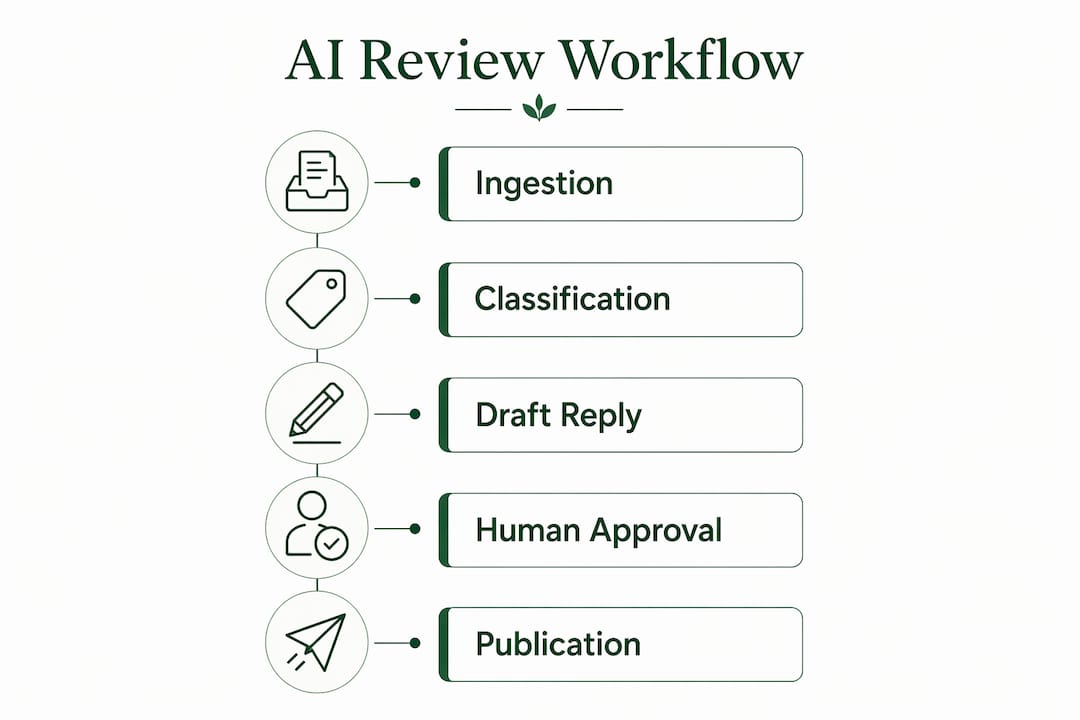
The core workflow is straightforward: AI ingests new reviews, classifies sentiment, generates a draft reply, and either auto-posts (for clear positives) or queues the draft for human approval (for anything sensitive). Tools like Localreviewreply connect directly to Google Business Profile and handle that pipeline end to end. The Google Places API caps public review returns at roughly five per place, so for owned listings, a direct Google Business Profile API integration is the right choice.
- Draft replies for positive and neutral reviews automatically
- Flag and queue 1–2 star reviews for human approval before posting
- Summarize recurring themes across locations weekly
- Connect via Google Business Profile API for owned listings
Responding consistently to reviews increases profile engagement and can drive more searchers to your site. That signal matters for local search visibility, and AI makes consistent response rates achievable even for high-volume locations.
Table of Contents
- What can AI actually do for your Google reviews?
- Why AI for Google reviews matters for local SEO
- How AI ingests, classifies, and drafts replies under the hood
- Ready-to-use workflow: roles, rules, and escalation
- Best-practice reply patterns for common review types
- What does Google allow for AI-assisted replies?
- How to choose and deploy an AI review tool
- Key Takeaways
- The part most guides skip about AI and review management
- Localreviewreply makes the pilot straightforward
- Useful sources for further reading
What can AI actually do for your Google reviews?
The practical capabilities go well beyond "write a thank-you reply." A well-configured AI review system handles the full pipeline: ingesting new reviews as they arrive, classifying each by sentiment (positive, neutral, negative) and issue type (service speed, product quality, staff behavior), extracting specific details for personalization, drafting a reply, and routing it appropriately.
Core capabilities in practice:
- Sentiment classification: Flags each review as positive, neutral, or negative within seconds of posting
- Issue extraction: Identifies recurring complaint categories (wait times, cleanliness, pricing) across all reviews
- Draft reply generation: Produces personalized, on-brand responses using reviewer details and review content
- Escalation routing: Automatically queues 1–2 star reviews, safety mentions, or fraud claims for human review
- Review distillation: Summarizes large review sets into recurring themes using aspect extraction, clustering, and LLM summarization, so you see patterns rather than individual comments
A single-location coffee shop might use AI to handle 30 positive replies per week without touching them manually. A 15-location franchise uses the same system to surface a recurring "slow drive-through" complaint across six outlets, something no one would catch reading reviews one by one.
Review distillation lets businesses extract actionable themes from hundreds of reviews rather than reacting to each comment individually. The technique uses aspect extraction and LLM summarization to surface what customers actually keep saying, not just what the most recent reviewer wrote.
Google already uses this approach internally. Gemini-powered summaries appear on Google Maps place cards, synthesizing multiple user reviews into a short overview. Adopting summarization on your end mirrors what Google is already surfacing to your potential customers.
Why AI for Google reviews matters for local SEO
The business case is operational first, then reputational, then SEO. On the operational side, businesses handling more than roughly 50 reviews per month find that manual responses become unsustainable, with automation typically saving 5–10 hours per week for high-volume managers. That time goes back to escalations, customer service, and actual operations.

Reputation benefits compound over time. Faster replies signal active management to both customers and searchers. A profile where the owner responds to nearly every review reads differently than one with months of silence, and that perception affects conversion before it affects rankings.
On the SEO side, owner replies contribute to local search engagement signals. Timely, specific responses keep profiles active and demonstrate relevance. AI-generated summaries that mirror the language customers use can also reinforce topical consistency across your profile.
Operational benefits at a glance:
- Consistent brand voice across every location, every reply
- Reply rates that scale with review volume instead of staff headcount
- Faster average response time, measured in minutes rather than days
- Weekly distillation reports that surface systemic issues before they become reputation problems
Pro Tip: Automate positive and neutral replies first. Keep negative reviews in a human-first approval loop for at least the first 30 days of any new deployment. This builds team confidence and catches edge cases before they become public mistakes.
How AI ingests, classifies, and drafts replies under the hood
Understanding the pipeline helps you evaluate vendor claims and spot integration gaps before you sign up for anything.
- Ingest: New reviews are fetched via the Google Business Profile API (for owned listings) or a third-party review endpoint. The Google Places API returns only about five reviews per place, so full-history access requires either the Business Profile API or a specialized third-party service.
- Classify: Each review goes through sentiment analysis (positive/neutral/negative) and issue detection. Some tools use a hybrid lexicon-plus-ML approach for speed and cost efficiency; others use a full LLM pass for nuance. The hybrid approach balances throughput with accuracy for daily high-volume operations.
- Cluster and summarize: Review distillation groups similar feedback across time periods and locations. The RevieWeaver framework demonstrates how aspect extraction, semantic clustering, and LLM summarization work together to avoid passing thousands of raw reviews as context.
- Draft reply: The system generates a personalized reply using reviewer name, star rating, specific details from the review text, and your brand voice guidelines. Free-form LLM outputs offer more nuance; template-driven generation offers more consistency and lower hallucination risk.
- Approve: Positive reviews can auto-post. Negative, neutral, or flagged reviews queue for human review. This is where dry-run mode matters: generate drafts without posting anything until your team has validated the output quality.
- Publish: Approved replies post via the Business Profile API and appear as owner replies. Audit logs capture every draft, edit, and post action.
The hallucination risk is real but manageable. LLMs occasionally fabricate details not present in the review. Structured prompts that constrain the model to reviewer-supplied content, combined with human approval for any reply that references specific facts, keep this risk low.
Callout: Always route negative or high-impact reviews through a human approval step. No automation threshold justifies posting an unreviewed reply to a 1-star review that mentions a safety incident or legal claim.

Ready-to-use workflow: roles, rules, and escalation
A practical deployment runs on clear rules, not just software. Here is a role-based workflow you can implement in under a week:
- Schedule review fetch: Pull new reviews every 1–4 hours via the Business Profile API.
- Auto-classify and auto-draft: Every incoming review gets a sentiment label and a draft reply generated immediately.
- Auto-post positives: Reviews classified as 4–5 stars with no flagged content post automatically after a configurable delay (typically 15–60 minutes).
- Queue neutrals and negatives: 3-star and below reviews, plus any review mentioning safety, legal issues, or fraud, go into an approval queue.
- Human review and edit: A designated team member reviews queued drafts, edits as needed, and approves or rewrites before posting.
- Log and audit: Every action (draft generated, edited, approved, posted) is logged with timestamps and user IDs.
Roles and permissions checklist:
- Admin: Manages API keys, sets escalation rules, configures per-location settings
- Location manager: Approves or edits queued drafts for their assigned locations
- Reviewer/editor: Can edit drafts but not post without manager approval
- Escalation contact: Receives alerts for safety, legal, or high-profile reviewer flags
Escalation criteria: Trigger human review for any review with 1–2 stars, any mention of injury, fraud, or legal action, any review from a verified public figure or media outlet, and any review that names a specific staff member in a negative context.
Track four metrics from day one: reply rate (percentage of reviews answered), average response time, escalation rate (percentage of reviews flagged), and reviewer sentiment trend over rolling 30-day periods.
Best-practice reply patterns for common review types
Templates work best as starting points, not scripts. The goal is a reply that sounds like a real person wrote it, not a form letter.
Positive review (4–5 stars): Neutral review (3 stars): Negative review (1–2 stars): Do-not-say list:
- Generic openers: "Thank you for your feedback!" with nothing specific following
- Keyword stuffing: repeating your business name or city multiple times in one reply
- Asking reviewers to change or remove their review in a public reply
- Fabricating details not present in the original review
- Responding to legal or safety claims in a public reply without legal guidance
Pro Tip: Reference one or two specific details from the review text. "We're glad the team got your HVAC fixed before the weekend" lands better than "We're glad we could help." Specificity is what separates a genuine reply from an obvious template.
Use editable response templates as your baseline and adjust for brand voice before launching any automated workflow.
What does Google allow for AI-assisted replies?
Google does not prohibit AI-assisted owner replies provided the responses are genuine, not spammy, and not keyword-stuffed. AI-posted replies via the Business Profile API appear as standard owner replies, with no distinction made between human-written and AI-drafted content.
Google's policy treats owner replies based on content quality, not generation method. Replies that are genuine, specific, and non-spammy comply regardless of whether a human or an AI drafted them.
Practical compliance steps:
- Avoid posting identical or near-identical replies to multiple reviews
- Never fabricate reviewer experiences or attribute claims the reviewer did not make
- Keep replies proportional in length to the review
- Confirm OAuth permissions and API key scope before enabling auto-post
- Maintain an audit log of every posted reply for at least 90 days
For reviews that mention safety incidents, personal injury, or potential legal liability, do not respond publicly without escalating to legal counsel first. Remove or redact personally identifiable information before any reply goes live.
Multi-signal AI approaches can also help detect fake or fraudulent reviews by combining text analysis with behavioral metadata, giving your team better grounds for flagging suspicious content to Google.
This article is general information, not legal advice. Confirm current Google policy and any applicable regulations with a qualified professional for your specific situation.
How to choose and deploy an AI review tool
The selection decision comes down to six criteria. Run through this checklist before committing to any platform:
- API integration method: Does it use the Google Business Profile API for owned listings, or does it rely on scraping? Direct API integration is more reliable and compliant.
- Dry-run and approval workflows: Can you generate drafts without posting? Can you set per-star-rating rules for auto-post vs. queue?
- Per-location permissions: Can individual location managers see and approve only their own reviews?
- Multi-location and franchise support: Does the platform handle dozens or hundreds of locations without manual reconfiguration?
- Analytics: Does it report reply rate, response time, sentiment trends, and escalation rates?
- Security: How are API keys stored and rotated? Who has access to posting credentials?
Adoption steps:
- Start with a free dry-run trial on one or two locations. Review 20–30 AI-generated drafts before enabling auto-post.
- Document your brand voice guidelines: tone, phrases to use, phrases to avoid, escalation contacts.
- Map roles and SLAs: who approves, within what timeframe, and who covers when they're unavailable.
- Run a two-week pilot on 1–3 locations. Measure reply rate, average response time, and escalation rate.
- Review quality weekly. Adjust prompts, templates, or escalation rules based on what you find.
- Expand to additional locations once the pilot metrics are stable.
Localreviewreply matches this checklist directly: AI-drafted, on-brand replies, approval controls for sensitive reviews, multi-location and franchise support, and an analytics dashboard. For agencies managing multiple clients, the white-label workflow handles per-client permissions and branding at scale.
Budget for subscription tiers based on location count and monthly reply volume. Factor in two to four hours of setup time for API authentication, brand voice documentation, and role mapping.
Key Takeaways
AI-assisted review management works best when positive replies are automated, negative reviews are routed to humans, and the whole workflow runs through a dry-run pilot before going live.
| Point | Details |
|---|---|
| Start with dry-run mode | Generate and review AI drafts for 1–3 locations before enabling any auto-post. |
| Automate positives, not negatives | Auto-post 4–5 star replies; queue 1–2 star reviews for human approval every time. |
| Time savings are real | Businesses handling 50+ reviews per month typically save 5–10 hours per week with automation. |
| Google permits AI replies | AI-drafted owner replies comply with Google policy when they are genuine, specific, and not keyword-stuffed. |
| Localreviewreply fits the checklist | Approval workflows, multi-location support, and on-brand drafting make it a practical starting point for a two-week pilot. |
The part most guides skip about AI and review management
The promise of AI for review management is speed and consistency. Both are real. What gets undersold is the judgment gap: AI is genuinely good at volume, pattern recognition, and first-draft generation. It is not good at reading the room on a complicated 2-star review from a long-term customer who had one bad experience.
The mistake most businesses make is treating the approval workflow as a temporary training step they'll eventually remove. They won't, and they shouldn't. The approval step is not a workaround for imperfect AI. It is the design. A system where a human sees every sensitive reply before it posts is not a half-measure; it is the correct architecture for brand-sensitive public communication.
The other underrated move: monthly review distillation. Reading individual reviews is reactive. Running a monthly summary that clusters complaints by theme, location, and time period is operational intelligence. A franchise that discovers "wait time" complaints spiked at three specific locations in March has something to act on. That insight does not come from reading reviews one by one.
Over-automation of negative reviews is the most common failure mode. The second most common is launching without documented brand voice guidelines, which produces technically correct but tonally wrong replies that feel like they came from a different company. Fix both before you flip the switch.
Localreviewreply makes the pilot straightforward
Cutting reply time without cutting corners is exactly what Localreviewreply is built for. The software drafts personalized, on-brand replies for every Google Business Profile review, routes sensitive and low-star reviews to an approval queue before anything posts, and gives franchise operators and multi-location managers a single dashboard to manage it all.

The free review tools let you test AI-generated drafts before committing to a paid plan. The Google review management software handles the full workflow: connect your locations, set your escalation rules, document your brand voice, and run a two-week pilot on 1–3 locations. Pricing scales by location count and reply volume, so you pay for what you actually use.
Start your pilot at localreviewreply.com and see how many hours your team gets back in the first two weeks.
Useful sources for further reading
The sources below cover policy, technical integration, and the research behind AI-powered review summarization and classification.
- Policy: Google's position on AI-assisted owner replies — practical guidance on dry-run workflows and what Google permits
- Technical integration: Google Reviews API for AI agents — explains the difference between the Places API, Business Profile API, and third-party endpoints, including MCP-based agent integrations
- Review distillation research: RevieWeaver (NAACL 2025) — the academic framework behind aspect extraction, clustering, and LLM summarization for large review sets
- Fake review detection: KE-MLLM framework (Applied Sciences) — multi-signal approach combining text and behavioral metadata for explainable fraud detection
- Platform-level summarization: Google Maps Gemini review summaries — community thread confirming Google's use of Gemini to generate place-level review summaries
- Practitioner workflows: AI review response generator and automation thresholds — practitioner consensus on volume thresholds and hybrid sentiment classification approaches