
Yes, you can automatically draft and post replies to Google Business Profile reviews. The safest approach pairs an AI drafting layer (via the Google Business Profile API and an LLM like OpenAI's GPT models) with a human approval gate for anything below four stars. Three practical paths exist: a Zapier or Make workflow connected to an LLM, a direct API integration built in-house, or a purpose-built SaaS like Localreviewreply that handles the connectors, approval controls, and audit logging for you.
The immediate next step for most local businesses:
- Pick your approach based on technical resources and review volume (details in the next section).
- Configure a brand-voice prompt with at least three example replies so the AI matches your tone.
- Set an approval rule: auto-post for 5-star replies, hold anything three stars or below for a human to review before publishing.
That single rule prevents the most common automation mistake: a generic or tone-deaf reply going live on a complaint before anyone reads it.
Table of Contents
- Which approach fits your business for automated Google review replies?
- How to build an automated reply workflow with Zapier or Make
- How to make AI replies sound human and stay on-brand
- How to design approval workflows that prevent damaging replies
- Copyable reply templates for common review scenarios
- How to measure success and scale across locations
- Realistic limitations, cost factors, and timelines
- Localreviewreply handles the workflows you just built, without the maintenance
- Key Takeaways
- Automation should serve your brand, not replace your judgment
- Useful sources and further reading
Which approach fits your business for automated Google review replies?
Three real-world options exist, and they differ significantly on cost, control, and setup time.

Zapier or Make + an LLM is the most accessible starting point for a technically capable staff member or agency. You connect a Google Business Profile trigger to an AI step (OpenAI, for example), generate a draft, and route it to a Slack channel or spreadsheet for approval before posting. Zapier and Make both offer templates for this pattern. The trade-off: you own the maintenance. When Google updates its API or Zapier changes a connector, someone on your team has to fix it.
Direct Google Business Profile API integration gives the most control and the lowest per-reply cost at scale, but it requires a developer. You write the webhook listener, the prompt logic, and the posting function yourself. For a single-location business, the engineering cost rarely justifies the savings. For a franchise with 50+ locations processing hundreds of reviews a month, it can.
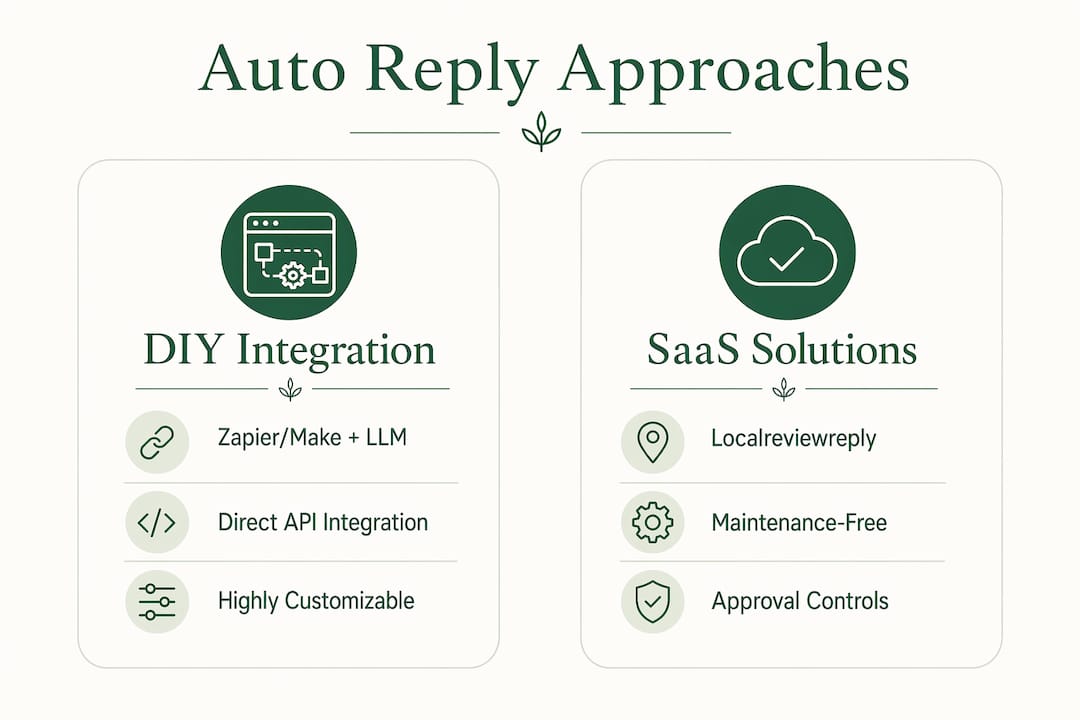
A purpose-built SaaS like Localreviewreply sits between those two. The connectors are maintained, the approval workflow is built in, and the audit log is automatic. You pay a subscription instead of engineering hours, and you get multi-location and team-role support without custom code.
| Approach | Best for | Top trade-off |
|---|---|---|
| Zapier/Make + LLM | Agencies and tech-capable small teams | You maintain the workflow |
| Business Profile API (custom) | High-volume franchises with dev resources | High setup cost |
| Purpose-built SaaS | Most local businesses and multi-location operators | Subscription fee |
Baseline recommendation for most local businesses: auto-post 5-star thank-you replies, hold one-to-three-star reviews for manual approval before anything goes live.

How to build an automated reply workflow with Zapier or Make
The architecture is straightforward: a trigger detects a new review, an enrichment step parses the rating and key phrases, an LLM generates a draft, and a human approves or edits before the reply posts via the Google Business Profile API.
Step-by-step setup
- Connect your Google Business Profile account to Zapier or Make using OAuth. Never paste raw credentials into a workflow; use the official connector so tokens are stored securely.
- Set the trigger to fire on a new review. Zapier's Google My Business integration polls for new reviews; Make's template does the same.
- Parse the review data: extract the star rating, reviewer's first name, and review text. You'll use these as variables in your prompt.
- Build your LLM prompt (see the next section for the full blueprint). Pass the rating, reviewer name, and a snippet of the review text as dynamic context.
- Call the LLM (OpenAI's API, for example) and capture the draft reply as a text output.
- Route the draft to your approval queue: a Google Sheet, a Slack message with approve/reject buttons, or a dedicated review inbox. For anything rated three stars or below, require explicit approval before proceeding.
- Post the approved reply via the Google Business Profile API or through the connector's "reply to review" action.
- Log the action: write the review ID, draft text, approver name, and timestamp to a spreadsheet or database. This is your audit trail.
| Trigger | Automation action | Output |
|---|---|---|
| New 5-star review | Generate draft → auto-post | Reply live within minutes |
| New 4-star review | Generate draft → send to queue | Awaits human approval |
| New 1–3 star review | Generate draft → flag + hold | Requires manual review and edit |
| Review with legal/health keyword | Flag only, no draft posted | Escalate to manager |
Pro Tip: Include three to five short example replies from your own business in the system prompt. The LLM will match your phrasing, sign-off style, and level of formality far more reliably than any generic instruction like "be friendly." Context length matters: keep your system prompt under 800 tokens so the model has room to process the actual review text.
Security note: use OAuth scopes limited to review management only, never full account access. Log every API call with a timestamp and the identity of the approver. If a reply posts in error, you need a clear record to identify and remove it quickly.
How to make AI replies sound human and stay on-brand
Robotic-sounding replies come from generic prompts, not from the underlying models. A well-structured prompt with a few real examples from your business produces replies that read like a real staff member wrote them.
The prompt blueprint
System instruction: State your business name, tone (warm and professional, casual and friendly, formal), and any signature line. Example: "You are the customer service voice for Riverside Plumbing. Replies are warm, professional, and end with 'The Riverside Team.' Never promise refunds or make legal commitments in a public reply."
Few-shot examples: Paste three to five short replies you've actually written or approved. These anchor the model's style better than any instruction.
Dynamic context block: Insert the variables your workflow parsed: {{first_name}}, {{star_rating}}, {{service_type}}, {{review_snippet}}. The more specific the context, the more specific the reply.
Output rules: Specify reply length (50–100 words for most Google replies), whether to include an emoji, and what call to action to use for negative reviews (typically "please reach out to us directly at [phone/email]").
Dos and don'ts
- Do include your preferred contact channel for complaints so the AI consistently directs unhappy customers to the right place.
- Do reference the industry-specific templates in your few-shot examples to match vertical tone.
- Don't let the AI auto-commit to refunds, replacements, or legal remedies in a public reply. State this explicitly in the system instruction.
- Don't include private customer details (appointment times, addresses, payment amounts) in a public reply, even if they appear in the review text.
Refresh your few-shot examples every quarter. Your business's tone evolves, staff changes, and the replies that felt right six months ago may not match where you are now. A quick monthly sample review (five to ten replies) catches drift early.
Pro Tip: Set tone and signature once in a shared prompt document, then reference that document in every workflow. Localreviewreply lets you configure voice and signature at the account level so every location inherits the same baseline without manual copy-pasting.
How to design approval workflows that prevent damaging replies
The approval layer is what separates safe automation from a liability. The goal is simple: let low-risk replies go out fast, and put a human between the AI and any reply that could make things worse.
Rules to implement from day one
- Auto-approve 5-star replies after a brief delay (15–30 minutes) so a human could still intervene if needed.
- Hold all one-to-three-star replies in a queue for manual review. No exceptions at the start.
- Flag reviews containing legal, health, or safety keywords (words like "injury," "lawsuit," "allergic reaction," "mold") and route them to a manager, not a general approver.
- Require a secondary approver for any edits made to a low-star draft before it posts.
Localreviewreply's approval controls include low-star flags and hold rules built into the platform, which removes the need to configure these manually in a Zapier workflow.
Workflow components
| Component | Purpose | Recommended SLA |
|---|---|---|
| Review inbox/queue | Holds drafts awaiting approval | Visible to all approvers in real time |
| Role-based approvers | Limits who can publish sensitive replies | Assign by location or category |
| Edit history | Tracks changes between AI draft and final post | Retained for several weeks |
| Audit log | Records who approved, when, and what was posted | Monthly quality review |
| Spam/rate-limit detection | Prevents API throttles and fake review replies | Automated, no manual action needed |
A rollback process matters too. If a reply posts in error, you need to know immediately and have a clear path to remove it via the Google Business Profile dashboard. Document that process before you go live, not after.
Copyable reply templates for common review scenarios
These templates are starting points. Drop them into your prompt as few-shot examples or into your approval queue as editable drafts. Every token in double braces is a variable your workflow should fill automatically.
-
5-star thank-you: "Thank you so much, {{first_name}}! We're thrilled you had a great experience with our {{service_type}} service. We look forward to seeing you again. — {{business_signature}}"
-
4-star request for details: "Thanks for the kind words, {{first_name}}! We'd love to hear more about what we could do better. Feel free to reach out at {{contact_email}} so we can make your next visit even better. — {{business_signature}}"
-
3-star problem acknowledgment: "We appreciate you sharing this, {{first_name}}. We're sorry your experience with {{service_type}} didn't meet expectations. Please contact us at {{contact_phone}} so we can make it right. — {{business_signature}}"
-
1–2 star apology and remediation route: "We're truly sorry to hear this, {{first_name}}. This isn't the standard we hold ourselves to, and we'd like to address it directly. Please reach out to {{contact_email}} and we'll prioritize your situation. — {{business_signature}}"
Industry example (home services): "Thanks for trusting us with your {{service_type}} project, {{first_name}}. Our team works hard to leave every home better than we found it, and your feedback means a lot. — The {{business_name}} Team." Localreviewreply's home services templates include additional variations with service-specific phrasing.
A few practical notes on format and timing:
- Keep replies between 50 and 100 words. Longer replies on Google rarely read better; they just look like marketing copy.
- Reply within 24 hours for negative reviews and within 48 hours for positive ones. Speed signals attentiveness.
- Use emojis sparingly and only if your brand voice already uses them in other channels. A plumber who never uses emojis anywhere shouldn't start in Google replies.
- Test every template on a non-production review stream (a test location or a staging account) before enabling auto-posting.
How to measure success and scale across locations
Automation without measurement is just noise. Track these five metrics from the first week of your pilot.
| Metric | Tracking frequency | Owner |
|---|---|---|
| Reply rate (% of reviews replied to) | Weekly | Location manager |
| Time-to-reply (hours from review to published reply) | Weekly | Operations lead |
| Approval SLA (% of drafts approved within 24 hours) | Weekly | Approver/team lead |
| Reply edit rate (% of AI drafts edited before posting) | Monthly | Content/brand lead |
| Average star rating trend | Monthly | Owner or agency |
A high edit rate (above 30–40%) is a signal your prompts need work, not that automation is failing. Treat it as feedback and update your few-shot examples.
Scaling for multi-location operators: create a separate voice profile per location or brand tier, but centralize approval for sensitive categories (legal flags, health complaints) at the corporate level. Delegate everyday 4- and 5-star approvals to local managers. Localreviewreply's multi-location features include team roles and permissions designed for exactly this split.
On the technical side, multi-location OAuth scopes require separate authorization per location in the Google Business Profile API. Build a queuing layer so a spike in reviews at one location doesn't throttle the API for others. Rate-limit handling is one of the less obvious maintenance costs of a DIY build.
Realistic limitations, cost factors, and timelines
Automation handles volume and consistency well. It handles nuance poorly. A review that describes a complex complaint, references a specific employee by name, or touches on a regulated topic (a health claim, a legal dispute, a safety incident) needs a human to write the reply, full stop. The AI draft is a starting point, not a final answer, in those cases.
Cost factors to plan for:
- LLM usage: OpenAI charges per token. A typical Google review reply costs a fraction of a cent to generate, but volume adds up at scale.
- Connector fees: Zapier and Make charge based on task volume and plan tier. High-volume accounts move to higher-cost plans quickly.
- Engineering or agency hours: a DIY Zapier/Make build takes a technically capable person roughly two to four weeks to set up and test properly. Ongoing maintenance adds hours each quarter.
- SaaS subscription: a purpose-built platform bundles the connectors, approval logic, and audit logging into a single subscription fee, which trades variable engineering costs for a predictable monthly line item.
Realistic implementation timeline:
- Pilot phase (2–4 weeks): connect one location, configure prompts, run all replies through manual approval. Measure edit rate and time-to-reply.
- Safe rollout (4–8 weeks): enable auto-post for 5-star reviews, keep approval gates for everything else. Refine prompts based on pilot data.
- Full scale (8–16 weeks): extend to additional locations, assign local approvers, set up centralized escalation for flagged reviews, and run monthly audit sessions.
Localreviewreply handles the workflows you just built, without the maintenance
Every workflow described above, from prompt engineering to approval gates to audit logs, is built into Localreviewreply. Instead of stitching together Zapier steps, an OpenAI API key, and a Google Sheet for your queue, you get a single platform that detects new reviews via Google Pub/Sub, drafts replies in your brand voice, and holds low-star reviews for approval before anything goes live.

The practical difference for a local service business or franchise: no connector maintenance when Google updates its API, no manual audit log setup, and no guesswork about whether your approval rules are actually firing. The multi-location and team-role features let you delegate everyday approvals to location managers while keeping sensitive escalations at the corporate level.
For agencies managing review programs across multiple clients, the team permissions and analytics dashboard give you the visibility to report on reply rate and response time without logging into each client's Google account separately.
Start with the free AI review response generator to test reply quality against your own reviews before committing to a full setup. It's the lowest-friction way to see whether the output matches your brand voice.
Key Takeaways
Safe, scalable Google review automation requires brand-voice prompts, a human approval gate for low-star reviews, and a clear audit trail from day one.
| Point | Details |
|---|---|
| Start with approval gates | Auto-post 5-star replies; hold one-to-three-star reviews for human review before publishing. |
| Prompt quality drives reply quality | Include three to five real example replies in your system prompt; refresh them quarterly. |
| Track five core metrics | Reply rate, time-to-reply, approval SLA, edit rate, and average rating trend tell you if automation is working. |
| DIY vs. SaaS trade-off | Zapier/Make builds cost engineering hours and ongoing maintenance; a purpose-built SaaS trades that for a subscription fee. |
| Localreviewreply for scale | Localreviewreply bundles drafting, approval controls, audit logs, and multi-location team roles into one platform. |
Automation should serve your brand, not replace your judgment
The businesses that get the most out of Google review automation are the ones that treat it as a drafting assistant, not a publishing machine. The AI handles the volume problem. Humans handle the judgment calls.
What concerns me about how automation gets discussed in most guides is the framing: set it up, let it run, save time. That's true for 5-star thank-you replies. It's genuinely risky for a 2-star review that mentions a safety issue or a billing dispute. The approval gate isn't a nice-to-have feature; it's the thing that keeps a bad situation from becoming a public relations problem.
The other underrated piece is the monthly audit session. Fifteen minutes reviewing ten to fifteen recent replies tells you more about prompt drift than any metric. You'll catch the reply that sounds slightly off, the one that used the wrong service name, the one that was technically correct but felt cold. That feedback loop is what keeps automation feeling human over time. Without it, even a well-configured system gradually drifts toward generic.
Useful sources and further reading
- Google Business Profile API documentation — OpenAI API reference for LLM integration into review workflows
- Automatically respond to Google Business Profile reviews — Zapier's step-by-step guide for connecting Google reviews to automation
- Make template: automatically reply to Google My Business reviews — ready-to-use Make scenario for review reply automation
- Automated Google Review Replies: Safe AI Workflow — Localreviewreply's overview of safe drafting and approval workflows
- Google Review Response Templates — industry-specific templates for home services, auto repair, cleaning, and more
- Multi-Location Google Review Replies — scaling patterns and team-role features for franchises and chains
- Free AI Review Response Generator — test reply quality against your own reviews at no cost