
The fastest, lowest-risk way to collaborate on review replies is a three-step chain: centralize every incoming review in one place, generate an AI-assisted draft reply immediately, then route that draft to the right teammate for one-click approval and posting. Google's Business Profile guidance confirms that replying signals you value customer feedback, and Bazaarvoice's research finds most consumers prefer businesses that respond at all. Local Review Reply builds this exact chain into one workflow. Aim for same-business-day replies on most reviews, with a slower, human-heavy lane reserved for anything low-star or legally sensitive. Speed matters, but not at the cost of a teammate rubber-stamping a reply that could embarrass the brand.
Key Takeaways
Collaborating on review replies works best when AI drafts the first pass, a defined approver reviews anything sensitive, and the whole handoff happens inside one shared workflow.
| Point | Details |
|---|---|
| Centralize before drafting | Pull reviews from Google Business Profile and Facebook into one dashboard or channel before assigning replies. |
| Assign clear roles | Name a monitor, drafter, approver, and owner so no review gets duplicated or dropped. |
| Route by risk level | Auto-approve routine five-star replies; require human sign-off on anything low-star or legally sensitive. |
| Personalize every template | Reference a specific detail from the review to avoid the canned-reply backlash consumers notice. |
| Use Local Review Reply for scale | Its approval queues and saved brand voice support this exact workflow once volume outgrows manual replies. |
Table of Contents
- A Step-by-Step Workflow to Collaborate on Review Replies
- Who Should Own Each Step? Roles and Approval Controls
- What Makes a Review Reply Template Actually Work?
- Which Integrations Actually Speed Up Team Approval?
- Where an AI-Assisted Tool Like Local Review Reply Fits
- Fixing Common Review Reply Breakdowns
- A 30-Day Rollout for Collaborative Review Replies
- How Do You Train a Team to Write Good Review Replies?
- Ready to Put This Workflow to Work?
- Sources
A Step-by-Step Workflow to Collaborate on Review Replies
Most teams that struggle with reviews aren't lacking effort. They're lacking a defined handoff. Here's a workflow that closes those gaps:
- Detect. A new review posts to Google Business Profile, Facebook, or another platform and lands in a shared dashboard or alert channel.
- Triage. A designated monitor scans it for star rating, urgency, and topic (complaint, compliment, question).
- Draft. An AI tool or a team member writes a first-pass reply, referencing the specific detail the customer mentioned.
- Approve. A manager or owner reviews anything flagged as sensitive, low-star, or refund-related before it goes live.
- Post. The approved reply publishes to the original platform.
- Track. Someone logs response time and outcome so the team can spot patterns.
Set target windows for each stage: triage within a couple of hours, draft within minutes if you're using AI, approval same business day, and posting immediately after. These aren't arbitrary. Bazaarvoice's guidance on prompt, authentic replies ties speed directly to how customers perceive a business.
Pro Tip: Route five-star reviews through a fast, low-friction approval channel, maybe even auto-post after a light template check, while sending anything one or two stars to a small group of two or three approvers who can catch liability language before it publishes.
Who Should Own Each Step? Roles and Approval Controls
Ambiguity kills speed. When three people think they're "handling" the same review, you get duplicate replies or, worse, contradictory ones. Assign these roles explicitly:
- Monitor: Watches incoming reviews across platforms and flags anything urgent.
- Drafter: Writes or generates the first response (often AI-assisted, human-edited).
- Approver: Reviews sensitive replies before they post, usually a manager or owner.
- Owner: Sets policy, handles escalations, and owns the brand voice guidelines everyone else follows.
Build a simple decision checklist for what needs approval versus what can auto-post: any review mentioning refunds, injury, legal threats, or discrimination goes to an approver, no exceptions. Routine four and five-star reviews with generic praise can often skip that step. Local Review Reply's approval workflow documentation shows how routing rules like this work in practice.
Pro Tip: Give most team members read-only access to the review queue and reserve posting permissions for a handful of people. Add a short version note every time someone edits a draft, so nobody's guessing why the wording changed. This kind of lightweight guardrail, paired with structured feedback frameworks that keep replies specific and behavior-focused, cuts down on both duplicate replies and off-brand tone.

What Makes a Review Reply Template Actually Work?
A good template has four parts: thank the customer, acknowledge something specific from their review, offer a next step or contact if needed, and sign off in your brand's voice. That's it. The trap most teams fall into is stopping at "thanks for the feedback" and calling it done.
Bazaarvoice's research on responding to reviews warns that canned, generic replies can actually backfire; customers notice when they're reading a copy-paste job. The fix is simple: every template needs at least one variable filled with something the customer actually said.
Compare these two:
Versus:
The second one reads like a person wrote it because a person actually read the review first. Skip replying to one-line five-star reviews with no detail. Nobody expects a novel in response to "great service!" Save your team's time for reviews with substance, and browse Local Review Reply's response templates for structures you can adapt rather than copy verbatim.
Which Integrations Actually Speed Up Team Approval?
Reviews scattered across five platforms with five different logins is how teams miss things. Centralizing detection is step one, and the integrations that matter most are:
- Google Business Profile feed or API, pulling new reviews as they post.
- Facebook review notifications routed to the same dashboard.
- Slack or Microsoft Teams channels where drafts land for approval.
- Email digests for managers who don't live in Slack.
- Webhooks connecting your review platform to internal ticketing for complex complaints.
Zapier documents a practical automation pattern here: a new review triggers a draft reply, which posts into a team channel with a permalink attached, so an approver can review and greenlight it without hunting for the original post.
AI should handle the drafting and context extraction, pulling out the star rating, key complaint, and customer name, not the final publish decision on anything risky. That distinction is what keeps a fast system from becoming a reckless one.
Pro Tip: Every draft message sent to your approval channel should include the permalink, star rating, timestamp, and the suggested reply text with variables already filled in. Approvers who have to click three links just to see context will approve slower or skip it entirely.
Where an AI-Assisted Tool Like Local Review Reply Fits
Manual processes work fine at one location with a handful of reviews a week. They fall apart fast once you're managing multiple locations or a franchise network. That's the volume threshold where a dedicated tool earns its keep.
Local Review Reply supports the exact workflow described above: AI drafts a reply matched to a saved brand voice, approval queues catch low-star replies before they post, and dashboards give owners visibility across every location at once, per its feature documentation.
Ask yourself three questions before adopting a tool over spreadsheets and manual replies:
- Are you managing more than one location?
- Are reviews arriving faster than your team can triage them by hand?
- Do you need consistent brand voice across multiple reply-writers?
If you answered yes to any of these, a tool built for approval controls and multi-location management, like this one used by a growing franchise network to standardize replies across a dozen locations, is worth the switch.
Pro Tip: Start with one location as a pilot before rolling a tool out network-wide. You'll catch brand-voice mismatches early, when they're cheap to fix.
Fixing Common Review Reply Breakdowns
Even a solid workflow hits snags. Here's what usually goes wrong and how to fix it fast:
- Duplicate replies: Two team members respond to the same review. Fix by assigning a single drafter per review and logging who's working on what.
- Reply rejected by the platform: Check the platform's moderation queue; Google's own guidance notes replies go through a review process that can delay posting.
- Stuck approvals: Reassign to a backup approver if the primary hasn't responded within your SLA window.
- Conflicting edits: Keep version notes on every draft so the latest edit is obvious.
- Missed SLA: Escalate to the owner role and review why the handoff broke down.
Keep an audit log of who drafted, edited, and approved each reply. Platform processing delays are common and mostly out of your control, so build your SLA expectations around a queue that assumes some lag rather than instant publishing.
A 30-Day Rollout for Collaborative Review Replies
You don't need a quarter to get this running. Here's a realistic month:
- Week 1: Set up monitoring across Google Business Profile and Facebook; configure Slack or Teams alerts for new reviews.
- Week 2: Build two or three reply templates covering your most common review types (compliment, minor complaint, service issue).
- Week 3: Define roles and approval rules; assign a monitor, drafter, and approver by name.
- Week 4: Run a pilot at one location, track response times daily, and adjust routing rules based on what's slowing things down.
Completion looks like this: pilot finished, SLA met for two consecutive weeks, and a documented process someone new could follow without you standing over their shoulder.
How Do You Train a Team to Write Good Review Replies?
Most people are bad at this the first time, not because they lack judgment, but because nobody showed them what good looks like. Training fixes that faster than trial and error.
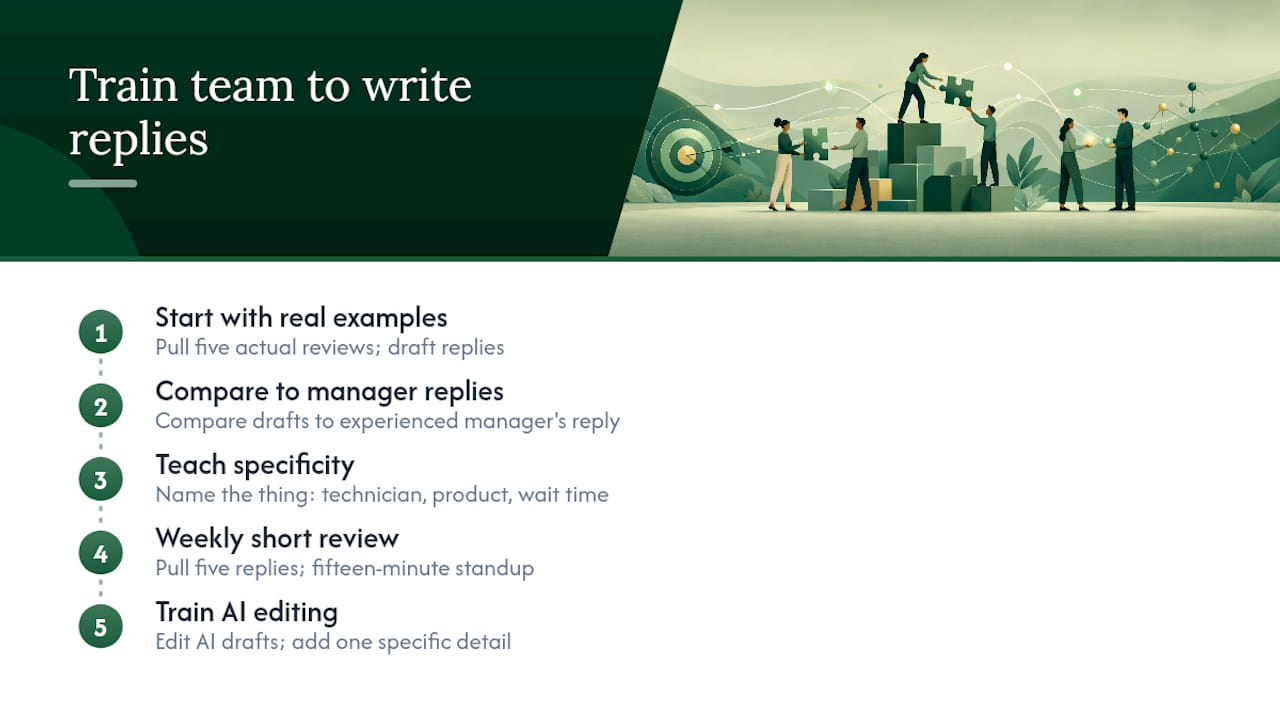
Start with real examples, not hypothetical ones. Pull five actual reviews your business has received, good and bad, and have new team members draft replies to each. Then compare their drafts against what an experienced manager would write. The gap usually shows up in specificity: new writers default to generic thanks, while experienced ones reference the exact detail the customer mentioned.
Leapsome's guidance on structured feedback applies directly here: behavior-focused, specific language works better than vague praise or vague apology. Teach your team to name the thing (the technician, the product, the wait time) rather than writing around it.
A short weekly review helps too. Pull five replies from the past week, discuss what worked and what felt canned, and adjust your templates based on patterns. This doesn't need to be formal. Fifteen minutes in a team standup covers it.
For teams using AI drafts, training shifts slightly: the skill becomes editing, not writing from scratch. Teach people to spot when an AI draft is close but generic, and how to add the one specific detail that makes it read as human. That's a faster skill to build than teaching someone to write from a blank page, and it's the skill that actually matters once your volume grows.
A Reputation Manager's Take on Approval Controls
Approval controls saved us from a reply that admitted fault before legal even saw the complaint. My habit now: a five-minute daily digest scan before anything goes live.
Ready to Put This Workflow to Work?
Everything above works with spreadsheets and manual effort if your review volume is low. Once you're juggling multiple locations or a growing franchise network, manual triage turns into missed reviews and inconsistent tone fast. Local Review Reply handles the draft-and-approve chain directly: AI writes a first-pass reply in your brand voice, low-star reviews route to an approval queue automatically, and dashboards give owners a single view across every location instead of five separate logins.

If you're managing reviews across more than one location, or you've noticed replies from different team members read like they came from different businesses, that inconsistency is usually a workflow gap, not a writing problem. Check out Local Review Reply's approval workflow software to see how the routing rules described above work in practice, or browse the review management platform to see the full picture. Start a trial and run your own 30-day pilot with your actual reviews.
Sources
- Manage customer reviews - Google Business Profile Help
- Responding to positive reviews: Best practices & examples — Bazaarvoice
- Create review reply draft and post to team channel — Zapier
- 32 Peer Review Feedback Examples for Team Growth — Leapsome