
No. You cannot hide other people's Google reviews, and there is no setting anywhere in your Google Business Profile that hides a review response from public view. What you can do is edit or delete your own reply, and request removal of a review itself if it breaks Google's content policies.
That distinction matters for how you spend your time. Here's what's actually within reach right now:
- Edit or delete your reply directly in your Business Profile in a few clicks.
- Report the review for a policy violation (spam, fake content, off topic, illegal material) through Google's Reviews Management Tool.
- Gather evidence (screenshots, booking records, timestamps) in case you need to file the one time appeal.
On timing: replies you post or delete usually show up within about 10 minutes, though Google notes some cases take up to 30 days. Developers can also delete replies programmatically through the Business Profile API, which matters if you use third party reply software.
Key Takeaways
Business owners cannot hide Google reviews or responses, but they fully control their own replies and can request removal only for reviews that violate specific Google policies.
| Point | Details |
|---|---|
| No hide option exists | Google gives no setting to disable or hide reviews or responses from public view. |
| Replies are fully editable | Owners and Managers can edit or delete their own reply, and a new reply replaces the old one. |
| Removal requires a policy violation | Only spam, conflict of interest, off topic, or illegal content qualifies for takedown requests. |
| Moderation timing varies widely | Replies usually post in about 10 minutes, though some cases take up to 30 days. |
| Third party tools need real API calls | Deleting a reply in a dashboard doesn't remove it from Google unless the platform calls the DeleteReply endpoint. |
| Software drafts, it doesn't remove reviews | Localreviewreply speeds up and standardizes replies with approval controls, but cannot delete a reviewer's post. |
Table of Contents
- What You Can and Cannot Control on Your Google Business Profile
- How to Edit or Delete a Reply to a Google Review
- When Google Will Actually Remove a Review
- What Happens After You Post or Reply: Moderation and the API
- Responding When You Cannot Remove the Review
- Why Structure Beats Speed for Multi-Location Reply Teams
- A Faster, More Consistent Way to Handle Replies
- Primary Sources and Further Reading
- Sources
What You Can and Cannot Control on Your Google Business Profile
Google will not give any business a way to turn off reviews. The company treats reviews as a core trust signal for search and maps, and letting businesses switch them off would undermine the entire point of the feature. That's the policy reality, not a technical limitation Google might someday lift.
What you do control sits closer to your own words, not the reviewer's:
- Replying to any review, public and visible to anyone who views your listing.
- Editing an existing reply whenever you want to soften the tone, correct a fact, or add new information.
- Deleting your reply entirely if you decide silence serves you better than a public response.
- Editing profile content like your business description, hours, and photos, which shapes how the whole listing reads alongside the reviews.
None of this touches the review text itself. If a customer posts something exaggerated but not policy violating, your only real lever is your reply and the surrounding context on your profile.
Managing any of this requires the right access. Google Business Profile assigns roles, Owner, Manager, or Site Manager, and only Owners and Managers can post or edit replies. If you've handed profile access to an agency or a former employee, check the user management settings before you assume a reply issue is a Google problem rather than a permissions problem.
The last limitation catches people off guard: Google will only remove a review that violates a specific policy. A one star review that's unfair, rude, or simply wrong about what happened is not eligible for removal on those grounds alone. Disagreement isn't a violation.
How to Edit or Delete a Reply to a Google Review
Fixing a bad reply is faster than most owners expect. Here's the path inside your Business Profile:
- Sign in to your Google Business Profile and open the Reviews tab.
- Find the review with the reply you want to change.
- Select the three dot menu next to your existing reply.
- Choose Edit reply to revise the wording, or Delete reply to remove it entirely.
- Confirm the change. It typically posts within minutes, though Google warns some updates can take up to 30 days to reflect everywhere.
One detail trips people up constantly: posting a new reply doesn't stack on top of the old one. It replaces it. There's no visible history, no "edited" tag, just the current version live on your listing. If you're rewriting a reply because the first draft was too defensive, the fix is clean, but it also means you can't point to a prior version later if a dispute comes up.
Third party reputation tools complicate this. If your reply was posted or deleted through a platform other than Google directly, deleting it inside that dashboard doesn't guarantee it disappears from your live Google listing. That only happens reliably when the tool calls Google's actual DeleteReply endpoint rather than just deleting its own local record. A walkthrough of edit and delete behavior covers this propagation gap in more detail.
Before you touch anything, confirm your role. Editing or deleting a reply requires Owner or Manager access; a Site Manager account often can't do either.
Pro Tip: If you manage several locations, check your reply history for older, generic responses before a slow season hits. A one line "thanks for the feedback" reply from two years ago can look worse next to a detailed, specific response you'd write today.
When Google Will Actually Remove a Review
Removal is possible, but only under specific, narrow conditions. Google's policy allows takedown requests for a defined set of violations, not for reviews you simply dislike.
Categories eligible for removal include:
- Spam or fake engagement — reviews posted by bots, competitors, or someone with no real transaction history with your business.
- Conflict of interest — a current or former employee reviewing their own employer, or a competitor posting a negative review to hurt a rival.
- Off topic content — a review about a different location, a political rant unrelated to your service, or commentary on an unrelated news event.
- Illegal content — discriminatory language, threats, or content promoting illegal activity.
To act on any of these, use Google's Reviews Management Tool, select the review, and choose the category that actually matches the violation. Vague reporting ("this isn't fair") gets rejected fast. Specific reporting, tied to an exact policy clause, gets a real look.
Google's decision on that initial report typically arrives somewhere between several days and a full month. If the report is denied and you still believe the review violates policy, you get one appeal. Use it carefully. Evidence that maps directly to the policy you're citing, a booking confirmation showing the reviewer was never a customer, a timestamp proving they reviewed the wrong location, screenshots of the exact language, moves the needle far more than a passionate explanation of why the review feels unfair.
While you wait, the tool shows status labels like "decision pending" or "no policy violation found" so you're not left guessing. Practitioner guidance generally recommends responding to the review publicly while the report is pending, rather than waiting in silence, since a thoughtful public reply does its own work regardless of the outcome.
Treat the appeal as a last move, not a first instinct. Spend a few days actually collecting evidence and mapping each piece to a specific policy clause before you submit anything. Emotional appeals asking Google to "just be reasonable" tend to go nowhere, because the reviewer on the other end has moderators evaluating policy language, not fairness.
What Happens After You Post or Reply: Moderation and the API
Google's moderation isn't instant, and it isn't always slow either. Most replies post in about 10 minutes, but the same documentation and independent reporting both note some reviews or replies can take up to 30 days to fully process. There's no visible queue position or estimated wait, so the range itself is the only reliable expectation to set with your team.
A few things worth knowing about what happens behind the scenes:
- Reviewers get notified when you reply. That's built into the system, and it sometimes prompts them to edit their original review, occasionally softening a rating after a good response.
- Replies are fully public. Anyone browsing your listing sees them, including future customers weighing whether to book with you.
- The API supports the same actions a human does manually, listing reviews, posting a reply, and deleting one, through defined endpoints businesses and developers can call directly.
- Third party software needs to use those real endpoints. A tool that only deletes its internal copy of a reply without calling the actual delete function leaves the "Business Owner" reply sitting live on Google, visible to every visitor, even though your dashboard shows it as removed.
That last point deserves attention if you're evaluating reputation software for a multi-location brand. Ask directly whether the platform calls Google's API for reply actions or just manages a local database.
Responding When You Cannot Remove the Review
Most negative reviews aren't going anywhere, so your reply is doing the real work; treat it that way. A tight, professional structure works better than an emotional one: thank the reviewer for the feedback, acknowledge the specific issue without admitting fault you haven't confirmed, and offer a next step, a phone number, an email, an invitation to discuss it directly, without litigating the details in public.

Save the report and appeal for reviews that genuinely cross a policy line, not every one star complaint. Before filing anything, collect the evidence that would actually support a claim: booking timestamps, payment records, photos, anything that ties the reviewer to a specific, verifiable interaction (or the lack of one).
A few practical habits reduce how often you're dealing with this at all:
- Encourage recent, genuine positive reviews consistently, rather than in a rush after a bad one lands. Consistent volume does more for your rating average than any single reply.
- Curate a handful of strong reviews as testimonials on your own website using a widget, which gives prospective customers context beyond whatever they saw on your Google listing.
- Use templates for common complaint types (late arrival, billing dispute, service quality) so your team isn't improvising tone under pressure.
- Route sensitive, low star replies through an approval step before they post, since a rushed reply to an angry review is often the one that causes the most damage.
Pro Tip: Draft your reply, then wait an hour before posting it if the review genuinely upset you. Nearly every regrettable public reply was written and posted within minutes of reading the review that provoked it.
Why Structure Beats Speed for Multi-Location Reply Teams
The riskiest replies aren't the routine ones. They're the low star reviews written by someone who's frustrated, replied to by a manager who's also frustrated, with no one checking the tone before it goes live and stays live, indefinitely, attached to your business name.
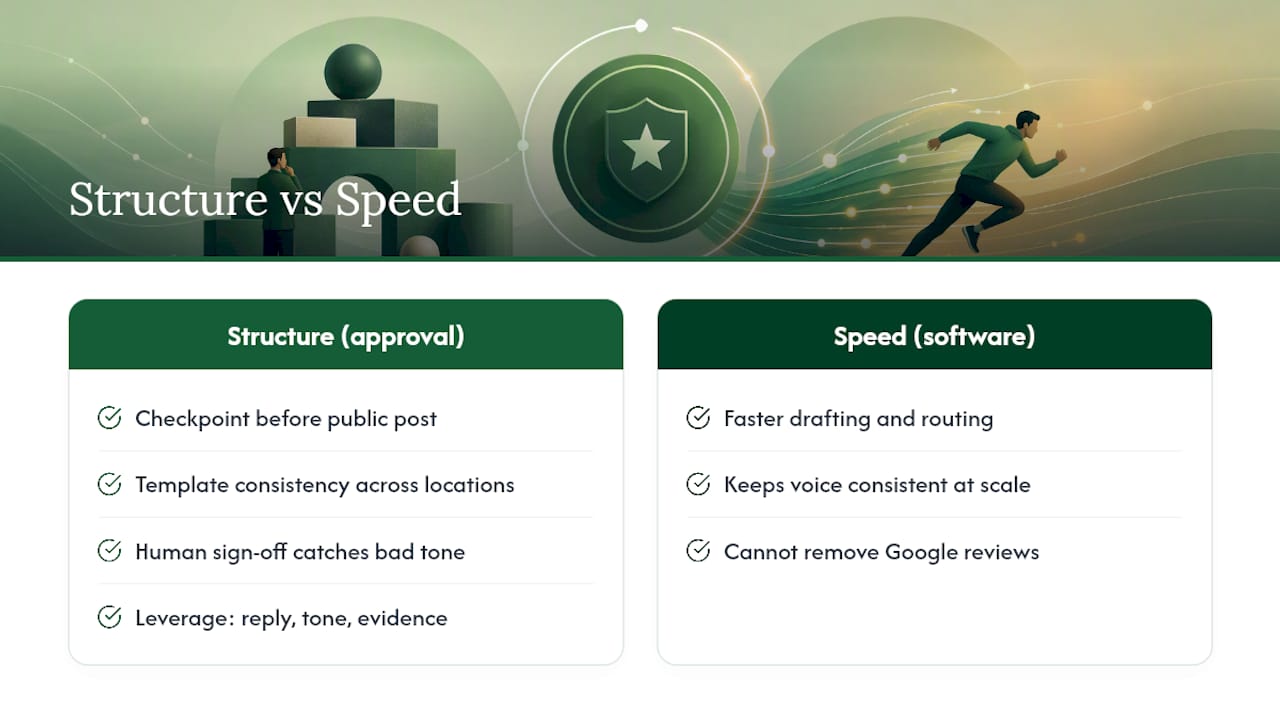
That's the actual argument for approval controls, not efficiency for its own sake, but a checkpoint between an emotional first draft and a public, permanent post. A template gives a team consistency across dozens of locations; a human sign off catches the reply that reads fine to the person who wrote it and terrible to everyone else who reads it later.
None of that changes the core fact this article opened with. Software can help you draft faster, route sensitive replies for review, and keep your voice consistent across ten locations or a hundred. It cannot remove someone else's review from Google, and no legitimate product should claim otherwise. The leverage is entirely on your side of the conversation, your reply, your tone, your evidence if you ever need to report something. Use that leverage deliberately instead of reactively.
A Faster, More Consistent Way to Handle Replies
Localreviewreply gives multi-location teams a way to reply to every Google review without a manager rewriting the same complaint response from scratch five times a week. The software drafts personalized, on-brand replies in seconds and routes anything sensitive, a one star review, a legal-sounding complaint, through an approval step before it ever goes public.

If you manage reviews across several locations or a franchise network, the drafting alone saves real hours, and the approval workflow catches the reply that shouldn't go out unedited. Try the free AI review response generator on a real review from your profile, or look at the full feature set to see how approval roles and templates work across multiple locations. One thing worth repeating: Localreviewreply manages what you say back. It does not, and cannot, remove a review someone else posted. For that, Google's own reporting tool is still the only legitimate path. Start with the review management software overview to see how it fits your current workflow.
Primary Sources and Further Reading
- Report inappropriate reviews — Google Business Profile Help
- Manage customer reviews — Google Business Profile Help
- Work with review data — Google Business Profile APIs
- Manage review removal requests workflow — Google Business Profile Help
- Deleting Google Reviews: How to Report, Appeal, or Dispute a Review — BrightLocal
Sources
- Report inappropriate reviews — Google Business Profile Help
- Manage customer reviews - Google Business Profile Help
- Work with review data | Google Business Profile APIs
- Google review responses — Fokal (local-seo)