
The fastest way to protect bookings and rebuild trust is to reply within 24–48 hours using a short, specific message that follows one structure: thank the guest → reference their specific experience → offer a remedy or next step → invite them back. Every effective hotel review reply, whether responding to a glowing five-star post or a frustrated one-star complaint, fits that four-part frame.
Here are three templates you can copy and adapt right now:
- Positive (5-star): "Thank you so much, [Guest Name]! We're thrilled you enjoyed [specific detail, e.g., the rooftop pool and breakfast spread]. Our team works hard to make every stay feel special, and feedback like yours means the world to us. We hope to welcome you back soon."
- Negative (1–2 star): "Thank you for sharing your experience, [Guest Name]. We sincerely apologize that [specific issue, e.g., the check-in delay] fell short of what you deserved. We'd like to make this right — please reach out to us directly at [email/phone] so we can address your concerns personally."
- Star-only or neutral (3–4 star, no text): "Thank you for staying with us and for taking the time to leave a rating, [Guest Name]. We'd love to hear more about your visit — feel free to reach out at [email] so we can keep improving."
Pro Tip: Use star score as your routing rule: 4–5 stars get a warm, brand-forward reply within 48 hours; 1–3 stars get a manager-reviewed reply within 24 hours, always with a private contact offer.
Key Takeaways
Effective hotel review replies follow one structure — thank, acknowledge, remedy, invite — and the star score determines who approves the reply and how fast it goes live.
| Point | Details |
|---|---|
| Reply timing by star score | 1–2 star reviews need a manager-approved reply within 24 hours; 4–5 star replies within 48–72 hours. |
| Template structure | Every reply follows: thank → reference the specific experience → remedy or next step → invite back. |
| Escalation thresholds | Safety, compliance, and fraud reviews require GM and legal review within 4 hours, not the standard SLA. |
| Platform rules vary | Booking.com moderates replies before publishing; Google replies go live immediately and are indexed by search. |
| Localreviewreply | Drafts personalized replies with AI, holds low-star replies for human approval, and supports multi-location teams at scale. |
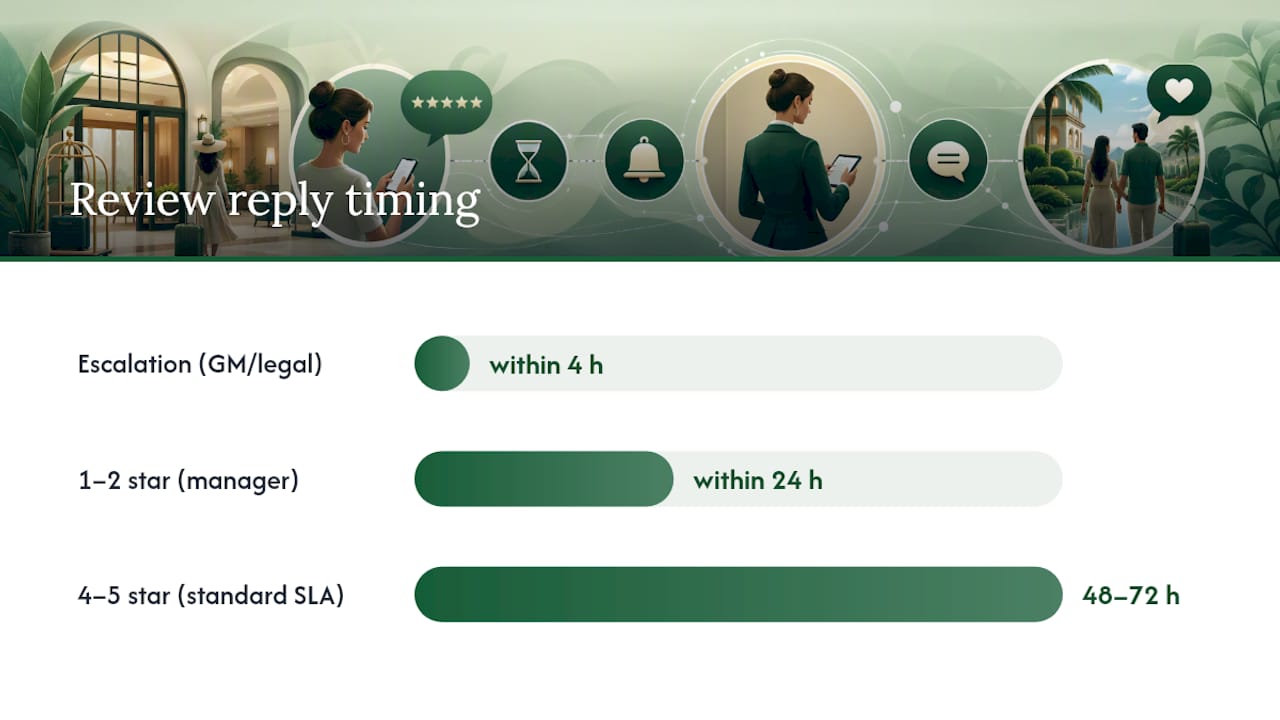
Table of Contents
- Why replying to reviews moves the needle on bookings and reputation
- Core rules every hotel manager should enforce on tone, timing, and length
- Templates for positive reviews: short, medium, long, and scenario-specific
- Templates for negative reviews: acknowledge, apologize, offer remedy, and escalate
- How to reply to mixed reviews and star-only posts
- What you need to know about Booking.com, Google, and Expedia reply rules
- Who can reply, who must approve, and when to escalate
- How to scale hotel review replies without losing the human touch
- The trade-off between speed and authenticity that most guides get wrong
- Localreviewreply cuts reply time without cutting corners
- Sources
Why replying to reviews moves the needle on bookings and reputation
Most hotel managers know reviews matter. Fewer realize that responding to them is itself a ranking and revenue signal.
Research reported by Harvard Business Review found a correlation between businesses that reply to reviews and improved ratings over time in measured samples. The mechanism is straightforward: guests who see responses trust that complaints get heard, which makes them more likely to book and less likely to leave a punishing review when something minor goes wrong.
Cornell School of Hotel Administration research supports this further, linking active engagement with consumers to measurable shifts in trust and booking behavior. When a prospective guest reads your reply to a complaint and sees a calm, specific, solution-oriented response, they're evaluating your management quality as much as the original complaint.
Statistic to use in internal briefs: According to Statista's research on accommodation booking factors, online reviews and ratings rank among the highest-influence factors when consumers choose where to stay.
The business impacts stack up quickly:
- OTA visibility: Platforms like Booking.com weight recent reviews more heavily in composite scores. Active, recent replies signal an engaged property.
- Conversion: Prospective guests reading a thoughtful reply to a complaint are more likely to book than those who see an unanswered grievance.
- Guest loyalty: A guest who received a genuine, personalized reply is more likely to return and recommend the property.
- Operational intelligence: Patterns in review text reveal recurring issues (slow check-in, noisy rooms, cold breakfast) before they show up in occupancy data.
Replying isn't just reputation management. It's a feedback loop that makes the property better.
Core rules every hotel manager should enforce on tone, timing, and length
Consistency is what separates a professional reply program from ad hoc responses that vary wildly by shift. These rules are short enough to train in 15 minutes and specific enough to audit.
Timing targets (your SLA by star score)
- 1–2 star reviews: Reply within 24 hours. These carry the highest damage potential and benefit most from a visible, calm response.
- 3–4 star reviews: Reply within 48 hours. Mixed feedback deserves acknowledgment before the guest moves on.
- 5-star reviews: Reply within 48–72 hours. Speed matters less here, but consistency signals that you value all feedback.
- Platform edits: If you need to revise a published reply (Google allows edits; Booking.com has moderation windows), do it within the same SLA window as the original.
Tone and voice
Replies should be signed by a named manager or the property name, not a generic "The Team." Personal signatures increase perceived authenticity. Use a warm but professional register: never overly casual, never corporate-stiff. Emotional neutrality is non-negotiable on negative replies — a defensive or sarcastic tone in a public reply is visible to every future guest who reads it.
What to avoid
- Public compensation specifics: Never write "we'll refund your first night" in a public reply. Offer to discuss offline.
- Defensive language: Phrases like "our records show" or "according to our staff" read as accusatory.
- Legal statements: Avoid anything that could be read as admitting liability ("we acknowledge the safety failure").
- Long essays: Public replies over 150 words lose readers. Keep it tight.
Pro Tip: For repeat complainers or emotionally charged reviews, draft the reply, then wait two hours before publishing. What reads as measured in the moment often looks defensive after a short pause. Have a second person review any reply to a 1-star before it goes live.
Templates for positive reviews: short, medium, long, and scenario-specific
Positive reviews are the easiest to underuse. A generic "Thanks for staying!" wastes the opportunity to reinforce your brand, name a staff member, and nudge the guest toward a return visit. Here's a bank of templates organized by length and scenario.

Short (1–2 lines, high-volume use)
"Thank you, [Guest Name]! We're so glad you had a great stay and hope to see you again soon."
Medium (3–4 lines, references specifics)
"[Guest Name], thank you for the wonderful review! We're delighted [specific detail, e.g., 'that you enjoyed the harbor-view room and our breakfast team'] made your stay memorable. We'll be sure to pass your kind words along to [Staff Name] — they'll be thrilled. Looking forward to welcoming you back."
Longer (notable reviews worth amplifying)
"What a generous review, [Guest Name] — thank you! Hearing that [specific experience, e.g., 'the anniversary dinner exceeded your expectations'] is exactly the kind of feedback that motivates our entire team. If you'd ever be willing to share your experience on social media or with friends planning a visit to [City], we'd be honored. We look forward to your next stay and hope to make it just as special."
Scenario variations
- Business traveler: "Thank you, [Guest Name]. We're glad the workspace and early check-in worked well for your schedule — we know business trips leave little room for hiccups. Safe travels, and we hope to be your go-to in [City] on your next visit."
- Family stay: "Thank you for choosing us for your family trip, [Guest Name]! We love having families and are so pleased [specific detail, e.g., 'the kids' pool was a hit']. We hope to see you all again next summer."
- First-time guest: "Welcome to [Property Name], [Guest Name] — and thank you for your first review with us! We hope this is the start of many great stays. Please don't hesitate to reach out before your next visit so we can make it even better."
- Group booking: "Thank you for bringing your group to [Property Name], [Guest Name]! Hosting [event type, e.g., 'corporate retreats'] is something our team genuinely enjoys, and we're glad the experience delivered. We'd love to host you again."
Upsell language (use only on positive or neutral replies)
Keep it light and non-salesy. One line at the end works: "On your next visit, our [spa/restaurant/suite upgrade] is worth exploring — just ask at the front desk." Never pitch an upgrade in a negative reply.
Templates for negative reviews: acknowledge, apologize, offer remedy, and escalate
Negative hotel review replies are the highest-stakes content your property publishes. Every future guest reads them. The goal is not to win an argument — it's to demonstrate that your management team listens and acts.
The public-first formula
Thank → Acknowledge → Apologize for the experience (not for fault) → Brief remedy statement → Invite offline.
Templates by complaint type
- Cleanliness: "Thank you for your feedback, [Guest Name]. We're genuinely sorry that the room's cleanliness fell short of our standards — that's not the experience we want for any guest. Our housekeeping team has been made aware, and we'd like to discuss this further. Please contact us at [email/phone] so we can make it right."
- Check-in delays: "Thank you for sharing this, [Guest Name]. We apologize for the wait at check-in — we understand that a slow start can color an entire stay. We're reviewing our front-desk processes to prevent this. Please reach out to [email] if you'd like to discuss your experience further."
- Billing issues: "Thank you for bringing this to our attention, [Guest Name]. We take billing accuracy seriously and are sorry for any confusion. Please contact our front office directly at [phone/email] and we'll review your account right away."
- Noise complaints: "We're sorry to hear that noise affected your rest, [Guest Name]. A comfortable night's sleep is something every guest deserves, and we clearly missed the mark. Please reach out at [email] — we'd like to understand what happened and discuss how we can do better."
- Amenity failures: "Thank you, [Guest Name]. We apologize that [amenity, e.g., 'the gym equipment'] wasn't up to standard during your stay. We've flagged this for our maintenance team. If you'd like to share more details, please contact us at [email]."
Private follow-up message template (email or DM)
"Dear [Guest Name], thank you again for your review. We'd like to learn more about your experience so we can address it properly. Could you share a convenient time to speak, or reply here with the details? Our goal is to understand what happened and make sure it doesn't affect another guest. We appreciate your patience."
Escalation template (serious incidents: safety, compliance, fraud)
"Dear [Guest Name], we take your concern about [specific issue] very seriously. Our General Manager, [Name], has been made aware and will contact you directly within [timeframe, e.g., 24 hours]. Please also feel free to reach us at [direct line]. We are committed to addressing this fully."
A note on liability and privacy: Never include a guest's personal details (room number, booking ID, full name) in a public reply. Avoid language that admits operational fault in legal terms ("we confirm the safety system failed"). Acknowledge the experience, not the liability. When in doubt, move the conversation offline immediately.
Chekin's practical playbook for hotels reinforces this: keep public replies to 3–6 lines, specific but not legally exposed, and always include a private-channel CTA for resolution.
Pro Tip: Never copy-paste the same apology reply to multiple negative reviews. Even a small change — the guest's name, the specific complaint, one personalized line — signals to readers that a real person responded. Identical apologies read as automated and make the situation worse.
How to reply to mixed reviews and star-only posts
Three- and four-star reviews are the most underrated category. They signal a guest who had a decent stay but left something unresolved — and they're often the most persuadable to return.
Mixed/neutral review template (3–4 stars)
"Thank you for your honest feedback, [Guest Name]. We're glad [positive element, e.g., 'the location worked well for your trip'] and genuinely appreciate you flagging [specific concern, e.g., 'the slow room service']. We're actively working on [improvement step], and we'd love the chance to show you the difference on a future visit. Please feel free to reach out at [email] before your next stay."
Star-only posts (no review text)
These are common and easy to overlook. A short, warm reply keeps the property's response rate healthy and shows prospective guests that no feedback goes unacknowledged.
- "Thank you for the [X]-star rating, [Guest Name]! We'd love to hear more about your stay — feel free to drop us a note at [email] anytime."
- "Thanks for rating us, [Guest Name]. If there's anything we can do better, we're always listening at [email/phone]."
Micro-CTA options for follow-up channels
- "Reach us at [email] before your next visit and we'll make sure [specific improvement] is in place."
- "Give us a call at [phone] — we'd love to hear what we can do differently."
- "Message us on [platform] and we'll follow up personally."
Keep these short. A star-only reply that runs four sentences is too long. Two lines, a thank-you, and a door left open is the right format.
What you need to know about Booking.com, Google, and Expedia reply rules
Each platform has its own mechanics, and a reply that works on one may be blocked or formatted differently on another. Here's what matters for each.
Booking.com
Booking.com's partner help documentation covers response workflows, language restrictions, and moderation windows in detail. Key points:
- Replies are submitted via the Extranet or the Pulse mobile app.
- Booking.com moderates responses before publishing — allow up to 72 hours for a reply to go live.
- Recent reviews carry more weight in the overall Guest Review Score than older ones, so timely replies to fresh reviews matter more than catching up on old ones.
- Language must comply with Booking.com's content policies: no personal attacks, no promotional language, no contact details in certain fields.
Google Business Profile
Google replies are public immediately and indexed by search engines, which means they're visible not just to the reviewer but to anyone searching your property name.
- Sign in to Google Business Profile and navigate to the Reviews tab.
- Replies can be edited after posting — useful if a factual error slips through.
- You can flag a review for removal if it violates Google's policies (spam, fake, off-topic), but Google rarely removes reviews based on negative content alone.
- Speed matters here: SiteMinder recommends responding within 72 hours as a general target, treating negative reviews as visible proof of your improvement process.
Expedia and other OTAs
Expedia Group's partner guidance recommends using post-stay messaging and review widgets to increase review volume, which in turn gives your replies more surface area to work with. On Expedia:
- Replies appear on the property's listing page, visible to all prospective bookers.
- Recency of both reviews and responses affects composite scores.
- Use the Partner Central dashboard to manage and respond.
Cross-posting guidance
Tailor replies to each platform rather than posting a single master reply everywhere. The tone that fits Google's public-search context (slightly more formal, SEO-aware) differs from Booking.com's traveler-focused interface. One practical approach: write a master reply, then adjust the opening line and any platform-specific references before posting.
Who can reply, who must approve, and when to escalate
A reply program without defined roles produces inconsistent output and, in the worst cases, a front-desk agent posting a defensive reply to a safety complaint before a manager sees it. Define this once and document it.
Suggested role structure
- Front-desk responder: Can draft and post replies to 4–5 star reviews. No approval required.
- Manager approver: Reviews and approves all 1–3 star replies before posting. Signs off on any reply that mentions compensation, process changes, or specific incidents.
- GM/legal escalation: Required for reviews involving safety incidents, fraud allegations, discrimination claims, or any content that could carry legal exposure.
Escalation thresholds
| Review Type | Star Score | Escalation Level | Target Response Time |
|---|---|---|---|
| Standard positive | 4–5 stars | Front-desk responder | 48–72 hours |
| Mixed/neutral | 3–4 stars | Manager review recommended | 48 hours |
| Negative/complaint | 1–2 stars | Manager approval required | 24 hours |
| Safety/compliance | Any | GM + legal review | 4 hours |
| Fraud/fake review | Any | GM + platform report | 4 hours |
Audit checklist for sensitive replies
- Was the reply reviewed by a manager before posting?
- Does the reply avoid naming the guest's personal details publicly?
- Is any compensation offer documented internally (not stated publicly)?
- Has the incident been logged in the property's incident record?
- If a platform report was filed, is the ticket number recorded?
Little Hotelier's hotel review management guidance suggests limiting reply responsibilities to a small, trained group and cites Cornell research pointing to a 40–50% response rate as a practical sweet spot for properties that can't reply to every single review. Prioritize negative and recent reviews first.
How to scale hotel review replies without losing the human touch
Volume is where most hotel reply programs break down. A single property with 200 reviews a month can manage manually. A group with 12 locations and 2,000 monthly reviews cannot — not without a structured process and the right tooling.
When automation helps and when humans must stay in the loop
Automation earns its place at the drafting stage: generating a first-pass reply that captures the right tone, references the review's key points, and follows the thank → acknowledge → remedy → invite structure. Where human review remains non-negotiable:
- Any 1–2 star reply before it goes live.
- Any reply that mentions a specific incident, compensation, or process change.
- Any reply on a review that contains a safety or legal element.
The workflow that works at scale: ingest → AI-assisted draft → human edit/approve → publish → log and analyze. Tools that separate the draft step from the publish step preserve brand voice while cutting response time. Localreviewreply is built around exactly this model: AI drafts a personalized reply in seconds, a manager reviews and approves before anything goes live, and the platform tracks response rates and reply quality across locations.
Feature checklist when evaluating reply tools
- Approval controls that hold low-star replies for human review before publishing.
- Role-based permissions so front-desk staff can draft but not publish sensitive replies.
- Multi-location support for groups and franchises managing reviews across properties.
- Analytics showing response rate, average reply time, and star-score trends by location.
- Audit log of who approved what and when.
Pro Tip: Build a "slot-fill" template library: master reply structures with bracketed placeholders ([Guest Name], [specific detail], [contact email]) that any team member can complete in under two minutes. This preserves personalization without requiring staff to write from scratch every time. Pair it with an AI drafting tool that pre-fills those slots from the review text, and your average reply time drops to under five minutes.
The trade-off between speed and authenticity that most guides get wrong
Speed is the metric everyone tracks. Response time shows up in platform dashboards, gets cited in best-practice guides, and feels like the obvious lever to pull. But speed without specificity is worse than a slight delay with a genuine reply.
A reply posted in 20 minutes that says "Thank you for your feedback! We're sorry to hear about your experience, and hope to see you again" tells the next reader nothing. It signals automation, not attention. A reply posted 36 hours later that references the guest's actual complaint, names the staff member involved, and offers a concrete next step reads as human and considered — and that's what actually moves the needle on trust.
The practical trade-off: use automation to get to a draft fast, but never skip the human edit step on anything below four stars. A two-minute review of an AI-generated draft is enough to add the one specific detail that makes the reply feel real. That detail is the difference between a reply that satisfies the reviewer and one that persuades the next 500 people who read it.
Templates are not a shortcut around personalization. They're a scaffold that makes personalization faster. The slot-fill approach — a fixed structure with bracketed placeholders — lets any staff member produce a specific, on-brand reply without staring at a blank screen. The template handles the structure; the human handles the one or two details that make it genuine.
Localreviewreply cuts reply time without cutting corners
Hotel teams managing reviews across multiple platforms and locations spend hours each week on replies that could be drafted in seconds. Localreviewreply gives you AI-generated, on-brand draft replies for every review, with approval controls that hold sensitive low-star responses for manager sign-off before anything goes live.

The workflow is straightforward: a review comes in, Localreviewreply drafts a personalized reply using your property's voice and the review's specific content, a manager approves or edits, and the reply publishes. Multi-location operators and franchise teams get consistent brand voice across every property without micromanaging each location's replies. The approval controls and role-based permissions mean your front-desk team can draft without the risk of a sensitive reply going live unreviewed.
Start with a free trial at Localreviewreply and see how much time your team saves in the first week.
Sources
The sources below back the recommendations in this guide. For platform-specific rules, start with the official partner documentation. For research evidence, the HBR and Cornell papers are the most cited.
- Responding to guest reviews — Booking.com partner help
- Mastering Hotel Guest Reviews: A Guide to Boost Your Reputation | Expedia Group Blog
- Study: Replying to customer reviews results in better ratings | Harvard Business Review
- Anderson — engaged consumers (Cornell School of Hotel Administration research)
- Guest review reply: a practical playbook for hotels & rentals - Chekin
- Hotel reviews: A complete guide | SiteMinder