
Always reply to Google reviews — every one of them, positive or negative. The fastest way to start: sign into your Google Business Profile, find your two most recent negative reviews, and post a calm, professional reply to each. Then thank one recent five-star reviewer by name. That's the minimum viable action. For businesses managing more than a handful of locations or dozens of reviews per month, a documented workflow and a tool like Localreviewreply will save hours and reduce the risk of a careless public reply.
Here's what to do right now:
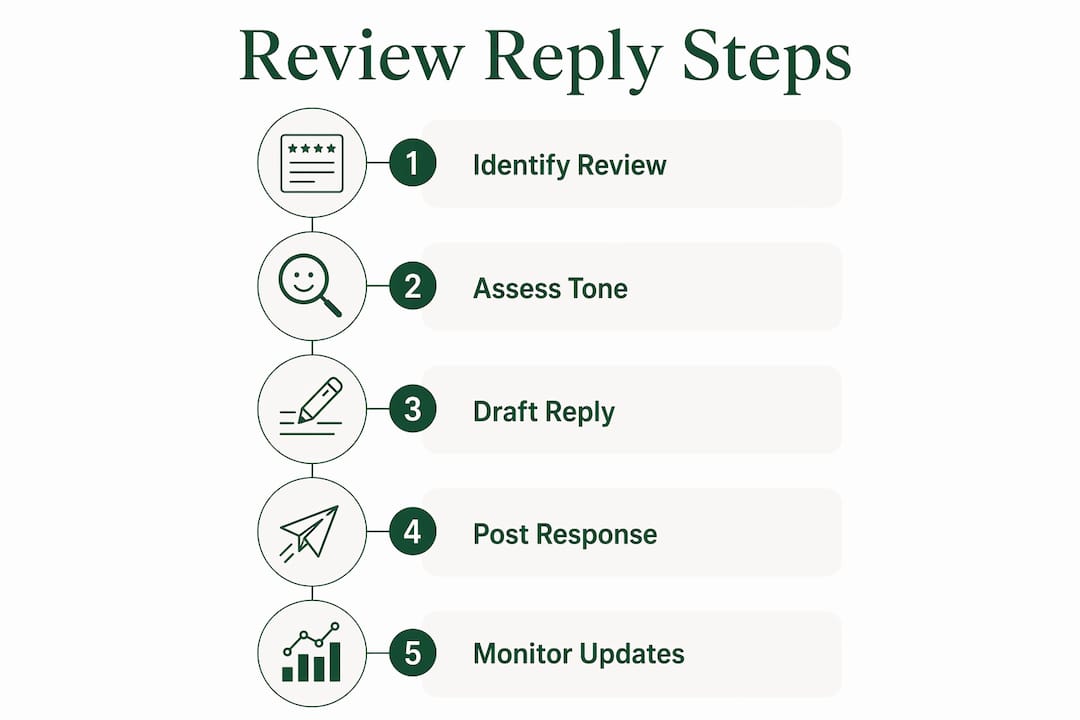
- Sign in to your Google Business Profile at business.google.com or through Google Search.
- Go to Reviews and sort by "Newest" to catch anything recent.
- Reply to the two most recent negative reviews first — acknowledge the experience, apologize without admitting fault, and offer a private contact channel.
- Thank one recent positive reviewer by name and reference a specific detail from their feedback.
- Set a calendar reminder to check reviews daily, or configure notifications in your Google Business Profile settings.
One thing most business owners don't realize: when you reply, Google notifies the reviewer, and they can update their original review. That dynamic matters. A thoughtful reply to a two-star review can turn into a four-star update within days.
Table of Contents
- Why does replying to Google reviews actually move the needle?
- How do you actually reply on Google, step by step?
- How should you handle negative reviews without making things worse?
- What makes a reply to a positive review worth writing?
- Ready-to-use reply templates for every review scenario
- How do you build a reply process your whole team can follow?
- When does automation help, and when does it create risk?
- How do you know if your reply strategy is actually working?
- Key Takeaways
- The part most guides skip entirely
- Localreviewreply makes consistent replies manageable at scale
- Useful sources and further reading
Why does replying to Google reviews actually move the needle?
Replying to reviews isn't just good manners. It's a business activity with measurable effects on reputation, local search visibility, and conversion rates.

Reputation signal. Every public reply is visible to anyone who pulls up your Google Business Profile — not just the original reviewer. Prospects reading your reviews are also reading how you respond to complaints. A calm, professional reply to a one-star review often does more for your credibility than five glowing testimonials, because it shows how you handle problems. Treating every reply as a marketing asset is the right frame: you're writing for the next customer, not just the one who left the review.

Local SEO and profile engagement. Reply activity correlates with higher local profile engagement, and Google's own guidance treats active management of your profile as a positive signal. Consistent replies show the algorithm — and your customers — that the business is open and attentive.
Conversion impact. A prospect comparing two plumbers, two cleaning services, or two HVAC contractors will notice which one responds to feedback and which one doesn't. Silence reads as indifference. A professional reply, even to a critical review, signals accountability. Research published by Harvard Business Review found that businesses that respond to reviews see measurable improvements in their average ratings over time.
The reviewer update loop. Because Google notifies reviewers when you reply, a well-crafted response creates an opportunity for the reviewer to reconsider their rating. If you resolve their issue offline and follow up, asking them to update their review is entirely appropriate — and many do.
How do you actually reply on Google, step by step?
There are three ways to post a reply: through the Google Business Profile dashboard on desktop, through Google Search, or through the Google Maps app on mobile. All three work; pick whichever fits your workflow.
Replying via Google Business Profile dashboard (desktop)
- Go to business.google.com and sign in with the account that manages your profile.
- Select the location you want to manage (if you have multiple).
- Click Reviews in the left-hand menu.
- Find the review you want to reply to and click Reply.
- Write your response in the text box. Keep it under 150 words for most cases.
- Click Post reply. Google reviews the reply for policy compliance before it goes live.
Replying via Google Search (quick method)
- Search for your business name while signed in to your Google account.
- Your Business Profile panel appears on the right. Click Reviews.
- Find the review and click Reply directly from the search results page.
Replying via Google Maps (mobile)
- Open the Google Maps app and tap your profile photo in the top right.
- Tap Your Business Profiles and select the relevant location.
- Tap Reviews, find the review, and tap Reply.
What happens after you post? Google reviews every submitted reply for policy compliance. Most replies appear within minutes, but the process can technically take up to 30 days in edge cases. Build your workflow with that lag in mind — don't assume a reply is live the moment you hit post.
Pro Tip: Keep a folder of short, editable draft templates in a shared Google Doc or your review management dashboard. When a new review comes in, pull the closest template, personalize it in under two minutes, and post. This cuts reply time from 15 minutes to under 3 and keeps tone consistent across team members.
How should you handle negative reviews without making things worse?
Negative reviews are where most businesses either win or lose their reputation. The instinct to defend yourself publicly is understandable — and almost always the wrong move.
The core structure for a negative reply:
- Acknowledge the experience without disputing the facts ("We're sorry to hear your visit didn't go as expected").
- Apologize for their disappointment — not for negligence or fault ("We apologize that we fell short of your expectations").
- Offer a private channel with a specific contact: a named email address or direct phone number, not a generic "contact us" page.
- State the next step briefly ("Please reach out to [name] at [email] so we can make this right").
Legal-safe wording matters. There's a meaningful difference between "We're sorry you had that experience" and "We're sorry we made that mistake." The first acknowledges feelings; the second admits liability. Avoid language that admits negligence — stick to empathy and process, not fault. Phrases like "we take all feedback seriously and want to investigate" are far safer than "you're right, that shouldn't have happened."
What to do and what to avoid:
- Do validate the reviewer's feelings and promise to look into the issue.
- Do provide a specific offline contact channel (not a generic form).
- Don't argue publicly, even if the review contains inaccuracies.
- Don't disclose any private customer data in your reply.
- Don't ask the reviewer to remove their review in your public reply — it violates Google's guidelines and looks desperate.
On fake or policy-violating reviews: You can flag reviews that violate Google's policies, but removal is not guaranteed. Always plan to reply publicly even when you've flagged a review. Silence while waiting for a removal decision looks worse than a measured response. For guidance on when to flag versus when to reply, the Google review policy violations guide on the Localreviewreply blog covers the decision criteria clearly.
SLA for negative reviews: Aim to reply within 24 hours, same-day when possible. Assign a named person responsible for escalation so a critical review never sits unanswered over a weekend.
Pro Tip: When a negative review references a safety concern, a health incident, or a regulatory claim, do not reply without routing through a manager or legal contact first. A quick acknowledgment ("We take this seriously and are looking into it immediately") buys time without creating liability.
What makes a reply to a positive review worth writing?
Positive reviews don't need long replies — but they do need replies. A two-sentence response to a five-star review signals to the next reader that you're engaged and that you value your customers. It also gives Google another piece of fresh, relevant content on your profile.
Keep it brief and specific. Thank the reviewer by name when it's available, reference one detail from their feedback, and close with a light invitation back. Three sentences is usually enough.
What to include:
- The reviewer's first name ("Thanks, Maria!").
- A specific reference to what they mentioned ("We're glad the kitchen remodel came together the way you envisioned").
- A warm close that invites repeat business or referrals ("We'd love to work with you again — and please send your neighbors our way").
When to mention a team member: If the reviewer called out a specific employee by name, echo that in your reply. It reinforces staff recognition and shows the team that good work gets noticed publicly. Avoid naming employees in replies to negative reviews, though — it can create awkward situations and puts individual staff in the spotlight for complaints.
Replying to old positive reviews is worth doing too. A short "Thank you — we appreciate you taking the time to share this!" on a six-month-old review signals ongoing engagement and takes about 20 seconds. Prospects scrolling through your review history will notice that you reply consistently, not just to recent posts.
Rotate your templates. If every positive reply starts with "Thank you for the five-star review!" it reads as automated and impersonal. Keep three or four variations in rotation and swap the opener regularly.
Ready-to-use reply templates for every review scenario
Templates save time without sacrificing quality — as long as you personalize them before posting. The 30-second framework is: thank, reference a specific detail, invite back. Apply it across all star ratings with adjustments for tone.
Template library by scenario
5-star review: 4-star review (good, but something was off): 3-star (neutral/mixed): 1–2 star (critical): Fake or mistaken review (you can't verify the customer):
Scenario-to-template mapping
| Scenario | Template type | Escalate? |
|---|---|---|
| 5-star, detailed | Personalized thank-you | No |
| 4-star, minor issue | Thank + acknowledge + invite back | No |
| 3-star, vague | Neutral acknowledgment + offline invite | No |
| 1–2 star, specific complaint | Empathy + offline contact | Manager review recommended |
| Safety or health claim | Acknowledgment only | Yes — legal/ops before posting |
| Fake or unverifiable | Neutral + contact offer | Flag + reply |
Before you post any template, run this quick check:
- Does the reply include any private customer data? Remove it.
- Is the contact information current and correct?
- Does the tone match your brand voice?
- For negative replies: has a manager or owner approved it?
On requesting a review update: After you've resolved an issue offline, it's acceptable to let the customer know they're welcome to update their review if their experience has changed. Don't pressure them or make it transactional. Timing matters — wait until the resolution is confirmed, not the moment you close the ticket.
How do you build a reply process your whole team can follow?
Best practices only work if they're written down and assigned. Without a documented policy, replies become inconsistent, SLAs slip, and one poorly worded response to a sensitive complaint can create real problems.
Policy checklist — what your written policy should cover:
- Who is authorized to post replies (owner, manager, designated staff, agency).
- Approved tone guide and sample phrases for common scenarios.
- Legal-safe phrasing for apologies and complaints.
- Rules for moving conversations offline (always, for anything beyond a simple thank-you).
- What to do when a review references a safety incident, health concern, or regulatory claim.
Ownership model by business type:
For single-location businesses, one named person owns replies — ideally the owner or a senior manager. For field service franchises and multi-location operators, a centralized team or agency typically manages replies with location-level input for personalization. Define role responsibilities and permissions clearly so no one is guessing who handles what.
SLA targets:
- Negative reviews: same-day reply when possible; no longer than 24 hours.
- Neutral or mixed reviews: within 48 hours.
- Positive reviews: within 48–72 hours.
- Daily monitoring: assign someone to check the dashboard every business day, even if it's a two-minute scan.
Approval workflow for sensitive replies:
Not every reply needs sign-off, but some do. Define escalation criteria before a crisis hits, not during one. Route through a manager or legal contact when a review:
- References a safety incident, injury, or health concern.
- Makes a regulatory or legal claim against the business.
- Involves a repeated unresolved complaint from the same customer.
- Could be defamatory or contains false factual claims.
Escalation steps:
- Flag the review internally (email or ticket to the responsible manager).
- Post a brief holding reply: "We take this seriously and are looking into it."
- Route the full reply draft through the approval gate before posting.
- Document the decision and the final reply for your audit trail.
When does automation help, and when does it create risk?
Automation is a tool for scale, not a replacement for judgment. Used correctly, it cuts reply time dramatically. Used carelessly, it produces robotic responses that make a business look worse than saying nothing.
Where automation genuinely helps:
- Generating first drafts for high-volume positive reviews.
- Maintaining consistent brand voice across multiple locations or team members.
- Flagging new reviews and routing them to the right person automatically.
- Tracking response rate and average response time across locations.
Where human review is non-negotiable:
- Any reply to a one- or two-star review.
- Any review that mentions a safety concern, health issue, or legal claim.
- Any reply that will go out under a named manager's or owner's voice.
- Replies to reviews that have already been escalated or flagged.
AI drafting with a human edit step is the right model for most businesses. The draft handles structure and tone; the human adds personalization, catches errors, and makes the final call on anything sensitive. That combination is faster than writing from scratch and safer than full automation.
Features to require from any review management tool:
- Brand voice controls so drafts match your tone, not a generic template.
- Location-aware templates for multi-location operators.
- Approval queues for low-star replies, so nothing goes live without sign-off.
- Audit trail showing who approved what and when.
- Analytics on response rate, average response time, and rating trends.
Pro Tip: Set your approval queue to require sign-off on any reply to a review with three stars or fewer. This single rule catches the vast majority of sensitive replies without slowing down your response to positive reviews.
The approval workflow software built into Localreviewreply handles this automatically — low-star replies go into a queue, not live, until a designated approver signs off.
How do you know if your reply strategy is actually working?
Measuring reply activity doesn't require a complex analytics setup. A few focused KPIs will tell you whether the effort is paying off.
Primary KPIs to track:
- Response rate: percentage of reviews that received a reply. Aim for 100% on negative reviews and as close to 100% as practical on all reviews.
- Average response time: hours between review posted and reply posted. Track separately for negative and positive reviews.
- Average star rating trend: track monthly. A consistent reply strategy, combined with offline resolution of complaints, tends to lift average ratings over time.
- Reviewer update rate: how often a reviewer updates their rating after you reply. Even a small percentage of updates can meaningfully shift your average.
Secondary KPIs worth watching:
- Web clicks and calls/messages from your Google Business Profile (available in the Profile's performance dashboard).
- Share of reviews flagged for policy violations versus resolved through replies.
- Number of offline resolutions linked to a review reply (track via your CRM or a simple spreadsheet tag).
Practical tracking approach: Export your Google Business Profile performance data monthly. Tag replies that led to an offline resolution in your CRM or a shared spreadsheet. Reply activity correlates with local profile engagement, so watch for changes in profile views and clicks alongside your reply cadence — but be cautious about attributing ranking changes to replies alone, since many factors influence local search position.
The AI search prompt tracker from Localreviewreply can help multi-location operators and agencies track how their profile presence evolves alongside their reply activity.
Key Takeaways
Responding to every Google review — especially negative ones within 24 hours — is the single highest-leverage reputation action a local business can take.
| Point | Details |
|---|---|
| Reply to every review | Prioritize negative reviews; aim for prompt replies within a day or two for any review. |
| Use legal-safe wording | Acknowledge and apologize for the experience without admitting fault; always move disputes to a private channel. |
| Document your process | Write a policy covering who replies, approved phrasing, SLAs, and escalation criteria for sensitive reviews. |
| Automate drafts, approve humans | Use AI tools to generate first drafts at scale, but require human sign-off on any reply to a low-star review. |
| Localreviewreply for scale | Localreviewreply drafts on-brand replies, routes low-star reviews through approval queues, and tracks response KPIs across locations. |
The part most guides skip entirely
The conventional advice on replying to Google reviews is sound as far as it goes: be prompt, be polite, take it offline. But there's a gap between that advice and what actually happens in most local businesses — and it's not a knowledge gap, it's a process gap.
Most business owners know they should reply to reviews. The problem is that "should" doesn't survive a busy Tuesday. Without a named owner, a written SLA, and a tool that surfaces new reviews automatically, replies become reactive and inconsistent. A franchise with 12 locations might have three locations responding within hours and nine that haven't replied to anything in six weeks. That inconsistency is visible to every prospect who compares locations.
The other thing guides underemphasize: the legal dimension. Apologizing publicly is almost always the right move, but the exact words matter more than most people realize. "We're sorry you had that experience" and "We're sorry we let you down" carry very different legal weight. This isn't paranoia — it's the kind of thing that matters when a complaint escalates. Build the approved phrasing into your templates before you need it, not after.
On automation: the risk isn't that AI drafts are bad. Most are fine for positive reviews. The risk is that someone sets up auto-posting and forgets about it, and then a sensitive complaint gets a generic "Thanks for your feedback!" reply. That's worse than no reply at all. The right setup is AI for drafts, humans for decisions — especially on anything below four stars.
Localreviewreply makes consistent replies manageable at scale
Keeping up with Google reviews manually works fine for a single location with light review volume. Once you're managing multiple locations, a franchise network, or a client portfolio, the manual approach breaks down fast — not because the work is hard, but because it's relentless.

Localreviewreply drafts personalized, on-brand replies for every review in your Google Business Profile, routes low-star reviews through an approval queue before anything goes live, and gives you analytics on response rate and timing across all your locations. The drafts are starting points, not final copy — your team edits, approves, and posts. That keeps the speed of automation without losing the human judgment that sensitive replies require.
If you manage reviews for a franchise group or a multi-location service business, the Google Business Profile review management workflow inside Localreviewreply is built specifically for that scale. Agencies can run white-label reply workflows across their entire client base from a single dashboard.
Start with the free AI review response generator to see what a drafted reply looks like for your actual reviews — no commitment required.
Useful sources and further reading
- Google Business Profile Help: Manage customer reviews — Google's official guidance on how replies are reviewed, what happens when you reply, and how to flag policy violations.
- Google Business Profile Community: How to effectively respond to Google reviews — Practical tips and best practices from the official Google Business Profile community.
- Harvard Business Review: Replying to customer reviews results in better ratings — Research on the measurable impact of review responses on average star ratings.
- Localreviewreply template library — Ready-to-use reply templates for common review scenarios, organized by industry and star rating.
- Localreviewreply blog — Operational guides on review response policy, brand voice, and workflow design for local businesses and agencies.