
Review escalation rules route low-star, ambiguous, or flagged Google Business Profile reviews to a human approver instead of letting software publish a reply on its own. The single rule that matters most: auto-publish only clearly positive reviews, and always send anything negative, sentiment-mixed, or legally sensitive to a person before it goes live. Google Business Profile is where these reviews live, and platforms like Local Review Reply are built to enforce that human gate automatically.
TL;DR:
- Review escalation rules should combine rating thresholds, sentiment analysis, and keyword triggers to effectively filter reviews requiring human oversight.
- Building a review pipeline involves API access, real-time detection, deduplication, enrichment, and notifications, with platform-based solutions recommended if API access is delayed.
- An effective approval workflow assigns roles such as local managers, regional approvers, and legal teams, with response time targets of under four hours for safety-related reviews.
- Certain reviews, including negative, ambiguous, or legally sensitive ones, must never be auto-published and always require human escalation.
- Using a dedicated review management platform simplifies automation, provides full audit trails, and supports scalable multi-location review oversight without extensive custom coding.
Table of Contents
- What are the best review escalation rules to start with?
- How do you connect escalation rules to your review pipeline?
- What does a good approval workflow actually look like?
- Which reviews should never be auto-published?
- How do you know if your escalation rules are working?
- How should you roll out escalation rules across locations?
- Why does a human approval gate matter more than full automation?
- Get Escalation Rules Working Without Building Them Yourself
- Sources
What are the best review escalation rules to start with?
Most escalation systems fail because they treat star rating as the only signal. A 4-star review with furious language slips through untouched while a fair 2-star complaint gets buried in a queue nobody checks. The fix is layering three rule types together: rating thresholds, sentiment analysis, and keyword triggers.
Start with rating thresholds as your baseline:
- 5-star reviews auto-publish a warm, on-brand thank-you with no human review required.
- 4-star reviews auto-publish only if sentiment analysis confirms the text is neutral or positive; anything with frustration or complaint language escalates.
- 3-star reviews always escalate. Mixed ratings almost always hide mixed feelings, and a templated reply here reads as tone-deaf.
- 1 and 2-star reviews escalate every time, no exceptions, regardless of what the text says.
Layer sentiment analysis on top of that baseline, because combining star rating with sentiment scoring catches cases a rating-only system misses, like the angry 4-star review mentioned above. Then add keyword triggers as a hard override: any mention of "lawsuit," "discrimination," "unsafe," "refund," "chargeback," or "police" forces escalation no matter what the star rating says. A simple version of the logic looks like this: if rating is 5 and sentiment is positive, publish. If rating is 4 and sentiment is negative or a blocklist keyword appears, escalate. If rating is 3 or below, escalate always.
How do you connect escalation rules to your review pipeline?
Building the pipeline is where most operators underestimate the work. Google Business Profile API access requires an application process, and teams should budget real time for approval, since access is gated and quota-limited. You're not turning this on the same afternoon you decide to build it.
Once access is in place, the technical build has a few non-negotiable pieces:
- Polling or webhook detection to catch new reviews as they post, with polling intervals tight enough to catch a 1-star review within minutes, not hours.
- Deduplication by review ID, storing every processed ID in a datastore so idempotent publish logic prevents double-replying to the same review.
- Enrichment that attaches location ID, reviewer history, and any prior replies to that customer before the draft reaches a human.
- Notification delivery through email, Slack, or a dashboard queue, following the pattern where automation tools generate templated messages with the draft reply and clear approve or reject actions.
If direct API access isn't approved yet, build on a platform that already holds that access rather than waiting, and confirm it gives you full logs and per-location control before you trust it with your brand's public voice. Local Review Reply's Google Business Profile review management tools handle this detection and routing layer directly.
Pro Tip: Before going live, run a two-week shadow test where the pipeline drafts replies but a human manually posts everything. You'll catch dedupe bugs and notification gaps before they touch a real customer.
What does a good approval workflow actually look like?
A good queue does one thing well: it puts everything an approver needs in front of them without forcing a click-through. Design the decision screen with three buttons, approve, edit, and reject, sitting directly under the AI-drafted reply, the original review text, and a quick note on reviewer history if one exists.
Roles matter as much as the interface. Set up a workflow like this:
- Local managers handle standard 3-star and neutral escalations for their own location.
- Regional approvers step in for repeated complaints across locations or anything flagged as a pattern.
- Legal escalation applies only to reviews containing safety, discrimination, or threat language, and skips the regional layer entirely.
Attach service-level targets to each tier. A workable standard: acknowledge every escalation within one hour, and for 1 or 2-star reviews carrying a safety flag, get a final published reply within four hours. That speed only works if the queue shows location ID, reviewer history, and the suggested reply side by side. Local Review Reply's approval workflow follows this same structure, and multi-location operators can route each escalation to the right owner through dedicated tools for franchises and chains.
Which reviews should never be auto-published?
Some categories deserve a permanent block, not a threshold that can be tuned away over time.
- Never auto-publish negative, ambiguous, or legally sensitive reviews, full stop, regardless of how confident your sentiment model is.
- Avoid any reply phrasing that could read as incentivizing a review or masking a real complaint, since that runs against Google's own content policies.
- Keep every published reply logged permanently; never delete or edit a log entry once a reply is live, even if the reply gets corrected later.
- Escalate immediately, outside your normal queue, when a review mentions a potential legal threat, a safety incident, or a discrimination claim. Human oversight becomes essential the moment content carries legal exposure, and no drafting tool should make that judgment call alone.
How do you know if your escalation rules are working?
Four numbers tell you almost everything: percent of reviews auto-published, percent escalated, average time from flag to resolution, and total response coverage across all locations. If escalation rates climb sharply in one location, that's usually a service problem, not a rule-tuning problem.
Your audit log needs specific fields, not a vague activity feed:
- Review ID and location ID
- The AI-drafted text and the final published text, if they differ
- Approver ID and timestamp for every decision
- Outcome (approved as-is, edited, rejected)
Logging every draft alongside the final reply builds a defensible record that matters if a franchise dispute or compliance question ever surfaces months later. Run a monthly sample of 20 to 30 published replies against your brand voice guidelines, not because the AI is likely to drift, but because thresholds set six months ago rarely match today's review volume or tone.
How should you roll out escalation rules across locations?
Start narrow and expand deliberately rather than flipping every location live at once.
- Run full human approval on every review for two to four weeks. No auto-publish exceptions, even for 5-star reviews, so you can see actual volume and tone patterns.
- After that pilot, turn on auto-publish for 5-star reviews only, then expand cautiously to 4-star reviews while permanently gating 1 and 2-star reviews.
- Seed test reviews across a few locations to confirm deduplication, logging, and notification delivery all fire correctly before trusting live customer reviews to the pipeline.
- Train staff with a one-page approval playbook, an escalation phone list for after-hours safety flags, and a sample message like: "New 1-star review at [location] flagged for [reason]. Draft reply attached, respond within 4 hours."
Pro Tip: Keep the pilot's full-approval phase running at least two weeks longer than feels necessary. Most rule gaps only show up once you've seen a genuinely weird review, not a hypothetical one.
Why does a human approval gate matter more than full automation?
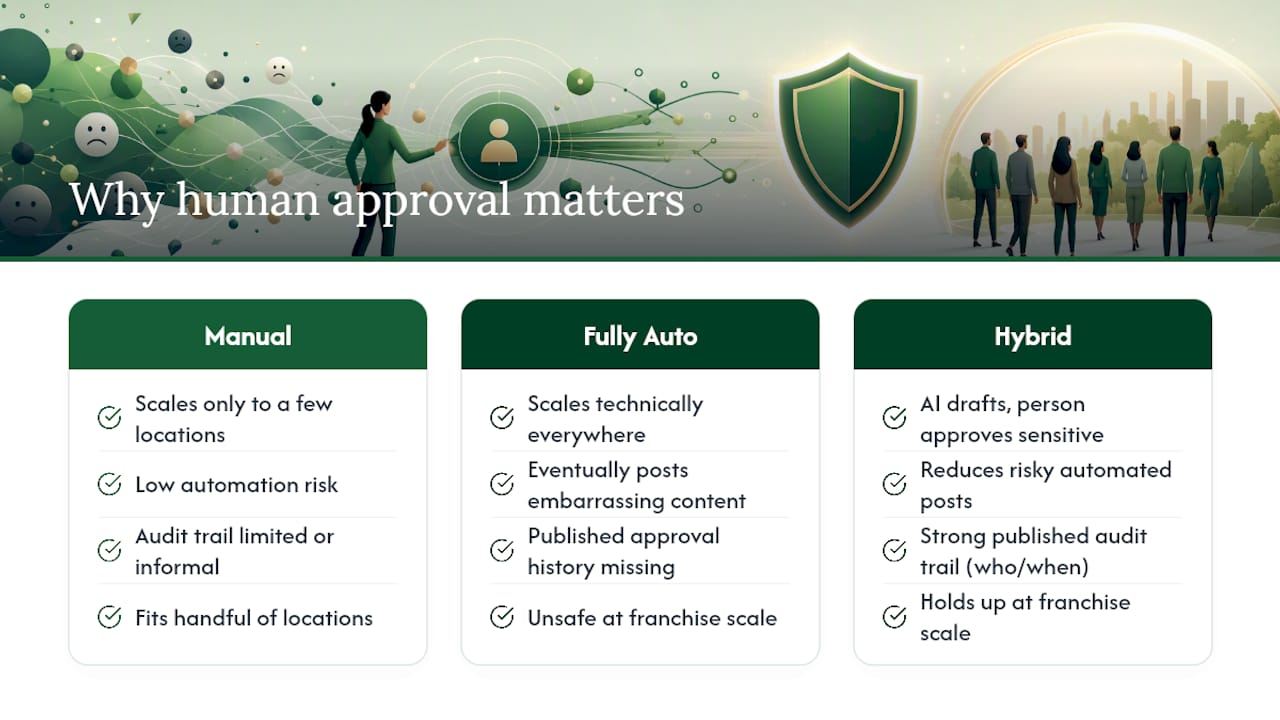
Manual-only review management doesn't scale past a handful of locations, and fully automatic publishing eventually posts something that embarrasses the brand. The middle path, AI drafts fast, a person approves the sensitive cases, is the only one that holds up at franchise scale.
What gets underrated is the audit trail itself. A published reply history that shows who approved what, and when, protects a multi-location brand far more than any single well-worded response does. If you want more on structuring that oversight, the operational posts on the Local Review Reply blog go deeper into specific workflow setups.
— Ryan
Get Escalation Rules Working Without Building Them Yourself
Local Review Reply is the alternative to hand-coding your own escalation pipeline. Instead of wiring together polling scripts, a Slack bot, and a spreadsheet of review IDs, you get AI-drafted replies, an approval gate for low-star reviews, multi-location routing, and role-based permissions already built into one dashboard.

Every draft is logged with a full publish history, so franchise operators and agencies managing dozens of locations can see exactly who approved what and when. Local managers, regional approvers, and agency teams each get scoped permissions instead of one shared login trying to cover every location. If you're currently relying on manual replies or a partial script, see how the platform handles review management at scale and start a trial to test the approval queue on your own locations.
Sources
For hands-on implementation detail, see Rex Automaton's guide to automating Google review replies and Connex Digital's walkthrough of an AI approval-step workflow.
- How to Automate Google Review Replies With AI (Without Letting It Embarrass You) | Rex Automaton
- Automate Google Reviews with AI (Approval Step) | Connex Digital
- Post review replies and create escalation tasks for negative reviews | Zapier Automations
- The pitfalls of using AI to write legal briefs: why human oversight is essential | Avard Law