
Review response analytics is the practice of measuring how your team replies to customer reviews, then using that data to improve response speed, sentiment outcomes, and operational consistency. The recommended posture is to treat it as a closed loop: collect reviews, classify them by sentiment and topic, prioritize by urgency and star rating, respond with on-brand replies, and then measure what changed.
If you're managing Google Business Profile reviews across multiple locations, a franchise network, or a portfolio of clients, the loop matters more than any single reply. Here's what to track from day one:
- Response rate: the share of reviews that received a reply within your SLA window
- Average response time: how long from review submission to published reply
- Sentiment change: whether the reviewer's expressed tone shifted after your reply (or in follow-up reviews)
- Resolution rate: the share of negative reviews that moved to a resolved or neutral state
The single most useful immediate step is to pull your current response rate from Google Business Profile's performance tab and compare it against your last 90 days. That number alone tells you whether you have a coverage problem, a speed problem, or both.
Key Takeaways
Treating review response analytics as a closed operational loop, not a one-off reporting exercise, is what separates teams that improve customer sentiment from those that just reply faster.
| Point | Details |
|---|---|
| Start with response rate | Pull your current rate from Google Business Profile and segment it by star rating before anything else. |
| Track five health signals | Rating trend, recency, velocity, response performance, and suspicious-pattern risk give a single monthly operating view. |
| Gate automation by star rating | Auto-send only for 4-star and 5-star reviews; require human approval for every 1-star through 3-star reply. |
| Audit monthly | Score 20 randomly selected auto-published replies each month to catch drafting drift before it becomes a brand problem. |
| Localreviewreply | Implements the full loop for Google Business Profile: ingestion, AI drafting, configurable approval gates, and location-level analytics. |
Table of Contents
- What is review response analytics, and how does it differ from review management?
- Why review response analytics matters across marketing, CX, and ops
- What metrics should you track in review response analytics?
- What capabilities should you require from a review-response analytics solution?
- How to implement review response analytics step by step
- How to safely automate review responses without losing brand voice
- How Localreviewreply implements review-response analytics and safe automation
- Questions to ask vendors and red flags to watch for
- The part most teams get wrong about review response analytics
- Localreviewreply puts the full loop in one place
- Sources
What is review response analytics, and how does it differ from review management?
Review management covers the full lifecycle: soliciting reviews, moderating flagged content, displaying ratings on your site, and responding to feedback. Review response analytics is a narrower, more operational discipline. It focuses specifically on reply performance, reply-driven sentiment change, and using each response as a measurable data point rather than a one-off task.
The distinction matters because the two functions often sit in different teams. Marketing owns reputation and display; CX or operations owns resolution and escalation. Analytics sits at the intersection, giving both teams a shared measurement layer.
Typical data sources to include:
- Google Business Profile (the primary channel for most US local businesses)
- Apple App Store and Google Play (for businesses with a consumer app)
- Industry-specific platforms: Healthgrades, Avvo, Houzz, Angi, depending on vertical
- Product directories: G2, Capterra, Trustpilot for B2B or SaaS-adjacent businesses
- Internal CRM or help desk tickets that originated from a review or public complaint
Trustpilot's Reply analytics dashboard, for example, tracks reply rate, response time, and team performance across all reviews, and surfaces reply trends over time. That's the kind of measurement layer that separates analytics from simple review management.
Key entities in this space include response rate, response time, sentiment delta, and platforms like Localreviewreply that combine AI-assisted drafting with analytics feedback loops. The goal is not just to reply faster but to understand what your replies are actually doing to customer sentiment and business outcomes.
Why review response analytics matters across marketing, CX, and ops
The business case for measuring reply performance is clearest when you look at what each team gains from the data.
Marketing and conversion: A consistent, visible response presence on Google Business Profile signals to prospective customers that the business is active and accountable. Unanswered negative reviews sit in search results indefinitely. Teams that track response rate by location can identify which locations are dragging down the brand's aggregate rating visibility.
CX and escalation reduction: When CX teams can see which review topics recur across locations, they can route those issues upstream before they become patterns. Tracking resolution rate, specifically whether a 1-star or 2-star reviewer updated their rating after a reply, gives CX a concrete metric tied to service recovery.

Operations and franchise oversight: For multi-location operators, response time variance across locations is an early signal of staffing or process problems. A location that consistently replies in under four hours is operating differently from one that averages three days. Analytics surfaces that gap without requiring a manual audit.
Product and roadmap input: Review text, once classified by theme, becomes a structured signal for product or service decisions.
Short bullets for how analytics informs adjacent functions:
- Segment review sentiment by campaign period to measure whether a promotion generated complaints
- Use topic clusters from negative reviews to brief frontline staff on recurring friction points
- Export resolution rate by location to include in franchise performance scorecards
What metrics should you track in review response analytics?
The core measurement model has eight metrics. Each one answers a different operational question.
| Metric | Definition | How to calculate | Recommended cadence |
|---|---|---|---|
| Response rate | % of reviews that received a reply | Replied reviews ÷ total reviews × 100 | Weekly |
| Average response time | Mean hours from review submission to reply | Sum of response times ÷ total replied reviews | Weekly |
| Sentiment change | Shift in reviewer tone or star rating post-reply | Compare pre/post reply star rating or NLP sentiment score | Monthly |
| Resolution rate | % of negative reviews that moved to neutral or positive | Resolved reviews ÷ total negative reviews × 100 | Monthly |
| Reply quality score | Internal rating of reply relevance, tone, and personalization | Scored via sample audit (1–5 scale) | Monthly |
| Platform breakdown | Response rate and time split by source platform | Segmented by Google, Yelp, app store, etc. | Monthly |
| Recency | Share of reviews from the last 30 and 90 days | Count by date range | Weekly |
| Suspicious-pattern risk | Spike detection for sudden rating changes or review clusters | Flag reviews outside normal velocity | As triggered |
OrderBoosts recommends combining rating trend, recency, velocity, response performance, and suspicious-pattern risk into a single monthly review health score. That composite view is more useful than tracking each metric in isolation because it forces a single operational verdict: is this location's review health improving or declining?
A few measurement pitfalls are worth flagging. Response rate looks great if you're only counting 4-star and 5-star replies. Always segment by star rating so you can see whether negative reviews are getting the same coverage as positive ones. They rarely do, and that gap is where reputation risk lives.
For platform differences: Google Business Profile allows replies from the business owner account directly, and those replies are indexed in search. App store replies on Apple and Google Play are visible in the store listing but don't carry the same SEO weight. Industry sites like Trustpilot have their own reply analytics tools that track reply-level performance separately from your Google data. Treat each platform as its own data stream rather than collapsing them into a single average.
What capabilities should you require from a review-response analytics solution?
Procurement teams often underweight the analytics layer when evaluating review tools, focusing instead on template libraries or publishing speed. The capabilities that actually determine long-term value are more specific.
Technical capabilities checklist:
- Multi-source ingestion (Google Business Profile at minimum; app stores and industry sites for broader coverage)
- Deduplication across sources when the same reviewer appears on multiple platforms
- Sentiment classification and topic taxonomy, not just star-rating aggregation
- Delta analysis: the ability to compare sentiment before and after a reply
- AI-assisted response drafting grounded in prior approved replies and location metadata
- Approval workflows with configurable rules by star rating
- Publishing connectors to Google Business Profile (direct API, not manual copy-paste)
- Team roles and permissions (owner, responder, approver, read-only analyst)
- Audit trails showing who approved, edited, or published each reply
- Export and alerting for SLA breaches or sentiment spikes
- Privacy and data storage controls, including clarity on where review data is stored and for how long
Operational capabilities:
- Template libraries with personalization variables (location name, reviewer name, service type)
- Multilingual support for markets with non-English reviews
- Reporting dashboards with date-range filtering and location-level drill-down
- SLA tracking with breach alerts
- CRM and help desk integrations for routing escalations
G2's thematic analysis features, for instance, allow sellers to extract themes from review text using automated classification and topic detection. That kind of taxonomy capability is what separates a reply tool from a genuine analytics platform.
Pro Tip: For multi-location and franchise operations, weight approval workflows and geo-level role assignments higher than template volume. A tool with 500 templates but no location-level approval controls creates more risk than it saves time.
How to implement review response analytics step by step
Implementation works best as a phased rollout rather than a full-system launch. The following sequence applies to a team starting from scratch or migrating from a manual process.
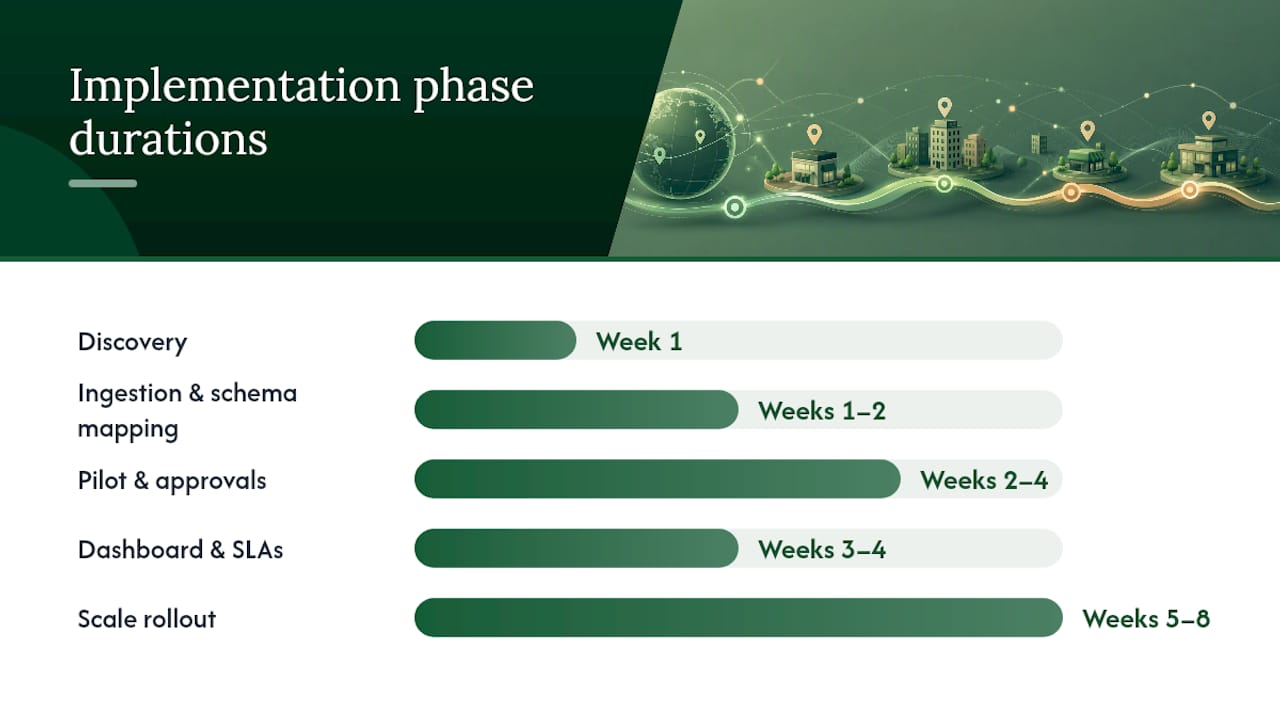
- Discovery (Week 1): Map all active review sources by location. Identify which platforms have API access and which require manual monitoring. Assign a data owner for each source.
- Ingestion and mapping (Weeks 1–2): Connect platforms to your chosen tool using available APIs. Trustpilot's developer documentation outlines API endpoints and data structures for programmatic access, which is the model to follow for any platform that offers it. Map review fields to a standard schema: location ID, platform, star rating, review text, date, reply status.
- Taxonomy design (Week 2): Define your topic categories before you start classifying. Common categories for local service businesses: service quality, wait time, staff behavior, pricing, cleanliness, and resolution. Keep the taxonomy to 8–12 categories at the pilot stage.
- Pilot and approval workflows (Weeks 2–4): Run a single-region or 10-location pilot. Set approval gates: auto-draft for all reviews, auto-send only for 4-star and 5-star replies, human approval required for 1-star through 3-star. Assign a named approver for each location cluster.
- Dashboarding and SLAs (Week 3–4): Build a weekly dashboard with response rate, average response time, and sentiment change by location. Set SLA targets: for example, 4-hour response for 1-star and 2-star reviews, 24-hour for 3-star through 5-star.
- Scale rollout (Weeks 5–8): Expand to all locations. Refine taxonomy based on pilot data. Add CRM or help desk routing for reviews that require service recovery.
- Monthly health score review (Ongoing): Score each location on the five-signal health score (rating trend, recency, velocity, response performance, suspicious-pattern risk) and use the score to trigger location-level interventions.
| Step | Owner | Typical timeframe |
|---|---|---|
| Discovery and source mapping | Analytics lead | Week 1 |
| Ingestion and schema mapping | Technical lead | Weeks 1–2 |
| Taxonomy design | CX lead + marketing | Week 2 |
| Pilot + approval workflow setup | Ops lead | Weeks 2–4 |
| Dashboard and SLA configuration | Analytics lead | Weeks 3–4 |
| Scale rollout | Ops lead | Weeks 5–8 |
| Monthly health score review | CX lead | Ongoing |
For CRM integration, the most practical approach is to route any review that triggers an escalation flag (1-star, unresolved complaint, specific topic keywords) directly into your help desk as a ticket. That closes the loop between the public reply and the internal service recovery action.
How to safely automate review responses without losing brand voice
Automation is where most teams either save significant time or create significant risk. The difference comes down to where you place the approval gate.
Core safety controls:
- Auto-draft for all reviews; auto-send only for 4-star and 5-star replies
- Human approval required for every 1-star, 2-star, and 3-star review, without exception
- Escalation triggers for reviews mentioning legal terms, safety incidents, or specific complaint keywords
- Brand voice controls: AI drafts should be grounded in prior approved replies, not generated from scratch each time
- Canned responses are acceptable for high-volume 5-star reviews, but personalization variables (reviewer name, service mentioned) should always be populated
Policy callouts that belong in your automation rules:
- Never promise a refund, credit, or compensation in a public reply. Move financial resolution to a private channel.
- Never make factual claims about an incident you haven't verified internally.
- Avoid legal language in public replies. If a review mentions a lawsuit or regulatory complaint, route it to legal before any reply goes out.
- Keep sensitive service-recovery conversations in direct messages or email, not in the public reply thread.
Asodesk's approach to app store review management illustrates the model well: auto-tagging and auto-reply rules handle routine positive reviews, while critical reviews stay in a human review queue. The same logic applies to Google Business Profile.
Pro Tip: Build your escalation keyword list before you launch automation. Include terms like "lawyer," "lawsuit," "injury," "refund," "fraud," and any service-specific risk words. A review containing any of those terms should never auto-publish, regardless of star rating.
To monitor automation performance, run a monthly sample audit: pull 20 randomly selected auto-published replies and score each one on relevance, tone, and personalization (1–5 scale). If the average drops below 3.5, recalibrate your drafting rules. That audit cadence catches drift before it becomes a brand problem.
How Localreviewreply implements review-response analytics and safe automation
Localreviewreply's workflow follows the recommended loop directly: reviews from Google Business Profile are ingested into the platform, an AI draft is generated using prior approved replies and location metadata, the draft enters an approval queue, and once published, the reply feeds back into the analytics dashboard.
The approval workflow is configurable by star rating, which means a franchise operator can set 4-star and 5-star replies to auto-publish while requiring a named approver for anything below that threshold. That single control eliminates the most common automation risk: an off-brand or factually incorrect reply going live on a sensitive complaint.
Pilot checklist for a single region or 10-location franchise:
- Connect all target locations to Google Business Profile via the platform
- Set taxonomy categories aligned to your service type (8–12 categories recommended)
- Configure approval rules: auto-send for 4-star and 5-star, approval required for 1-star through 3-star
- Assign location-level approvers and set SLA targets (4-hour for negative reviews)
- Run for 30 days, then pull response rate, average response time, and reply quality score
- Score each location on the five-signal health score and flag any location below threshold
- Adjust drafting rules based on the monthly sample audit
The analytics dashboard surfaces response rate and response time by location, which gives franchise managers a single view of which locations are meeting SLA and which need intervention. Multi-location and franchise deployments benefit specifically from the geo-level role assignments, where a regional manager can approve replies across a cluster of locations without needing access to the full account.
Questions to ask vendors and red flags to watch for
Vendor evaluation moves faster when you have a fixed question set. Use these across every platform you're considering.
Ingestion and publishing:
- Which platforms do you ingest natively, and which require a manual upload?
- Do you publish replies directly to Google Business Profile via API, or does the user copy-paste?
- How do you handle deduplication when the same reviewer appears on multiple platforms?
Approvals and controls:
- Can approval rules be configured by star rating and by location?
- Is there an audit log showing who approved, edited, or published each reply?
- What happens if an approver doesn't act within the SLA window?
Security and data:
- Where is review data stored, and for how long?
- Do you comply with applicable US data privacy frameworks?
- Can we export all data, including reply history and audit logs, at any time?
Analytics depth:
- Do you track sentiment change before and after a reply, or only aggregate star ratings?
- Can we drill down to location-level response rate and response time?
- Do you support custom taxonomy, or is classification fixed?
Red flags to stop the evaluation:
- No approval controls at all, meaning every AI draft auto-publishes
- No audit log or reply history export
- Vague or absent data storage and privacy policy
- Claims of guaranteed ranking improvements from review responses (no platform can guarantee this)
- Closed system with no API or data export option
- No ability to configure rules by star rating
Capterra's listing for Thematic highlights theme detection and dashboarding as core features. Use that as a benchmark for what a capable analytics layer should include, and ask any vendor to demonstrate those capabilities live rather than in a slide deck.
The part most teams get wrong about review response analytics
Most teams implement review response analytics backwards. They build a dashboard first, then try to figure out what to do with the data. The result is a beautiful chart that nobody acts on.
The operational loop only works if the output of analytics is a decision, not a report. Response rate drops below your SLA threshold at a specific location? That's a staffing or process flag, not a metric to note and move on. That's a signal that your replies are technically present but not actually resolving the complaint, which points to a drafting quality problem, not a coverage problem.
The teams that get the most value from this data are the ones who assign a named owner to each metric and a specific action to each threshold breach. Without that, analytics becomes a reporting exercise. With it, the loop closes.
One trade-off worth naming honestly: approval workflows slow things down. A franchise with 50 locations and a 4-hour SLA for negative reviews needs either enough approvers to cover that window or a very clear escalation path when the primary approver is unavailable. The answer isn't to remove the approval gate. It's to design the staffing model around it. Speed without control is the fastest way to publish a reply you'll regret.
Localreviewreply puts the full loop in one place
Most teams running review responses across multiple locations are managing at least three separate problems: getting replies out fast enough, keeping them on-brand, and knowing which locations actually need attention. Localreviewreply handles all three in a single workflow.

The platform ingests Google Business Profile reviews, generates AI drafts grounded in your approved reply history, routes sensitive reviews through a configurable approval gate, and feeds published replies back into a location-level analytics dashboard. You get response rate, average response time, and reply quality data without building a separate reporting layer.
For agencies managing multiple clients, the white-label AI reply workflow keeps each client's brand voice separate while giving your team a single dashboard. For franchise operators, the field service franchise workflow supports geo-level role assignments so regional managers can approve replies for their cluster without touching other locations.
Start with a free trial on a single location or a 10-location pilot. Measure response rate, average response time, and reply quality score over 30 days. The Google review management software page walks through setup and plan options.
Sources
The following sources were used to shape this guide and are worth bookmarking for implementation reference.
- Reply analytics
- G2
- Capterra
- Review Health Score: The Metrics You Should Track Every Month | OrderBoosts
- Developers