
Yes, you can schedule Google review replies, using the Google Business Profile API, no-code tools like Zapier, or dedicated software. The safe pattern is a split path: auto-post clearly positive replies immediately, and route negative or ambiguous reviews to a human for approval. Google reviews every reply before it goes live and notifies the original reviewer once you respond, so tone and accuracy matter every time.
TL;DR:
- Always route reviews rated between one and three stars to a human for approval before posting replies to avoid public backlash.
- Use OAuth authorization for API access, limiting permissions per location to prevent security risks and rate limit errors during busy periods.
- Set clear thresholds for sentiment analysis to auto-post positive reviews immediately while queuing negative or ambiguous reviews for review within 24 to 48 hours.
- Log every reply with review ID, timestamp, and approver details to ensure accountability and facilitate dispute resolution if needed.
- Employ packaged reputation management software for quick setup, transparent approval workflows, and consolidated dashboards, especially for franchise or multi-location businesses.
Table of Contents
- How to Schedule Google Review Replies: Three Paths to Choose From
- Setting Up Your Review Reply Schedule: A Step-by-Step Checklist
- What Rules Keep Automated Replies From Backfiring?
- Reply Templates and Cadence That Actually Work
- How Local Review Reply Builds Safe Scheduling Into the Workflow
- Why the Split-Path Method Is the Only Approach Worth Trusting
- Get a Packaged Approval Workflow Without Building One Yourself
- Primary Sources for Implementing This Safely
- Sources
How to Schedule Google Review Replies: Three Paths to Choose From
Most businesses land on one of three approaches, and each one trades speed for control differently.
A custom API build gives you the most flexibility; learn more about website integration and technical services at Web Design Scientist | Clear Website Quotes Australia | PC Scientist. You work directly with the Google Business Profile API, using OAuth authorization to connect securely rather than sharing passwords. This route makes sense for franchises or multi-location operators with unusual routing logic (different tone by region, different escalation rules by brand), but it requires developer time, API access approval from Google, and ongoing maintenance.
No-code workflows sit in the middle. Tools like Zapier can connect your Business Profile to an AI model, pulling in new reviews and drafting replies automatically before posting them back. Zapier's own walkthrough for connecting ChatGPT to Google Business Profile shows how a trigger maps the reviewer's name and comment straight into a drafting prompt. It's fast to set up, but the built-in logic can be shallow. Without careful configuration, it's easy to let a no-code chain auto-post something to a one-star review that should have gone to a person first.
Packaged reputation software is the fastest and generally safest option for a local business without engineering resources. These platforms typically bundle:
- Prebuilt AI drafting tuned to your brand voice
- Approval queues for sensitive or low-rated reviews
- Role-based permissions for teams and agencies
- Per-location dashboards for franchises
The trade-off is subscription cost versus a one-time build, and you're trusting a vendor with API access to your profile. That trust has to be earned through transparent permissions and clear audit logs, not assumed.
Setting Up Your Review Reply Schedule: A Step-by-Step Checklist
Whether you build it yourself or configure a vendor tool, the underlying sequence rarely changes. Here's the order that works:
- Confirm profile access. Verify your Google Business Profile and document who holds owner or manager rights, since API access depends on that permission level.
- Define routing thresholds. Decide the star-rating and sentiment rules that separate auto-post candidates from human-review candidates. Most guides recommend a split-path architecture: score sentiment first, auto-post the clear positives, queue everything else.
- Secure API or vendor access. Use OAuth flows for authorization. Never hand over your Google account password to a third-party tool, no matter how convenient it seems.
- Build your fetch mechanism. Set up polling or webhooks to catch new reviews, and record each handled review ID so you never post a duplicate reply.
- Write prompt fragments for the AI draft. Include the reviewer's name, star rating, a quoted phrase from their review, and a short brand-tone snippet. Specific prompts produce specific replies; vague ones produce generic ones.
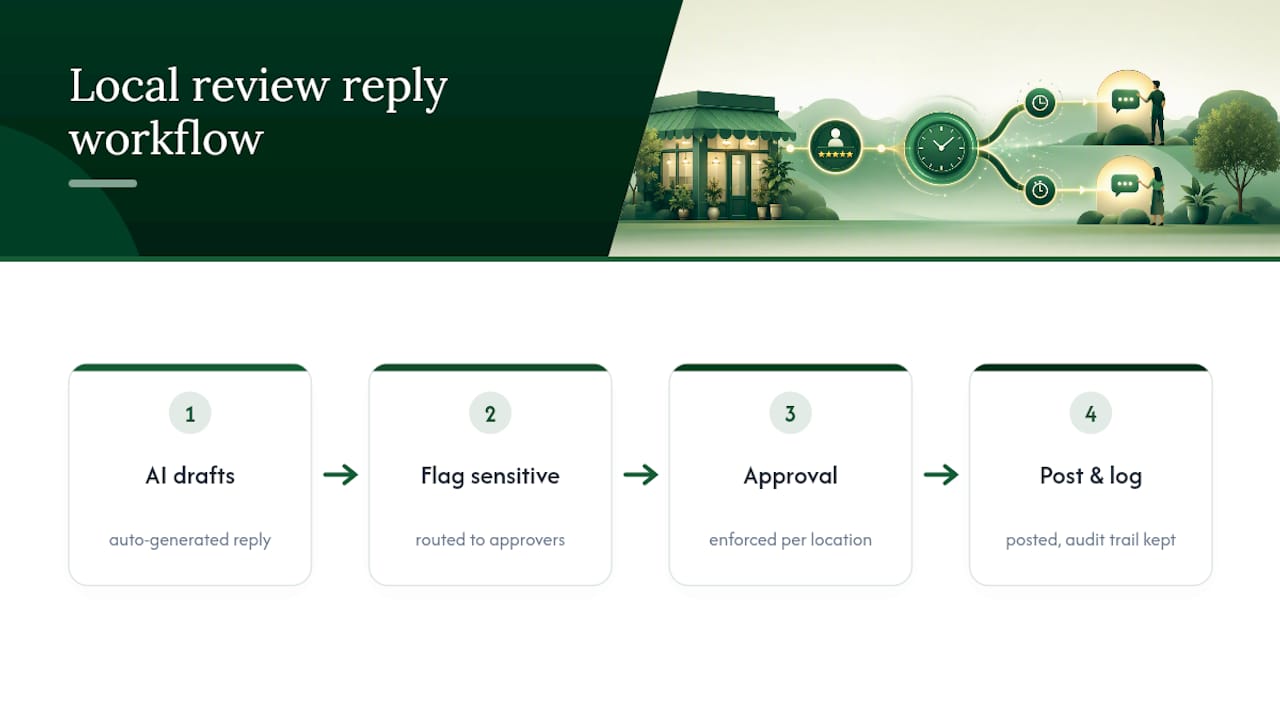
- Configure the approval queue. Negative or ambiguous reviews go to a human. Clearly positive reviews can auto-post without a bottleneck.
- Post and log. Replies go live through the
accounts.locations.reviews.replyendpoint or your vendor's interface. Log every action, per location, with a timestamp.
Pro Tip: Log the reviewId, replyId, timestamp, and approving user for every reply you post. If Google ever flags a reply or a reviewer disputes it, that audit trail is the only way to reconstruct what happened and why.
What Rules Keep Automated Replies From Backfiring?
Automation fails publicly, not privately. A tone-deaf reply to a one-star review sits on your profile indefinitely, so the guardrails matter more than the drafting speed.
Never let a rule auto-post to a review rated one to three stars, or to anything your sentiment model flags as ambiguous. Send it to a person instead. When you do reply, aim to respond within 24 to 48 hours and keep the public reply to roughly 50 to 100 words, moving any detailed resolution to a phone call or private message. Public replies should sound factual and calm. Skip anything that names private account details or makes a legal claim, since both can create problems later.
On the technical side, connect any automation tool through OAuth, never through shared logins, and keep per-location scopes tight so one compromised credential doesn't expose every store you manage. Set request quotas to avoid hitting API rate limits during busy review periods.
The effort pays off. A 2017 study by Proserpio and Zervas found that businesses responding to negative reviews saw average ratings rise by 0.12 stars and positive reviews increase by 12%. That's a modest but real return for doing the uncomfortable work of replying to criticism instead of ignoring it.
- Route 1 to 3 star reviews to a human, always.
- Reply within 24 to 48 hours; keep it under 100 words.
- Use OAuth, never password sharing.
- Log every reply with reviewId, timestamp, and approver.
- Cap API calls per location to avoid rate limit errors.
Reply Templates and Cadence That Actually Work
A positive reply doesn't need much: a short thank-you and a specific detail, like the employee or service the reviewer mentioned. "Thanks for the kind words about Maria's work on your kitchen remodel. We'll pass this along to her." That's it. Specificity beats a canned line every time, since it signals a real person read the review.
A negative reply needs three moves: acknowledge the issue, apologize briefly, and offer a private channel to fix it. Something like, "We're sorry your visit didn't go as expected. Please call us at [number] so we can make this right." No excuses, no defensiveness.
For cadence, auto-post positives immediately, review queued negatives daily, and audit your auto-posted replies weekly to catch anything that slipped through wrong. When writing AI prompt fragments, always instruct the model to quote a specific phrase from the review and reference the star rating, which keeps replies from sounding interchangeable.
- Positive template: thank-you plus a specific, named detail.
- Negative template: acknowledge, apologize, redirect privately.
- Cadence: auto-post positives, daily queue review, weekly audit.
How Local Review Reply Builds Safe Scheduling Into the Workflow
Local Review Reply drafts replies with AI, then routes anything sensitive through approval controls before posting, rather than letting every reply go out unsupervised. Settings apply per location, so a franchise with ten stores can enforce the same approval rule everywhere while still letting each location keep its own voice. Every action gets logged, which matters if you ever need to explain why a specific reply went out.
When evaluating any vendor, including this one, ask to see the approval flow in action, check what role permissions look like for your team, and confirm what a trial period actually unlocks before committing to a paid tier.
Why the Split-Path Method Is the Only Approach Worth Trusting
Most advice on this topic treats automation as an all-or-nothing decision. Either you trust the AI completely, or you write every reply by hand. That framing is wrong, and it's why so many businesses end up either buried in review backlog or embarrassed by a robotic reply to a furious customer.
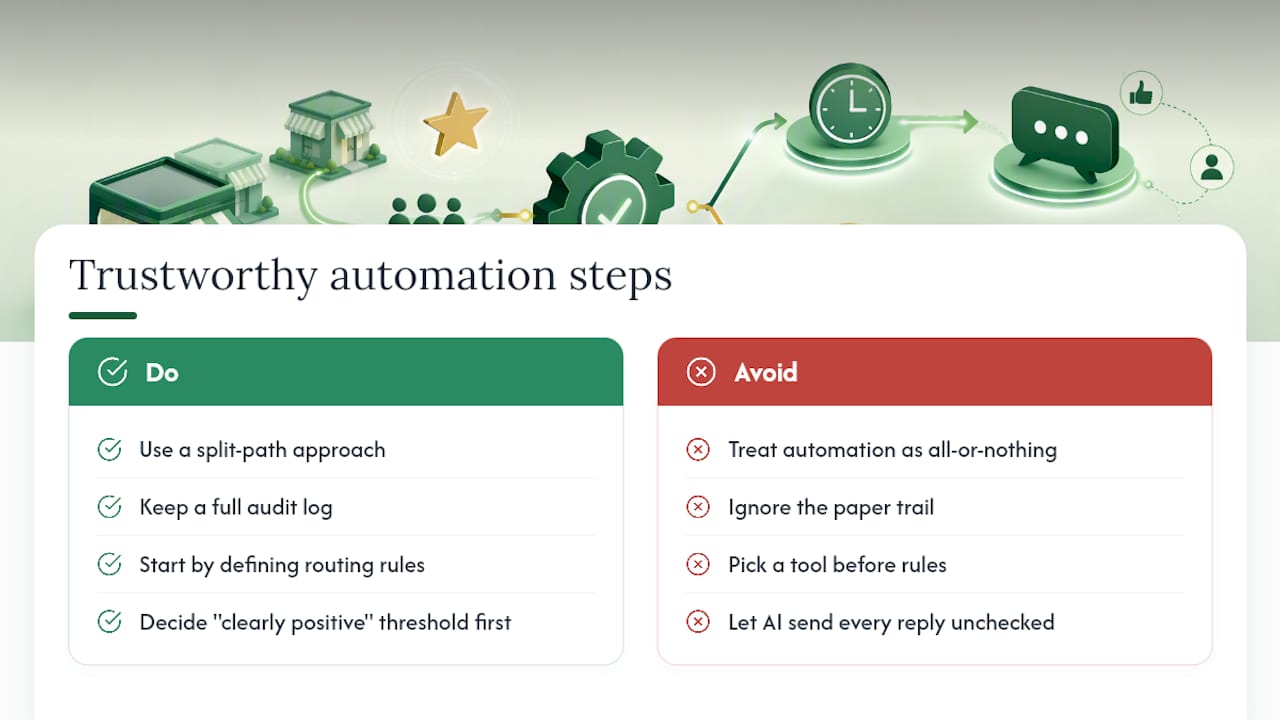
What gets underrated in most guides is the audit log. Businesses obsess over the drafting quality and ignore the paper trail, but the log is what protects you when a reply goes wrong or a reviewer disputes what happened.
Start with routing rules, not with picking a tool. Decide what counts as "clearly positive" before you decide whether to build, use no-code, or subscribe to software. Get that threshold wrong, and every tool downstream inherits the mistake.
— Ryan
Get a Packaged Approval Workflow Without Building One Yourself
Local Review Reply is the alternative to hiring a developer for a custom API build or stitching together a no-code chain by hand. You get AI-drafted replies tuned to your brand voice, approval queues that hold back anything risky, and per-location dashboards that let a franchise or agency manage every store from one place.

Before choosing any platform, ask to see a sample approval flow, check how role permissions work for your team, and review what the reporting dashboard actually tracks. Those three checks tell you more about a vendor's safety design than any feature list. If you manage reviews across multiple locations or handle reputation for client accounts, explore the Google review management software built for local businesses and start a trial to see how the approval controls fit your existing routine.
Primary Sources for Implementing This Safely
Before you configure anything, read the documentation directly rather than relying on secondhand summaries.
- Manage customer reviews covers Google's official reply policy and posting behavior.
- Implement OAuth for Google Business Profile explains secure API authorization for developers.
- Proserpio & Zervas (2017) provides the academic evidence behind the ratings uplift from responding to reviews.
Sources
- Manage customer reviews - Google Business Profile Help
- Implement OAuth for Google Business Profile
- Proserpio & Zervas (2017) — study on review responses