
Use an AI review-reply suggestion tool to draft fast, personalized replies, then approve before posting. That single habit, AI drafting plus human sign-off, covers the two things most businesses get wrong: slow response times and generic copy that reads like it came from a form letter.
Getting started takes under 60 seconds:
- Paste the review text (or connect your Google Business Profile so the tool pulls it automatically).
- Select your tone and any brand voice settings.
- Read the draft, make two quick edits to personalize it, then post.
Before you hit publish, run this safety check: no customer PII in the public reply, no promises you cannot keep, no factual claims you have not verified, and no legal admissions. Those four items catch the majority of AI draft errors that create real liability.
Key Takeaways
AI review reply suggestions work best when AI handles the draft and a human handles the judgment call, especially for low-star reviews.
| Point | Details |
|---|---|
| Draft plus approval wins | Use AI to generate the draft, then require human approval for any reply below your star threshold. |
| Personalize every reply | Change at least two review-specific elements per draft to avoid the canned-response effect that damages credibility. |
| Escalate the right reviews | Route reviews containing legal language, safety mentions, or repeated complaints to a human before any draft is posted. |
| Free vs. paid trade-off | Free tools handle single replies; paid platforms add approval workflows, multi-location support, and audit logs that franchises and agencies need. |
| Localreviewreply for scale | Localreviewreply drafts on-brand replies, enforces approval controls for sensitive reviews, and supports multi-location and franchise teams from one dashboard. |
Table of Contents
- How do AI review-reply suggestion tools actually generate replies?
- What are the best practices for using AI-generated replies safely?
- Ready-to-use AI-suggested reply templates you can edit now
- Free review-reply generators vs. paid platforms: which do you actually need?
- What should you check about privacy and data handling before using any AI reply tool?
- How do you scale AI review replies across multiple locations or a franchise?
- What questions should you ask when evaluating an AI review-reply tool?
- The case for AI review replies: where it actually helps and where it does not
- Localreviewreply cuts reply time without cutting human oversight
- Sources
How do AI review-reply suggestion tools actually generate replies?
The mechanics are straightforward. You feed the tool a set of inputs: the review text, the star rating, the platform (Google, Yelp, TripAdvisor), the customer name when available, and a brand voice prompt or style guide. The model processes those inputs and returns one or more draft replies, sometimes with metadata like suggested tone, recommended length, or a flag to escalate to a human.
Most paid platforms connect directly to the Google Business Profile API, which means reviews flow in automatically and approved replies post without manual copy-pasting. Browser extensions, including options available in the Chrome Web Store, let you generate a draft reply directly on the review platform page, which works well for occasional single-reply use. CRM or ticketing handoffs are a feature of more advanced setups, where a flagged review creates a support ticket rather than a draft reply.
Three operational limits are worth knowing before you rely on any tool. First, language models can hallucinate: they may invent a detail about the customer's experience that was not in the review. Always read the draft. Second, review text sometimes contains PII (a customer's full name, phone number, or order details) that should never appear in a public reply. Third, Google and other platforms have posting-rate limits; bulk auto-posting can trigger account flags.
A common and sensible pattern: auto-post quick thank-you replies for 5-star reviews automatically, and use AI-generated drafts with human approval for anything rated lower. RealTimeFeedback describes this split as a practical default that balances speed with reputational safety.
Pro Tip: Set your brand voice prompt once and save it as a reusable profile. A single well-written prompt (two to three sentences describing your tone, your business type, and any phrases to avoid) cuts editing time on every subsequent draft.
What are the best practices for using AI-generated replies safely?
Speed matters, but not at the cost of quality. Best-practice guidance recommends replying to negative reviews within 24–48 hours, keeping public replies short, and centering them on empathy and a concrete next step rather than a defense of your business.
A few rules that hold across every rating level:
- Always include at least two review-specific elements. The customer's name, the service they mentioned, the date, or the location. Changing at least two elements per reply is the minimum needed to avoid the canned-response effect that erodes credibility at scale.
- Match length to the situation. A 5-star reply can be two sentences. A 1-star reply needs more: acknowledgment, a specific response to the complaint, and an offline next step.
- Keep public replies solution-focused, not defensive. Correct a factual error once, calmly, then move the conversation offline. The public reply's real audience is every future customer reading it.
- Use the L.A.S.T. framework for negatives. Listen, Apologize, Solve, Thank gives a reliable structure that covers the four things an upset customer needs to see.
Escalation triggers: route a review to a human immediately when it contains a legal claim or threat, mentions a safety incident, includes another customer's personal information, or is the third complaint about the same issue in 30 days. No AI draft should go live on any of those without a person reading it first.
Pro Tip: Build a short escalation keyword list (words like "lawyer," "injured," "refund," "dangerous") into your tool's triage rules. Any review containing those words skips the auto-draft queue and lands in a human inbox.
Ready-to-use AI-suggested reply templates you can edit now
The examples below show a starting draft and the two edits that make it feel personal. Fields in brackets are the personalization tokens to replace.
| Star Rating | Draft Reply | Key Edits to Make |
|---|---|---|
| 5-star | "Thank you so much, [Name]! We're thrilled you had a great experience with [service]. We look forward to seeing you again at [location]." | Replace [Name] and add one specific detail from their review (e.g., the technician's name or the job type). |
| 4-star | "Thanks for the kind words, [Name]. We're glad [service] met your expectations. If anything fell short, we'd love to hear more at [email]." | Name the specific service mentioned; swap the generic closing for your actual contact channel. |
| 3-star | "Hi [Name], thank you for taking the time to share your feedback. We hear you on [specific issue] and are looking into it. Please reach out to [contact] so we can make it right." | Name the issue directly from the review; use a real contact name, not a generic address. |
| 1–2-star | "Hi [Name], we're sorry your experience with [service/location] didn't meet your expectations. [Specific acknowledgment of complaint]. Please contact [name] at [contact] so we can resolve this for you." | Write the specific acknowledgment in your own words; sign with a real name and role. |
A few usage notes:
- For Google, keep replies under 150 words. Google's guidance favors concise, professional responses because those replies are visible to every future searcher.
- For product pages or Yelp, slightly longer replies are acceptable when the complaint is complex.
- On low-star replies, always sign with a real name and role. It signals accountability in a way that "The Team" never does.
Free review-reply generators vs. paid platforms: which do you actually need?
Free generators handle single replies fast. You paste a review, click generate, and get a draft in seconds. Browser-based tools and Chrome extensions work the same way with no account required. For a business owner handling five to ten reviews a month, that is often enough.
The gap opens when volume, compliance, or team coordination enters the picture.
| Capability | Free generators | Paid platforms |
|---|---|---|
| Draft generation | Yes, single reply | Yes, bulk and automated |
| Approval workflows | No | Yes, with role-based controls |
| Multi-location support | No | Yes |
| Brand voice profiles | Limited or none | Saved, per-location profiles |
| Analytics and reporting | No | Yes |
| Audit logs | No | Yes |
| Auto-posting | Rarely | Yes, with configurable rules |
| Data retention controls | Usually unclear | Documented in privacy policy |
| Support SLA | None | Varies by plan tier |
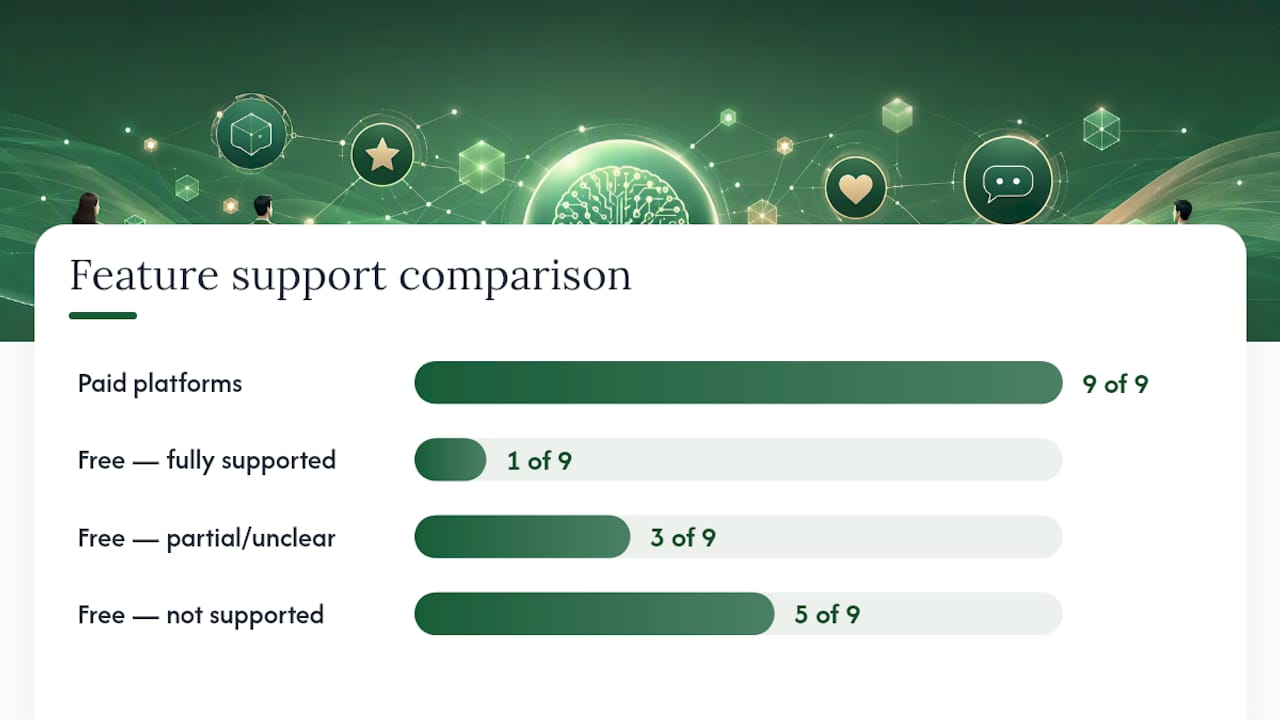
Auto-posting quick thank-yous for 5-star reviews is a safe automation pattern most paid platforms support. Auto-posting lower-rated replies without human review is where reputational risk climbs fast. Paid platforms let you set a star threshold below which every draft requires approval before it goes live. Free tools do not.
For franchise operations, multi-location teams, or any business under regulatory data requirements, the audit trail and role-based access controls of a paid platform are not optional extras. They are what keeps a regional manager from discovering that a franchisee's location auto-posted an apology that admitted liability.
What should you check about privacy and data handling before using any AI reply tool?
Review text is customer data. Before you connect a tool to your review accounts, get clear answers on four questions:
- What does the vendor retain? Does review text get stored, and for how long? Is it used to train models?
- Who can access drafts? Can every seat in the account see every location's reviews, or is access scoped by role?
- What are the deletion policies? Can you request deletion of stored review data, and is that deletion documented?
- How does the tool handle PII? If a customer includes their phone number or order ID in a review, does the tool flag it or pass it through to the draft?
The practical minimum for any multi-location or franchise operation: require explicit human approval for every reply below a set star threshold, and document that rule in your review-management policy. A single auto-posted reply on a sensitive complaint, without a human reading it first, is the scenario that creates the most reputational and legal exposure.
Trust signals to look for: a published privacy policy that addresses review-data retention specifically, role-based access controls, and an audit log of who approved what and when. SOC 2 or ISO 27001 certifications are meaningful for enterprise buyers. For smaller teams, a clear, plain-language data-handling page is the minimum bar.
If the platform integrates with your website via a widget, check how it handles cookie consent. Some integrations require a separate consent layer under applicable privacy laws.
How do you scale AI review replies across multiple locations or a franchise?
The workflow that works at scale has five stages: ingestion, AI draft, local rep review, corporate QA for flagged replies, publish, then analytics. Each stage needs a clear owner.
The role model that prevents most scaling failures: local reps can edit drafts and approve routine replies; only flagged reviews (low star rating, escalation keywords, legal language) route to a corporate or agency reviewer. Everyone else stays out of each other's queues.
Role and permission structure matters more than the AI itself at this stage. A well-configured platform lets you set who can edit, who can approve, and who can see analytics across all locations. Without that structure, a 50-location operator ends up with 50 different reply styles and no visibility into which locations are falling behind.
Voice profiles solve the brand consistency problem. Rather than writing a new prompt for every location, you maintain a master brand voice profile and allow location-level overrides for regional phrasing or local service names. That keeps replies recognizably on-brand while still feeling local.

Pro Tip: Use automated triage rules based on star rating and keywords to route high-risk reviews to human reviewers before a draft is even generated. Catching a review that mentions "injury" or "lawsuit" at the ingestion stage is faster and safer than catching it after a draft exists.
For agencies managing multiple clients, white-label AI review reply workflows let you maintain separate brand voice profiles and approval chains per client without mixing accounts. That separation is what makes agency-scale management operationally clean.
You can see how approval and triage rules work in practice in Localreviewreply's franchise workflow case study.
What questions should you ask when evaluating an AI review-reply tool?
Run through this checklist before committing to any platform:
- Accuracy and brand adaptation: Can you lock a brand voice profile so every draft reflects your tone? Does the tool let you require edits before posting, or does it default to auto-post?
- Platform integrations: Which review platforms does it connect to natively? Does it support Google Business Profile API posting, or does it require manual copy-paste?
- Approval workflows: Can you set a star-rating threshold below which every reply requires human approval? Are approval actions logged with a timestamp and user ID?
- Role-based access: Can you scope access by location, team, or role so a franchisee only sees their own reviews?
- Security and privacy: What is the data retention period for review text and drafts? Is deletion available on request? Is the privacy policy specific about review data?
- Multi-location support: How does the platform handle hundreds of locations? Is there a bulk-management view or dashboard?
- Reporting and analytics: Can you track reply rate, average response time, and sentiment trends by location?
- Pricing model: Is it priced per location, per reply, or per seat? Does the free trial include approval workflows, or only basic draft generation?
- Support SLA: What is the guaranteed response time for support issues? Is there a dedicated account manager at higher tiers?
The case for AI review replies: where it actually helps and where it does not
AI drafts add the most value on high-volume, routine positive replies. A business receiving 200 five-star reviews a month does not need a human writing each one from scratch. Consistent, on-brand thank-yous, posted within hours, signal responsiveness to every future customer who reads them. That is a real operational win.

The ROI case is time saved on routine replies and improved consistency across locations, not guaranteed ranking improvements. Public replies do influence how potential customers perceive a business, and responding to reviews can modestly improve ratings and review volume over time, but no tool can promise a specific outcome.
Where AI should not own the reply: complex disputes, safety complaints, legal threats, and any situation where the customer is genuinely distressed. Those replies need a person who can read between the lines, make a judgment call, and take accountability in a way that a draft cannot. The public reply in those cases is a conversion-facing communication read by hundreds of future customers. Speed matters less than getting it right.
Responding publicly is as much for future customers as it is for the reviewer. A well-handled 1-star reply, written by a human who clearly read the complaint and offered a real solution, often does more for a business's reputation than ten additional 5-star reviews.
Localreviewreply cuts reply time without cutting human oversight
Most businesses that try AI review reply suggestions hit the same wall: free tools draft fast but offer no approval controls, no brand consistency across locations, and no audit trail. Localreviewreply is built specifically for local service businesses, franchises, and agencies that need all three.

Connect one location, set your approval threshold (for example, require human sign-off on anything under 4 stars), and run your first 50 replies. The platform drafts on-brand replies in seconds, routes sensitive reviews to a human before posting, and gives you a dashboard view across every location. Industry-specific templates are included so you are not starting from a blank prompt. For agencies, white-label workflows keep each client's voice and approval chain separate. Start a free trial at Localreviewreply and have your first approved reply live today.
Sources
- How to respond to negative reviews: examples and best practices | Bazaarvoice
- How to Effectively Respond to Google Reviews: Tips and Best Practices - Google Business Profile Community
- How to respond to negative reviews: the L.A.S.T. framework + 7 real examples · Reviewz
- Review Response Templates (2026): 40+ Copy-Paste Examples | TheStacc
- Automatic AI Review Responses for Fast, Consistent Google Review Replies | RealTimeFeedback