
The best way to bulk reply to reviews is AI-assisted drafting paired with human approval and smart filters, not one canned message pasted across dozens of reviews. Before you send anything at scale, confirm three things: you can filter and select the right reviews, your drafts pull in dynamic details so no two replies read identically, and sensitive or low-star reviews route to a person before they go live.
- Filter first. Sort by star rating, date, and location so you're never replying to a one-star complaint with a template built for happy customers.
- Draft with context. Use tools that generate a unique reply per review based on sentiment and reviewer details, not a single message applied to many.
- Gate the risky ones. Route negative or legally sensitive reviews to a human before publishing.
Skip these steps and you risk two problems at once: platforms flagging your account for spammy behavior, and customers noticing you didn't actually read what they wrote.
Pro Tip: If you're behind on replies right now, don't try to clear the entire backlog in one afternoon. Publishing a large number of replies in a short time can look more like automation abuse than good customer service, even when every word is genuinely different.
Key Takeaways
The safest and most effective way to bulk reply to reviews combines AI-generated, context-specific drafts with human approval gates on sensitive replies and staggered publishing to avoid spam flags.
| Point | Details |
|---|---|
| Never copy-paste identical replies | Platforms and reputation tools flag repeated boilerplate, damaging both trust and deliverability. |
| Filter before you batch | Sort by rating, date, and location, and never mix star ratings inside one publish batch. |
| Gate anything risky | Route negative, legal, or health-related reviews to a human before they go live. |
| Stagger your publishing | Use randomized delays across waves instead of posting dozens of replies at the same timestamp. |
| Local Review Reply supports the full workflow | It pairs AI-drafted, per-review replies with approval controls and multi-location dashboards for franchises and agencies. |
Table of Contents
- What Are Your Options for Bulk Reply to Reviews?
- How Do You Set Up a Safe Bulk-Reply Process?
- How Does AI Generate Bulk Replies, and Where Does It Fall Short?
- Who Should Approve Replies Before They Go Live?
- What Reply Templates Actually Work at Scale?
- Are Bulk AI Replies Legal and Ethical to Use?
- Try Local Review Reply for Multi-Location Bulk Replies
- Frequently Asked Questions
- Sources
What Are Your Options for Bulk Reply to Reviews?
Four main entry points exist, and most businesses end up combining two of them.
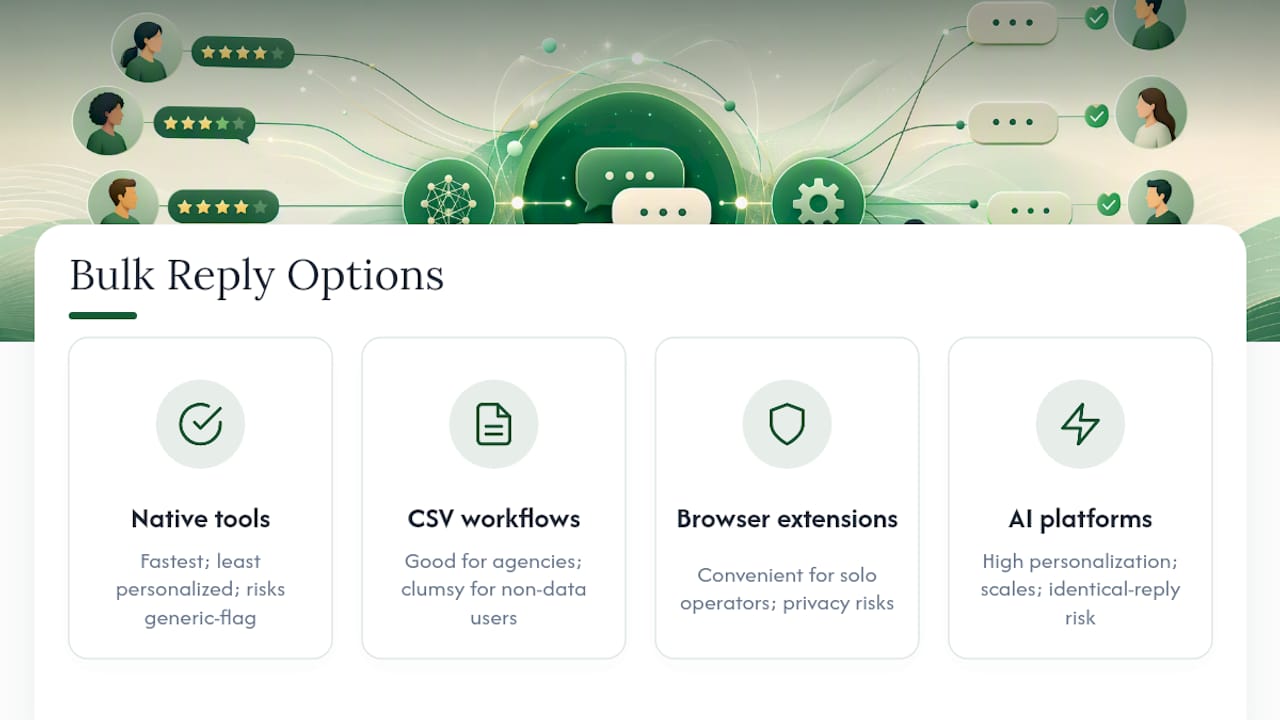
Platform-native bulk tools let you select multiple reviews inside a dashboard and apply a single response or lightly edited template. This is the fastest option but the least personalized, and it's the one most likely to trigger a "generic reply" flag if you're not careful.
CSV import and export workflows let you draft replies in a spreadsheet, tag them by review ID, and push them back in a batch. Good for agencies managing many clients, clumsy for anyone without a data-entry habit.
Browser extensions, like ReplyReviews on the Chrome Web Store, add quick-action buttons for replying without leaving the review page. They're convenient for solo operators but come with extra privacy considerations, since extensions operate under Chrome Web Store limited-use rules governing how they can access your data.
AI bulk-generation platforms are the fourth option, and the meaningful difference is this: instead of one reply stretched across many reviews, the software writes a distinct draft for each one using the review's own language, rating, and reviewer name. Uberall's Bulk AI Responses feature works this way, and its own documentation warns that manual, identical responses risk getting flagged as spam.
Small teams tend to do fine with a native tool plus manual edits. Multi-location operators and agencies need the AI-generation model, because volume makes manual personalization impossible past a certain point.
Pro Tip: Test any new bulk tool on your lowest-stakes location first. If a batch gets rejected or flagged, you want to find out on a branch with ten monthly reviews, not the flagship location with three hundred.
How Do You Set Up a Safe Bulk-Reply Process?
Running bulk replies well is less about the software and more about the sequence you follow before you hit publish.
- Inventory and filter. Pull all pending reviews and sort by date range, star rating, location, and any tags (refund requests, staff mentions, safety complaints). Flag anything sensitive for manual handling right away.
- Build batches deliberately. Keep batch size manageable, and don't mix star ratings in the same run. A batch of forty five-star reviews behaves very differently than one mixing a five-star and a one-star complaint about food poisoning.
- Draft with dynamic fields. Whether you're using AI or templates, pull in the reviewer's first name, their specific comment, and the location name. Zoho Publish's review automation guidance recommends assigning reviews by rating so the right staff member or workflow handles each type.
- Route through an approval gate. Anything under four stars, or anything mentioning a legal issue, staff conduct, or a health/safety claim, should sit in a queue for a human to read before it posts.
- Publish in waves, not all at once. Vendor guidance from tools like GMBapi's review management platform recommends randomized posting windows, sometimes spread across 24 to 48 hours, to avoid the suspicious pattern of fifty replies landing at the exact same timestamp.
- Log everything. Track which replies are pending, approved, rejected, or published, and note who approved what.
Once replies are live, measure what changed:
- Response rate (percentage of reviews receiving a reply within your target window)
- Time-to-reply, before and after adopting bulk tools
- Any shift in overall review sentiment or star average over the following months
How Does AI Generate Bulk Replies, and Where Does It Fall Short?
AI bulk-reply tools work by reading each review's text, star rating, and reviewer name, then generating a response shaped around that specific input rather than a fixed script. The better platforms also factor in your business category, so a reply to a plumbing review reads differently than one to a bakery review, even from the same engine.

The upside is real: speed, consistency across dozens of locations, and hours of staff time returned every week. The downside shows up when businesses skip the guardrails. Generic AI output that reads the same across ten reviews gets treated the same way as manual copy-paste: as spam, not service.
What keeps it honest:
- Force dynamic variables (name, specific detail from the review, location) into every draft, no exceptions.
- Set brand and tone guidelines per location, so a franchise in Texas doesn't sound identical to one in Vermont.
- Apply per-rating rules: auto-post for four and five stars, hold everything below that for a person to read first.
Pros: speed at scale, consistent brand voice, dramatic time savings for multi-location teams. Cons: risk of generic-sounding output if variables aren't enforced, potential platform rejection of boilerplate phrasing, and the ethical weight of a public response that a customer assumes came from a person.
Pro Tip: Read five AI-generated drafts back to back before you approve a batch. If you can't tell which review each one is responding to without checking, the variables aren't doing their job.
Who Should Approve Replies Before They Go Live?
Not every reply needs a human set of eyes, but the ones that do need a clear rule, not a judgment call made under deadline pressure.
A workable gate: auto-publish clearly positive, low-risk replies. Require approval for anything negative, anything referencing a legal claim, or anything touching health information. Google's privacy policy is worth reviewing here too, since reviewer names and other identifiers used in public replies fall under platform data-handling expectations, and conservative use of personal details is the safer default.
- Define roles clearly: who can approve, who can publish, who can edit a flagged draft, who audits the log monthly.
- Build in routing rules so flagged replies land with the right person automatically, not in a shared inbox everyone ignores.
- Add randomized posting delays and a fallback plan for when a publish attempt fails or a platform API times out.
- Keep an audit trail: reviewer, timestamp, and outcome for every reply, approved or rejected.
A simple franchise model looks like this: the local manager reviews anything flagged for their location, and a regional marketer periodically checks for patterns, like a location that keeps getting held for the same complaint.
Pro Tip: If one location's replies get flagged for approval every single week for the same issue, that's not a review-reply problem anymore. That's an operations problem showing up in your reply queue.
What Reply Templates Actually Work at Scale?
A reliable template has four parts: open with the reviewer's name and a thank-you, acknowledge the specific issue or compliment, state a next step or action, and close with a sign-off.
Do: use the reviewer's first name, reference one detail unique to their review, keep it under four sentences, and give negative reviews a concrete next step (a phone number to call, a manager's name).
Don't: paste the same paragraph across multiple reviews, publish contact details where the platform's policy restricts them, or slip promotional language ("Ask about our 20% off deal!") into a reply meant to address a customer's experience.
Three quick examples:
- Positive: "Thanks so much, Maria. Glad the team got your kitchen faucet fixed same-day. We'll pass your kind words along to Dave."
- Neutral: "Appreciate the feedback, James. Sounds like the wait time on Tuesday wasn't what we aim for. We're adjusting staffing for peak hours."
- Negative: "We're sorry to hear this, Priya. This isn't the experience we want. Please call our office at [number] so we can make it right."
Before any bulk publish, run a three-item check: confirm no two drafts are near-identical, confirm nothing violates the platform's content policy, and confirm every flagged reply has an approval status logged.
Are Bulk AI Replies Legal and Ethical to Use?
Using AI to draft review replies isn't illegal, but a few areas deserve real caution rather than a shrug.
The first is disclosure and authenticity. Most platforms don't require you to label a reply as AI-generated, but presenting an automated response as a personal message from a specific staff member, when no such person wrote or read it, edges toward deceptive practice. The safer standard: the business is replying, a person retains oversight, and the content reflects an accurate account of what happened.
The second is data handling. Reviewer names, locations, and sometimes incidental personal details appear in reviews, and any tool that stores or processes that data to generate replies should handle it conservatively. Reviewing Google's privacy policy helps clarify what counts as reasonable use versus overreach, particularly if your workflow involves a third-party tool touching that data.
The third is platform compliance itself, which is really a contractual matter, not a law. Google, Yelp, and Facebook each set their own rules for what counts as an acceptable response, and violating them risks suspension or removal of your ability to reply publicly, not a courtroom outcome. That's a real business risk even without a legal one attached.
The fourth is liability language. A reply that admits fault, promises a specific remedy, or makes a factual claim about an incident can matter later if a dispute escalates. This is exactly the category of reply that should never auto-publish. It belongs with a person who understands what the business can and cannot promise in writing.
Practical perspective: small teams vs. multi-location operations
Small teams do best starting with AI drafts and manual approval on every single reply. Speed matters less than getting the local voice right. Franchise and multi-location operators need the opposite emphasis: role-based approval, per-location tone settings, and a dashboard that shows patterns across sites, not just individual replies.
Try Local Review Reply for Multi-Location Bulk Replies
If you've been piecing together a browser extension, a spreadsheet, and a native platform tool to keep up with review replies, Local Review Reply was built to replace that patchwork with one workflow. It drafts a distinct, on-brand reply for every review using the reviewer's name, rating, and comment, and it routes anything low-star or sensitive to a person before it ever goes public.

For franchises and agencies, the approval workflow controls let you set who approves what per location, so a fifteen-location operator isn't relying on one overworked manager to catch every risky reply. The multi-location dashboard shows reply status across every site at a glance instead of forcing you to check each Google Business Profile separately.
The practical next step: start a free trial, run it against one location's backlog first, and turn on approval gates for anything under four stars before you scale to the rest of your locations.
Frequently Asked Questions
Is it safe to bulk reply to reviews on Google Business Profile? Yes, as long as replies are unique per review and you avoid posting large batches at identical timestamps, which can read as automated abuse rather than genuine engagement.
Can I use the same reply template for multiple reviews? You can use a template structure, but each individual reply needs unique details, like the reviewer's name and a specific detail from their comment, or it risks looking like spam.
Should AI ever auto-publish a reply without review? Only for clearly positive, low-risk reviews. Anything negative, legally sensitive, or involving a specific complaint should go through a human approval step first.
How many reviews can I safely reply to in one batch? There's no universal number, but smaller waves with randomized timing between them are safer than publishing dozens of replies in a single burst.
Do bulk reply tools work across Google, Yelp, and Facebook? Support varies by tool. Confirm platform-specific compliance before automating replies anywhere outside Google Business Profile, since each platform sets its own rules for acceptable response behavior.