When a review comes in loaded with profanity, the right move is almost never silence or a heated reply. Post a short, specific public response that names the issue, apologizes for the experience, and offers a real next step with a timeline. Flag the review for removal only if it crosses into harassment, hate speech, or threats under platform policy. Everything else stays public and gets handled with a calm, documented reply.
TL;DR:
- Most profane reviews should be responded to publicly with a neutral, empathetic message that addresses the specific issue within 24 to 48 hours.
- Flag reviews only if they contain clear harassment, hate speech, or threats, and support this with documented evidence before escalation.
- Use pre-written templates that acknowledge the complaint, apologize, and provide a direct next step, adjusting tone for industry relevance.
- Maintain a central log of incidents, follow up on resolved cases, and avoid tying refunds to review removal to identify operational issues.
- Establish a review response system with decision flows, templates, and approval steps to ensure consistent, appropriate handling at scale.
Table of Contents
- When Should You Reply Publicly vs. Flag a Review for Removal?
- How Do You Write a Public Reply to a Profanity-Filled Review?
- What Are Good Response Templates for Profanity in Reviews?
- When Does Platform Moderation Actually Remove a Review?
- How Do You Track Follow-Up and Prevent Repeat Incidents?
- How Local Review Reply Fits Into This Workflow
- Why Most Advice on Profane Reviews Misses the Point
- Try a Controlled Draft-and-Approval Workflow for Free
- Sources
When Should You Reply Publicly vs. Flag a Review for Removal?
Google's own reporting tools list profanity, bullying, harassment, and discrimination as removable categories, but the bar is higher than most business owners assume. A single curse word aimed at a bad haircut or a late delivery usually does not qualify. The review has to cross into targeted abuse, threats, or slurs before a platform will act, according to Google's Business Profile community guide.
That means most angry, profane reviews still need a public answer, not a flag. Run this quick decision flow before you do anything:
- Assess: Is the profanity attached to a specific, checkable complaint (wrong order, rude staff, billing error)?
- Verify: Does the language target a protected characteristic, threaten violence, or amount to harassment rather than frustration?
- Reply: If it's frustration with a real grievance attached, answer publicly within 24 to 48 hours.
- Flag: Only escalate to Google if the content clearly matches a policy-violation category.
How Do You Write a Public Reply to a Profanity-Filled Review?
Reacting fast feels satisfying. Reacting well takes a beat. Here's the workflow that keeps a profane review from turning into a bigger reputation problem.
- Pause before you write anything. Read the review twice, pull up the transaction or service record, and confirm what actually happened. Replying from anger is how a bad review turns into a screenshot on social media.
- Open by naming the issue and apologizing for it. Skip the defensive throat-clearing. Say what went wrong in plain terms: "We're sorry your delivery arrived two hours late and cold." This is the Listen and Apologize half of the L.A.S.T. framework, a structure built specifically for de-escalating angry public feedback.
- Offer a concrete next step. Give a direct contact, a name, and a timeline: "Please email us at [address] and we'll follow up within 24 hours." Vague promises to "look into it" read as filler.
- Sign with a real name and role when your brand voice supports it. A reply signed "Maria, General Manager" reads more accountable than an anonymous corporate voice, especially on a review this heated.
- Keep the whole thing between 50 and 100 words. Longer replies start arguing facts in public, which almost never helps and often escalates things further, per Search Engine Land's guidance on handling negative Google reviews.
- Log the incident internally before you close the tab. Note the date, the complaint, who responded, and what was promised. If you later decide to flag the review, you'll want this record ready.
Pro Tip: Draft the reply, then read it back as if you're a customer who's never heard of your business. If it sounds defensive or dismissive to a stranger, rewrite the first sentence before posting.
Responding within that 24 to 48 hour window isn't just good manners. Shopify's guidance on negative reviews notes that a fast, focused response can calm an upset customer down and head off a second, angrier post.
What Are Good Response Templates for Profanity in Reviews?
You don't need to write these from scratch every time. Keep a short library of editable templates and swap in the specifics for each situation. Our Google review response templates library has a broader set, but here are four starting points for profanity-heavy cases specifically.
- Clearly abusive language, little substance: "We take feedback seriously, but we're unable to address concerns expressed this way. Please contact us directly at [email/phone] so we can help resolve whatever happened."
- Angry but factual complaint with profanity mixed in: "We're sorry your [specific issue] wasn't handled the way it should have been. We'd like to make this right. Please reach [name] at [contact] and we'll follow up within [timeframe]."
- Profanity-only comment or a one-star rating with no detail: "We're sorry to see this rating. We'd genuinely like to understand what happened. Could you email us at [contact] with more detail so we can fix it?"
- Follow-up after the issue is resolved: "Thanks for working with us on this, [name]. We're glad we could sort out [issue]. If you have a moment, we'd appreciate an updated review reflecting your experience."
Adjust the tone slightly by industry. A cleaning services template reads differently than one for a restaurant, but the structure holds across almost any local business.
When Does Platform Moderation Actually Remove a Review?
Harassment, hate speech, and direct threats are the categories platforms will actually act on. Profanity layered onto a legitimate complaint about service or product quality typically stays up, even when it's uncomfortable to read, because the underlying feedback is considered valid customer speech.
Before filing any removal request, build a simple evidence file:
- Screenshot the review exactly as it appears, including the date and reviewer name.
- Pull the matching transaction, order number, or appointment record.
- Note any prior contact with this customer, including support tickets or emails.
- Write one sentence explaining exactly which policy category the review violates.
Filing without that groundwork wastes everyone's time. Over-flagging reviews that don't clearly meet Google's policy criteria tends to slow down responses on future, legitimate flags, according to GoodMarks' field guide on responding to bad reviews. Our policy violations breakdown walks through more edge cases if you're unsure whether a specific review qualifies.
How Do You Track Follow-Up and Prevent Repeat Incidents?
Every profanity-containing review deserves a line in a central incident log: date, complaint, who replied, what was promised, and whether it got resolved. Without that log, patterns (a specific employee, a recurring product issue) stay invisible.
- Log the incident with an outcome and a follow-up date, not just the initial reply.
- After a resolution, ask politely for an updated review, but never tie a refund or discount to removing or changing one.
- Set up monitoring alerts so low-star and profanity-flagged reviews route to a manager, not a junior staffer, before anything goes public.
- Train staff on when to escalate a review internally rather than replying solo under pressure.
Pro Tip: If the same complaint shows up in three or more profane reviews within a quarter, that's an operations problem, not a reputation problem. Fix the root cause before writing another reply.
How Local Review Reply Fits Into This Workflow
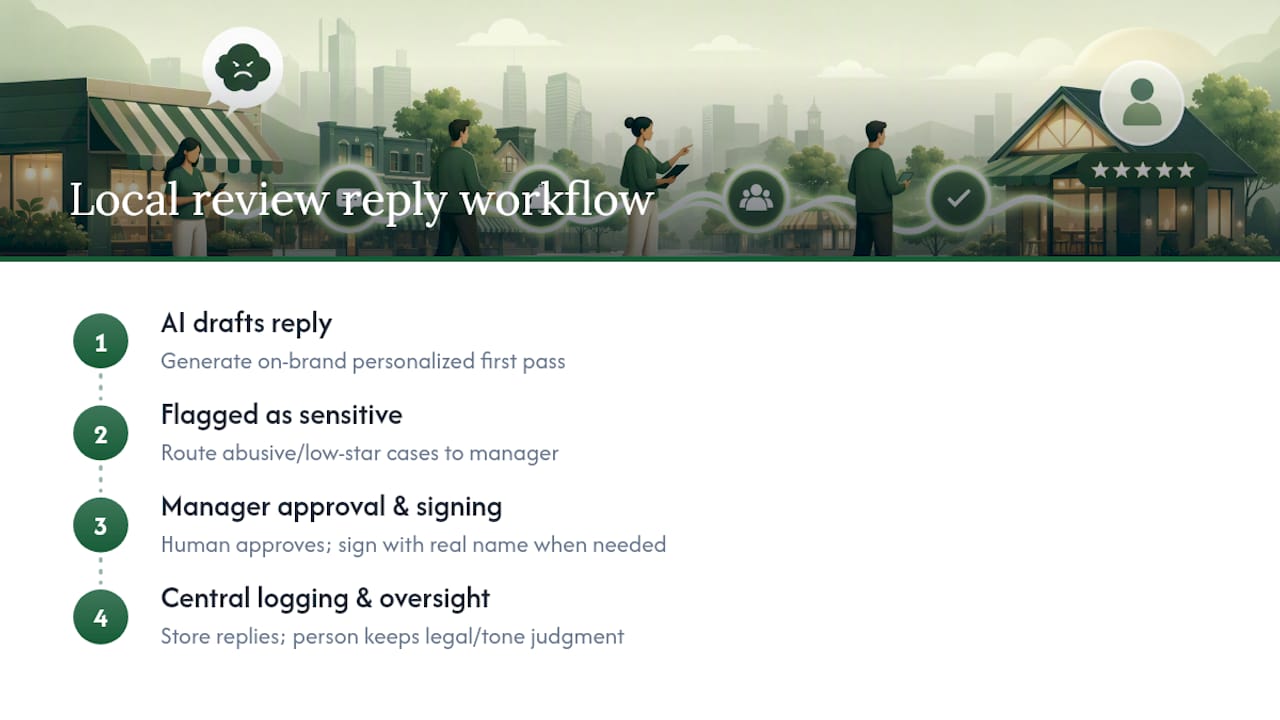
Local Review Reply drafts personalized, on-brand replies for Google Business Profile reviews and supports approval controls built for sensitive, low-star cases. That distinction matters for profanity: an AI-generated draft can get the tone and structure right fast, but a human should read and approve anything tied to abusive language before it posts.
The practical setup looks like this: let the software draft the first pass using a consistent, on-brand voice, route anything flagged as sensitive through a manager for approval, sign replies with a real name where your brand voice calls for it, and keep everything logged centrally. Speed and consistency come from the tool. Judgment on legal or tone risk stays with a person.
Why Most Advice on Profane Reviews Misses the Point
The conventional wisdom treats profanity reviews as an emotional problem: stay calm, don't argue, breathe before you type. That's true but incomplete. The bigger failure point is inconsistency at scale. One manager replies with empathy on Monday, another argues facts on Friday, and a franchise's public reputation starts to look erratic across locations.

What actually matters is a repeatable system: a decision flow that separates "this needs a reply" from "this needs a flag," templates that don't require reinventing tone under pressure, and a log that turns one angry review into a pattern you can actually fix. Businesses that skip the system and rely on individual judgment calls get inconsistent results, even when each individual reply is well written.
Prioritize the system before the sentence. Get the decision flow and the approval step right, and the exact wording of any single reply matters a lot less than most guides suggest.
— Ryan
Try a Controlled Draft-and-Approval Workflow for Free
Local Review Reply is built for exactly this problem: managers handling profanity-heavy reviews across multiple locations who need speed without losing control over tone. Instead of drafting every reply from scratch or leaving it to whichever staffer is online, you get an on-brand first draft in seconds and an approval step that keeps sensitive replies in front of a human before they go live.

If you manage reviews for more than one location, or you're a marketing agency handling this for clients, try the free AI review response generator on a real profane review you're sitting on right now. See the draft it produces, then decide if it needs editing before you approve it. For a fuller look at approval controls and team roles, the Local Review Reply features page covers how sensitive-review workflows are structured. Human approval on anything profanity-related stays essential. The tool's job is to make the drafting fast, not to replace the judgment call.
Sources
- Shopify — How to handle negative reviews
- Google Business Profile community guide — Responding to reviews
- Reviewz — L.A.S.T. framework for responding to negative reviews
- Search Engine Land — How to handle negative Google reviews