
A review response dashboard is a centralized inbox that lets your team read, draft, and publish replies across review platforms from one interface. For most local service businesses, the right setup pairs AI-generated drafts with manual approval controls, especially for low-star reviews. Before anything else: replies on Google are public. Google's review management guidance confirms they post after Google's own review process, usually within about 10 minutes but sometimes longer, and customers receive a notification the moment your reply goes live.
Key Takeaways
A review response dashboard works best when AI drafting handles volume and human approval handles risk, especially for low-star reviews where a wrong word in public costs more than the time saved.
| Point | Details |
|---|---|
| Centralize before you automate | Connect all review channels to one inbox before configuring AI drafting or approval rules. |
| Replies are public and queued | Google reviews replies after submission; they notify the customer and may take up to 30 days to post. |
| Approval gates protect you | Route all reviews rated three stars or below to a human approver before publishing. |
| Roles and SLAs before scaling | Define owner, approver, and responder roles with clear SLAs before rolling out to multiple locations. |
| Localreviewreply | Combines AI drafting, approval workflows, and multi-location management in one platform for local businesses and franchises. |
Table of Contents
- What does a review response dashboard actually do?
- What features should you prioritize in a review management dashboard?
- How do AI auto-replies work, and what guardrails do you need?
- Best practices and example reply templates
- How to set up approval workflows and roles for multi-location teams
- What does a review dashboard cost, and how long does setup take?
- How to choose the right review response dashboard for your business
- The case for keeping humans in the loop
- Localreviewreply puts AI drafting and approval controls in one place
- Sources
What does a review response dashboard actually do?
The core job is simple: pull reviews from multiple sources into one stream so your team stops logging into five platforms to check for new feedback. From that single interface, you read, filter, tag, assign, and reply without switching tabs.
Who uses one, and why it matters for each:
- Single-location owners need speed. A dashboard surfaces new reviews immediately and lets one person draft and post a reply in under two minutes.
- Franchise operators need consistency. A multi-location view with shared templates keeps every location's replies on-brand, even when different staff members handle replies at each site.
- Marketing agencies need control. Role-based permissions and consolidated reporting let account managers oversee client replies without handing over full account access.
Channel coverage is the first thing to check. Most dashboards pull from Google Business Profile, Facebook, and Yelp. Bing Places support is less common but worth confirming if your clients have a presence there.
What features should you prioritize in a review management dashboard?
Not every feature deserves equal weight. Here is how to think about the trade-offs:
Ingestion and channel coverage sets the ceiling on your responsiveness. If a platform your customers use isn't connected, you'll miss reviews entirely until someone manually checks.
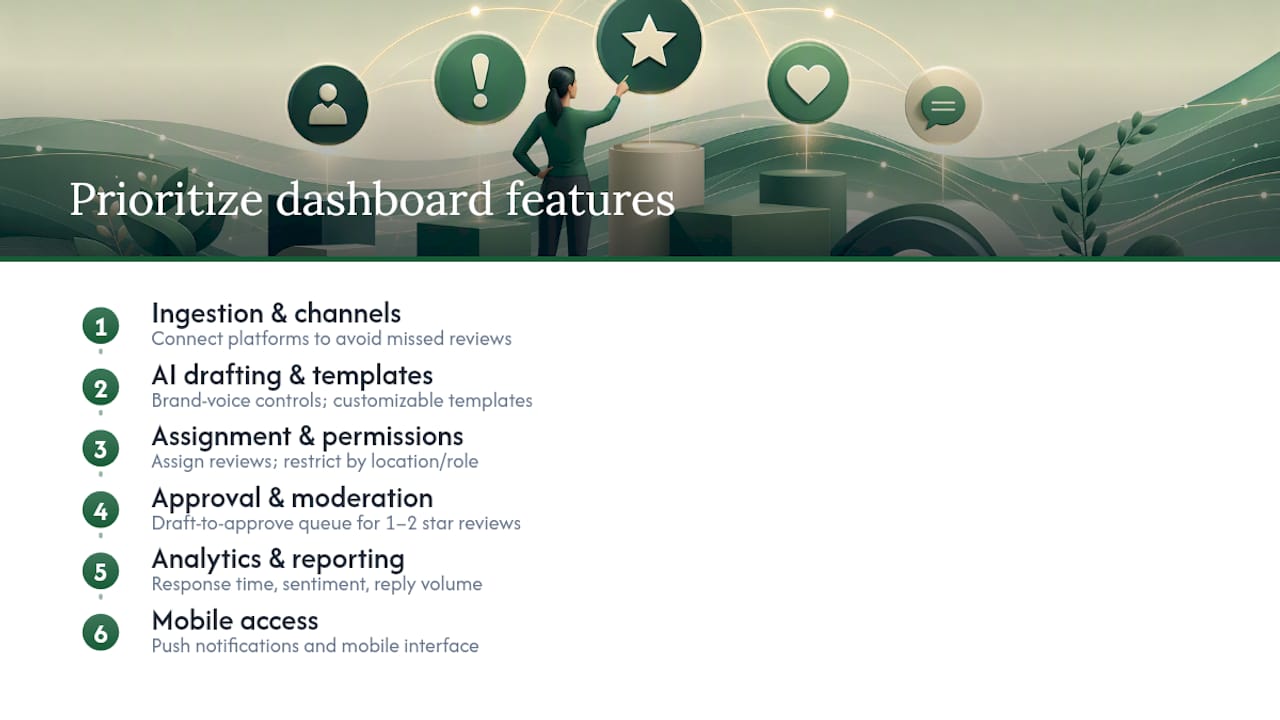
AI drafting and template libraries are where most teams see the biggest time savings. Look for brand voice controls, the ability to set tone by location or industry, and a library of starting templates you can customize. Generic AI replies that ignore your business type or locale read as hollow to customers.
Approval and moderation controls matter most for sensitive situations. A draft-to-approve queue for one-star and two-star reviews gives a manager the chance to review wording before it goes public. This is not optional for franchises or any business where a poorly worded reply could escalate a complaint.
Assignment, roles, and permissions determine how work gets distributed. Look for the ability to assign specific reviews to specific team members, set location-based permissions so a regional manager can only see their locations, and restrict who can publish versus who can only draft.
Analytics and reporting convert raw reply activity into something you can act on. Response time by location, sentiment trends, and reply volume over time are the three metrics most teams find genuinely useful. Dashboards that combine monitoring, sentiment analysis, and engagement workflows let teams route priority reviews to the right people and turn qualitative feedback into measurable actions.

Mobile access is non-negotiable for owner-operators who aren't at a desk all day. Push notifications and a functional mobile interface let you catch and respond to a one-star review before it sits unanswered over a weekend.
Pro Tip: Before committing to any platform, test the AI drafting on your actual reviews, not demo content. Paste in three real reviews, including one negative, and evaluate whether the output matches your brand voice without editing.
How do AI auto-replies work, and what guardrails do you need?
AI drafts speed up replies significantly, but they need human review for anything sensitive. The typical flow looks like this:
- A new review is ingested from the connected platform.
- The AI generates a draft reply based on the review text, your business profile, and any templates or tone settings you've configured.
- A team member reviews and edits the draft.
- The edited reply is submitted to the platform.
- For Google, the reply enters Google's own review queue before it appears publicly.
That last step matters for SLA planning. Google's guidelines confirm replies are subject to review and may take up to 30 days to post in some cases, though most go live within minutes. Treat reply submission as a queued, asynchronous action rather than immediate publishing, and your team won't be confused when a reply doesn't appear instantly.
The main risks with AI drafts:
- Privacy leakage: An AI might include details from the review text that the customer didn't intend to make more public, such as a specific address or medical detail.
- Tone mismatch: A draft that reads as dismissive or overly formal can make a bad situation worse.
- Factual errors: AI may hallucinate details about your business, hours, or policies.
- Policy violations: Google's content policies prohibit soliciting private information in replies; an unchecked AI draft could cross that line.
Pro Tip: Build a short privacy checklist into your drafting review step: Does this reply mention the customer's name, location, or any personal detail they didn't volunteer publicly? If yes, remove it before posting.
The most practical guardrail is a mandatory approval queue for any review rated three stars or below. Positive reviews with straightforward AI drafts can move faster, but anything with a complaint, a factual dispute, or an emotional tone deserves a human read.
Best practices and example reply templates
Google's reply guidance is clear: be professional, keep replies concise, personalize them, respond promptly, and protect reviewer privacy. For complex negative situations, request that the customer contact you privately rather than trying to resolve everything in a public thread.
Dos and don'ts:
- Do acknowledge the specific experience the customer described.
- Do apologize when something genuinely went wrong.
- Do invite offline resolution for complaints that need investigation.
- Don't include the reviewer's personal information in your reply.
- Don't offer incentives in exchange for changing a review; Google prohibits it.
- Don't write a reply that reads like a legal disclaimer.
Short reply templates you can adapt:
- Brief positive review: "Thank you, [First Name]! We're glad the [service] went smoothly. We look forward to seeing you again."
- Neutral or question-based review: "Thanks for the feedback. We'd love to hear more about your experience so we can do better. Please reach out to us at [contact]."
- Negative review with apology: "We're sorry to hear this didn't meet your expectations. Please contact us at [contact] so we can make it right."
- Negative review with a factual dispute: "Thank you for sharing this. Our records show [brief factual clarification]. We'd welcome the chance to discuss this further at [contact]."
For anything involving a legal threat, a claim of injury, or a potential compliance issue, escalate to a manager or your legal team before posting any reply. A public reply in those situations can create liability.
Pro Tip: Keep your industry-specific reply templates in a shared library inside your dashboard so every team member pulls from the same approved language, not from memory.
How to set up approval workflows and roles for multi-location teams
Design your workflows so routine positive replies can move quickly while sensitive reviews always hit a human approver. That's the principle. Here's how to build it:
Step-by-step setup:
- Verify every Business Profile before configuring reply permissions. Google requires business verification before you can reply to reviews, and availability can vary by region.
- Define roles: Owner (full access), Approver (can publish), Responder (can draft only), Viewer (read-only). Assign these by location, not globally, for multi-location teams.
- Set SLAs: First read within 4 hours, draft within 24 hours, published reply within 48 hours for most reviews. Adjust for your team size.
- Configure notification rules: Push alerts for one-star and two-star reviews; daily digest for three-star and above.
- Establish escalation paths: Who gets notified if a reply isn't approved within the SLA window? Name the person, not just the role.
- Set up audit trails: Every edit, approval, and rejection should be logged with a timestamp and the team member's name.
For multi-location rollouts, give regional managers read and approve rights while limiting edit rights to local staff. Roll up analytics by location group so regional managers see their cluster's performance without accessing other regions' data. This setup is detailed in multi-location review management guidance.
Pro Tip: Add canned rejection reasons to your approval queue ("Tone too formal," "Remove personal detail," "Needs factual check") so responders get specific feedback, not just a rejected draft.
What does a review dashboard cost, and how long does setup take?
Common pricing models:
- Per-location subscription: A flat monthly fee per location. Predictable for franchises; can add up quickly at scale.
- Per-reply tiers: Pay based on reply volume. Works well for seasonal businesses with uneven review flow.
- Seat-based pricing: Charged per user. Favors small teams managing many locations.
Hidden costs to budget for: custom template development, integration work with your CRM or ticketing system, and the staff time required to maintain approval SLAs. These rarely appear in a vendor's headline price.
Realistic implementation timeline:
- Days 1–3: Trial signup, connect your primary Google Business Profile, test AI drafting on real reviews.
- Week 1–2: Configure roles, approval queues, and notification rules for a single location.
- Weeks 2–6: Roll out to additional locations, build shared template libraries, train regional approvers.
- Week 6+: Review analytics, adjust SLAs based on actual response time data, refine templates.
Multi-location rollouts with custom approval workflows consistently take longer than vendors advertise. Budget for at least four weeks before expecting a fully operational setup across more than five locations.
How to choose the right review response dashboard for your business
Work through this checklist before committing to a trial or a paid plan:
- Channel coverage: Does it connect to every platform where your customers leave reviews?
- Approval workflows: Can you route low-star reviews to a mandatory human approver?
- AI drafting quality: Does the output match your brand voice, or does it require heavy editing every time?
- Multi-location reporting: Can you see response time and sentiment trends by location and by region?
- Roles and permissions: Can you set location-level access so staff only see their own location's reviews?
- Mobile accessibility: Is the mobile experience functional enough for off-hours review management?
- Integrations: Does it connect to your CRM, ticketing system, or Slack for notifications?
When automation matters most: high-volume locations with mostly positive reviews and a consistent brand voice. When control matters more: any location with frequent complaints, a regulated industry, or a history of sensitive review situations. When white-label matters: agencies managing multiple clients who need client-facing reporting under their own brand.
The case for keeping humans in the loop
The conventional wisdom in review management is that speed is everything. Reply fast, reply often, and your ratings will improve. That framing isn't wrong, but it misses the more important variable: a fast, wrong reply is worse than a slow, right one.
AI drafting genuinely changes the economics of review management. What used to take a staff member 10–15 minutes per reply can happen in seconds. But the value of that speed disappears the moment an AI draft goes live with a privacy violation, a factual error, or a tone that reads as dismissive to a customer who was already frustrated.
The Review Reply Benchmark research Localreviewreply conducts across hundreds of Google review scenarios consistently points to the same finding: the highest-quality replies combine AI drafting efficiency with a human approval step for anything below four stars. That's not a conservative position. It's the operationally sound one, because the cost of a bad public reply, in lost trust and potential policy violations, far exceeds the time saved by skipping the review step.
The AI Search Prompt Tracker work Localreviewreply uses to improve local relevance of AI replies is a good example of where the real engineering effort goes: not just generating a reply, but generating one that's accurate to the specific location, service type, and customer context. Generic AI replies are easy to build. Contextually accurate ones take real work.
Localreviewreply puts AI drafting and approval controls in one place
Spending hours each week on review replies, or worse, letting them pile up unanswered, costs you more than the time itself. Localreviewreply drafts personalized, on-brand replies in seconds and routes sensitive low-star reviews to an approval queue before anything goes public, so your team stays in control without slowing down.

Core capabilities relevant to this guide:
- AI drafting tuned to your brand voice and location context
- Mandatory approval workflows for low-star reviews
- Multi-location management with role-based permissions and location-level reporting
- Audit trails and edit history for compliance
- Support resources and template libraries for faster setup
Start with the free AI reply generator to see how the drafts handle your actual reviews, then explore the full Google review management software for teams ready to scale.
Sources
- Manage customer reviews - Google Business Profile Help