Yes, but not the way most business owners assume. Google auto-translates review text for viewers, but it does not auto-translate the reply you post. The reliable setup pairs platform translation for reading reviews with an AI-assisted drafting and human-approval pipeline for writing replies. Before automating anything, verify your Google Business Profile, check your language display settings, and put an approval step in place.
TL;DR:
- Google automatically translates reviews for viewers based on their device language, but it does not translate your posted replies into the reviewer's language.
- Automated reply translation involves passive display of translated text and active generation of translated responses, with active translation risking tone and accuracy issues.
- Business owners must verify their Google Business Profile and establish approval processes to avoid miscommunications and ensure quality control across multiple locations.
- Sensitive, negative, or legally complex reviews should always be reviewed manually before replying, regardless of language, to prevent misinterpretations or policy violations.
- AI-powered tools can draft personalized replies, but multiple steps including human approval are essential for effective, accurate, and compliant multilingual review responses.
Table of Contents
- How Do Platforms Handle Automatic Review Translation?
- How Does Automatic Reply Translation Actually Work?
- How Do You Set Up an Approved Auto-Reply Workflow?
- What Are the Best Practices for Translated Review Replies?
- How Local Review Reply handles Multilingual Reply Workflows
- When Does Automating Translated Replies Actually Make Sense?
- Try Local Review Reply for Consistent Multilingual Reply Management
- Sources
- FAQ
How Do Platforms Handle Automatic Review Translation?
Google Maps and Google Search detect the language set on a viewer's device and show them a translated version of the review, with the original text displayed underneath. Google's own product team built this specifically so customers don't have to copy a review into a separate translator just to understand it, according to Google's product blog. That part is automatic and requires nothing from you as a business owner.
The reply side works differently. Nothing in Google's system automatically converts your posted reply into the reviewer's language, a distinction Digital Trends points out clearly in its coverage of the feature. If a customer wrote their review in Portuguese and you reply in English, your reply stays in English for everyone who reads it, including that customer.
A few operational details matter here:
- Google reviews replies for policy compliance before they go live, and posting isn't always instant.
- Reviewers get notified when a business responds, and they can edit their original review after reading your reply.
- You must verify your Google Business Profile before you're able to reply at all.
That verification and moderation layer is the part most auto-translate confusion traces back to. Owners see translated reviews and assume the whole loop is handled. It isn't.
How Does Automatic Reply Translation Actually Work?
Two distinct patterns get lumped together under "auto translate," and mixing them up causes real mistakes.
The first is passive, display-only translation: a platform shows a translated version of text to a reader without changing what's actually stored or published. This is what Google does with reviews. The second is active translation: a tool generates translated text and either stores it or publishes it as the reply itself. Some review widgets and third-party tools use configurable toggles for this, and behavior varies by plugin or account settings, based on discussions in the Google Maps Community.
Active translation introduces quality risk that passive translation doesn't. Machine translation handles straightforward sentences fine but stumbles on idioms, regional phrasing, and tone. "We appreciate your patience" can come out oddly stiff or overly formal in another language if translated literally, which is exactly why human review matters before anything posts publicly.
A few practical limits to plan around:
- Language coverage isn't universal. Less common languages often get worse translation quality.
- Some tools gate auto-translate behind specific plans or widget configurations, not the base product.
- A mistranslated reply that sounds dismissive or makes an unintended promise can create a policy problem or a public relations headache, not just an awkward sentence.
Pro Tip: Treat every machine-translated draft as a first draft, never a final answer. Tools built for multilingual review responses recommend exactly this: draft, review, adjust, then publish.
How Do You Set Up an Approved Auto-Reply Workflow?
Start with the reading side, since that part takes minutes. Then build the reply pipeline properly.
Enable and confirm reading-side translation:
- Open Google Maps or Google Search on a device set to your customer's language and search your business to see how your reviews display for that audience.
- If you run a review widget on your website, check its settings or plugin editor for a translation toggle. Not every widget has one, and where it exists, it's often plan-gated.
- Confirm your Google Business Profile is verified. You cannot post replies at all until this step is done, per Google's own guidance.
Build the reply pipeline:
- Set a trigger for new reviews as they come in, whether through native platform alerts or a connected tool.
- Auto-detect the review's language.
- Generate an AI draft reply in that language.
- Route the draft to a human for approval or edit before it goes anywhere public.
- Publish, and log the exchange.
A short checklist keeps this from breaking down at scale:
- Confirm business verification is active across every location, not just your main profile.
- Assign specific approval roles so someone is always accountable for what gets published.
- Keep the original review text stored alongside the translated draft and the final published reply.
- Review personalized reply workflows and templates periodically to keep tone consistent across languages.
What Are the Best Practices for Translated Review Replies?
Speed matters, but not more than getting the reply right. A few rules keep automation from creating new problems.
Gate anything sensitive. Negative reviews, complaints involving money, safety, or legal exposure, and anything with a public compensation offer should always go through human approval before posting, regardless of language. Push complicated issues to a private channel instead of litigating them in a public reply, no matter what language the original review was written in.
Translate the tone, not just the words. A polite, slightly formal reply in Japanese reads very differently than the same politeness level translated word-for-word into English. Add one specific detail from the actual interaction (the barista's name, the exact service performed, the specific delay) so the reply reads like it came from a person who was actually there, a habit that review response tools consistently recommend regardless of language.
Keep base templates but let them flex by language and region. What sounds warm in Spanish can sound overfamiliar in German. And keep a simple record for every reply: original text, translated draft, who approved it, and when it published. That record is your audit trail if a customer or a platform ever questions what you said.
- Never promise specific compensation in a public reply.
- Redirect account-specific or dispute-heavy issues to a private message or phone call.
- Localize idioms and etiquette instead of translating them literally.
Pro Tip: Keep one master template per common review type (praise, minor complaint, major complaint) and let each language version diverge slightly in phrasing. Rigid, word-for-word templates across languages are where translated replies start sounding robotic.
How Local Review Reply handles Multilingual Reply Workflows
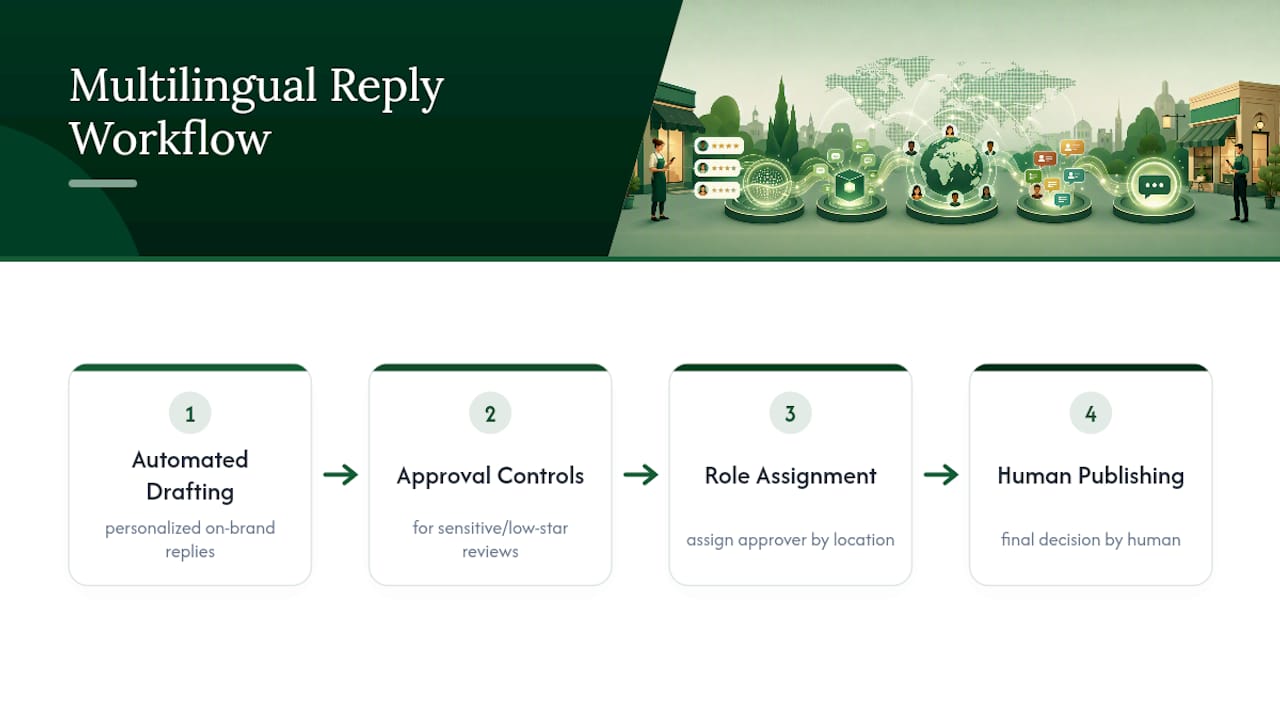
Local Review Reply builds the drafting and approval structure this whole workflow depends on. The software drafts personalized, on-brand replies to Google Business Profile reviews, and it includes approval controls specifically for sensitive or low-star reviews, so nothing sensitive publishes without a human checking it first.
For teams managing more than one location, that structure matters even more. Multi-location and franchise operators can assign team roles and permissions so the right person approves the right reply, rather than one manager trying to review everything across every market.
This setup fits teams such as local service businesses handling multilingual reviews, franchises or multi-location chains managing review tone consistency across profiles, and marketing agencies managing review responses for multiple clients.
The drafting process is automated, while the publishing decision remains human, providing a balance of efficiency and oversight.
When Does Automating Translated Replies Actually Make Sense?
Automate the routine stuff: short thank-yous, quick acknowledgments, straightforward five-star responses. Keep a human in the loop for anything negative, legally sensitive, or emotionally charged, no matter what language it's written in.
Track response time, sentiment trends, and whether your brand voice holds up across languages. If a translated reply ever reads off, revert to manual and adjust the template before automating that pattern again.
— Ryan
Try Local Review Reply for Consistent Multilingual Reply Management
Hiring translators for every review or building a manual approval spreadsheet across ten locations doesn't scale, and generic machine translation alone risks a public misstep. Local Review Reply gives you a faster middle path: AI drafts a personalized, on-brand reply, your team approves it (with extra controls automatically applied to sensitive or low-star reviews), and multi-location teams can manage the whole thing through defined roles instead of one overloaded inbox.

The feature set covers AI drafting, approval workflows, and Google integration, all built around the same principle this article covers: automation drafts, humans approve. If you want to see the drafting quality before committing to anything, try the free AI review response generator on a real review first. When you're ready to run this across your full location list, the Google review management software page walks through setup for teams managing reviews at scale.
Sources
- Local reviews in your language—wherever you are
- Manage customer reviews - Google Business Profile Help
- Google Maps automatically translates business reviews—here’s how it works
- Isystem
FAQ
How Do I Automatically Reply to Google Reviews?
Google doesn't offer a native auto-reply feature. Third-party tools can draft replies automatically using AI, but you still need to verify your Google Business Profile and post the reply yourself or through a connected tool with approval controls.
How Do I Turn on Automatic Translation for Reviews?
You don't need to turn it on. Google automatically translates reviews for viewers based on their device language, showing the translated text alongside the original, according to Google's product blog.
What Is a Good Way to Respond to a Positive Review?
Thanks to the customer specifically, mention a real detail from their visit, and keep it brief. Tools built for multilingual replies recommend adding one concrete detail to avoid sounding generic, a rule that holds regardless of language.
How Can I Get Google to Automatically Translate My Reviews?
You don't have to do anything. Google handles this automatically for reviews shown to viewers, but it does not extend that same automatic translation to the replies you post, a distinction Digital Trends explains clearly.
Can Local Review Reply Draft Replies in Multiple Languages?
Local Review Reply drafts personalized, on-brand replies with approval controls built in, which supports the recommended workflow of AI drafting followed by human review before anything publishes in a customer-facing language.