
The fastest path depends on your stack, but the hierarchy is consistent: pick a native CRM app first if your review tool has one, since it takes the least setup and lowest risk. If no native option exists, middleware like Zapier or Make gets you running in a day. Only build on webhooks or a raw API when you need custom logic native apps and middleware can't handle.
TL;DR:
- Native apps are the fastest way to integrate reviews into your CRM, as they treat reviews as first-class records with built-in linking to contacts and deals.
- Middleware like Zapier or Make provides a quick setup for connecting tools without developer support but may introduce delays or limitations on automation volume.
- Webhooks and APIs offer complete control over payloads and timing but require ongoing maintenance and coding skills; CSV imports are only suitable for one-time data migration.
- Triggering review requests after completed interactions, such as service closures or support tickets, ensures higher response rates and more accurate data linking.
- Separating drafting from publishing and using human review steps improves accuracy and maintains reputation, especially for low-star or sensitive responses.
Table of Contents
- What Are the Best Ways to Set Up CRM Integration for Reviews?
- How Does a CRM–Review Integration Actually Work?
- Which Integration Method Fits Your Complexity and Budget?
- How Do You Set Up a CRM–Review Integration Without Rework?
- How Do You Measure Whether the Integration Is Working?
- What Do the Best Integrations Get Right About Automation?
- Small Team or Enterprise: How Should the Approach Change?
- A Practical Option for AI-Assisted Reply Drafting and Approval
- Sources
What Are the Best Ways to Set Up CRM Integration for Reviews?
Three approaches cover almost every real-world setup, and picking the right one starts with knowing what your CRM already supports.
Native apps live inside your CRM's marketplace and treat reviews as first-class records rather than bolted-on data. ProofFlow is a good example inside HubSpot: it creates a native Review object that links directly to contacts and deals, so a sales rep can see a customer's review history without leaving the deal page. That kind of review-as-record pattern unlocks segmentation and reporting that a standalone review tool never could.
Middleware (Zapier, Make) is the pragmatic default when you don't have developer time. You build a trigger, a request, and a landing spot for the response, and the platform handles the plumbing between systems that don't talk natively.
Webhooks and APIs give you full control over payload structure, timing, and error handling, but they require someone who can write and maintain code.
Here's how to match the approach to the situation:
- Use a native app when your CRM's marketplace already lists one for your review platform.
- Use middleware when you're stitching together two or three tools with no developer on staff.
- Use webhooks or API access when you need conditional logic, custom fields, or high-volume, low-latency processing.
- Use CSV import for one-time historical migrations or as a fallback when no live integration exists yet.
Feedback platforms like LogRocket Feedback typically support several of these paths at once, from app-store connectors to raw API access, so you're rarely locked into a single method as your needs grow.
How Does a CRM–Review Integration Actually Work?
Every integration boils down to the same skeleton: something happens in your business, that event fires a trigger, the trigger sends a review request, and the response eventually lands back in your CRM tied to the right contact.
The event triggers that work best are the ones tied to a completed interaction, not an open one:
- Post-purchase, timed a few hours to a day after delivery confirmation.
- Service completion, sent right after a technician marks a job closed.
- Support ticket closure, sent within an hour of resolution while the experience is fresh.
The data flow looks like this: a contact ID triggers on one of those events, a review request goes out (email, SMS, or in-app), the customer's response gets captured by the review platform, and that response gets written back into the CRM as a record or a notification. CX automation platforms that integrate with Salesforce, HubSpot, or Zendesk are typically built around this exact sequence.
Matching logic is where most integrations quietly break. If you're linking on email address alone, a customer who orders under a work email and reviews under a personal one becomes two disconnected records. The safer pattern uses a stable identifier, ideally a CRM contact ID or an email-plus-order-ID combination, so the review always lands on the correct existing record instead of spawning a duplicate.
Consent matters here too. If your review request goes out via SMS or email, make sure the contact has actually opted in to that channel before you automate anything.
Pro Tip: Run a test batch of a small number of contacts through the full trigger-to-CRM flow before turning it on for your whole database. It's the only way to catch a broken field mapping before it multiplies across thousands of records.
Which Integration Method Fits Your Complexity and Budget?
Every method trades speed against control. Here's the honest breakdown.
- Native apps: Fastest to install, produce clean native records, but you're limited to whatever fields and workflows the app's developer built. Fine when the built-in fields cover your use case.
- Middleware: Quick to launch and connects almost anything to almost anything, but can introduce lag between the trigger and the request, and most platforms cap how many "zaps" or scenarios run per month on lower tiers.
- Webhooks/API: Full control over payload structure and timing, richer data than either alternative, but you need someone who can write and maintain the integration code, and someone to fix it when a vendor changes their API.
- CSV import: No live automation at all, useful only for backfilling historical reviews or as a stopgap while you build something better.
Whichever method you choose, human approval has to sit somewhere in the loop before a reply goes public. A low-star review that triggers an automatic public response without a human glance at it is a real reputational risk, not a hypothetical one. The safer pattern: automation handles collection and drafting, and a person approves anything below a set star threshold or containing flagged language before it posts.
How Do You Set Up a CRM–Review Integration Without Rework?
Skipping the planning step is how teams end up rebuilding their integration three months in. Work through this sequence instead:
- Inventory your customer touchpoints. List every moment a customer interaction closes: purchase, delivery, service visit, support ticket. Pick the two or three with the highest completion rate as your trigger points.
- Map your identifiers. Decide whether you're matching on CRM contact ID, email, or email-plus-order-ID, and write down the dedupe rule before you build anything.
- Draft your request templates. Write the actual message text for each trigger, and personalize at least the customer's first name and the specific service or product involved.
- Define your approval workflow. Decide which star ratings or keywords require human review before a reply posts, and assign who owns that review queue.
- Test with a small cohort. Run a moderate-sized test group through the full flow, log every event (trigger fired, request sent, response received, CRM record created), and check for duplicates or missing fields before expanding.
- Stage the rollout. Turn it on for one location or one product line first, watch it for a week, then expand.
Timing affects response rates more than most teams expect. A request sent while the experience is still fresh, same day for a completed service call, within 24 hours for a delivered product, consistently outperforms one sent a week later once the details have faded.
Pro Tip: Keep your first request template short and specific to what happened. "How did the installation go on Tuesday?" outperforms a generic "We'd love your feedback!" because it proves a human process is actually behind the message.
Franchise and multi-location operators should build one approved template set centrally, then let individual locations customize only the name and location fields. That keeps tone consistent without forcing every location manager to write their own copy from scratch.
How Do You Measure Whether the Integration Is Working?
Track four numbers, and track them monthly, not just at launch: review volume per trigger event, average response time between request and reply, average star rating trend, and whether reviewed customers show different retention or repeat-purchase rates than non-reviewed ones.
Most of this reporting only becomes possible once reviews live inside the CRM rather than in a separate tool. Adding review fields to your contact and deal reports lets you filter by star rating, see which sales reps' customers leave the most reviews, or spot a location whose average rating is quietly sliding.
Two practical uses stand out once that data is in place:
- Sales enablement: Surfacing a relevant review snippet directly on a deal record gives reps social proof at the exact moment they need it, without hunting through a separate review dashboard. ProofFlow's Review Library deal cards are built around exactly this use case.
- Retention signals: A dropping average rating tied to a specific product line or location is often an earlier warning sign than a churn spike, since dissatisfied customers frequently leave a bad review before they leave for good.
What Do the Best Integrations Get Right About Automation?
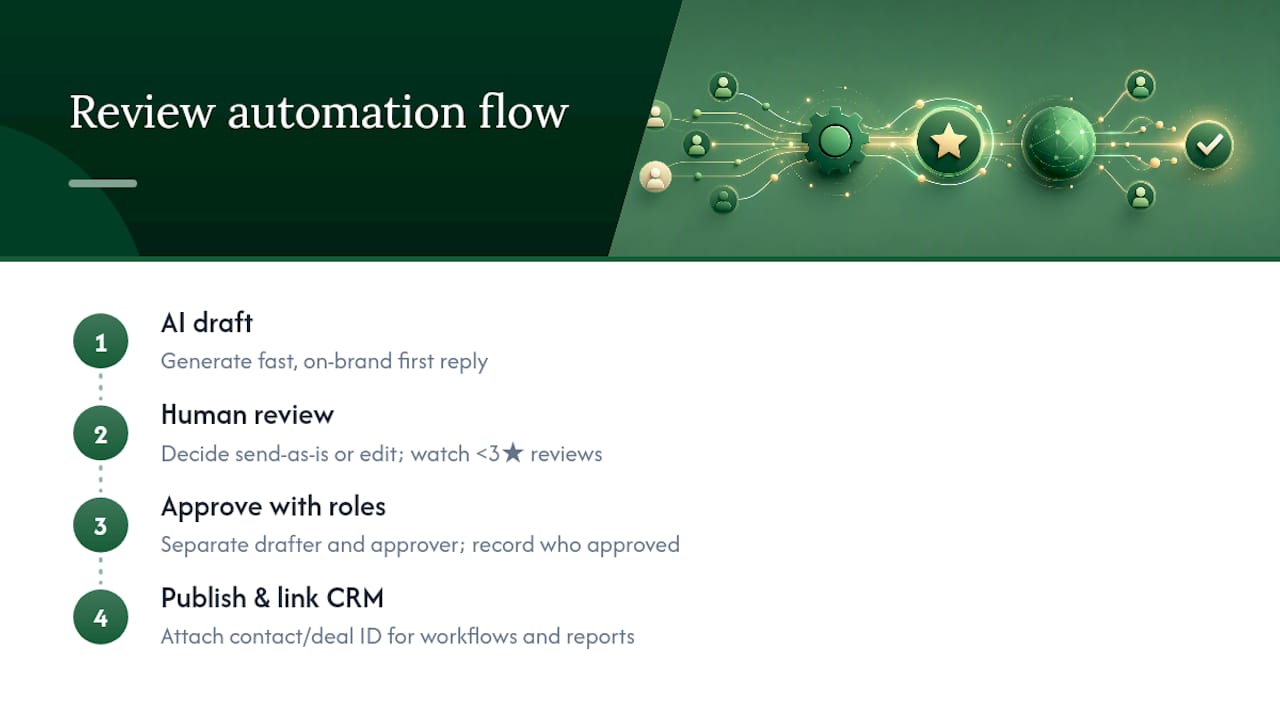
The pattern worth borrowing from mature CRM-review setups is separating drafting from publishing. AI can write a fast, on-brand first draft. A person decides whether it goes out as written, especially for anything below three stars.
Vendors building AI-assisted review tools consistently recommend treating AI-generated replies as drafts rather than final output, adding human review before anything sensitive or low-rated gets a public response.
That guidance shows up repeatedly across review automation tools built for team collaboration, which surface new reviews in Slack alongside suggested replies rather than auto-posting them.
The second pattern worth copying: treat reviews as CRM records, not as content living in a separate app. Once a review has a contact ID and a deal ID attached, it becomes usable in workflows, lists, and reports instead of sitting isolated in a review platform's own dashboard.
Pro Tip: Build your approval workflow with roles, not just a single gatekeeper. One person to draft, one to approve, and a log of who approved what, catches mistakes before they go public and gives you a paper trail if a reply ever gets questioned.
Small Team or Enterprise: How Should the Approach Change?
Overbuilding is the mistake I see most often here. A five-location service business does not need a custom webhook pipeline. It needs a native app or a middleware flow it can set up in an afternoon and forget about.
Small teams should default to middleware or the simplest native app available, get one trigger working end-to-end, and resist the urge to add complexity before the basic flow proves itself. Enterprises with real developer resources are the ones who actually benefit from webhooks and API-level control, because they're the ones hitting middleware's rate limits or needing custom fields no native app supports.
Franchise and multi-location operators sit in between. The technical choice matters less than the discipline: one approved reply template library, one set of escalation rules for low-star reviews, applied identically whether the location is company-owned or franchised. Consistency across locations, not integration sophistication, is usually the actual gap I see teams fail to close.
— Ryan
A Practical Option for AI-Assisted Reply Drafting and Approval
If your CRM integration is solid but the reply side still eats hours every week, that's the gap Local Review Reply is built to close. It drafts personalized, on-brand replies to Google Business Profile reviews in seconds, and routes anything sensitive or low-star through an approval step instead of publishing it automatically.

In an integration architecture, the division of labor is straightforward: your CRM manages the review record, the contact link, and the reporting. Local Review Reply handles the drafting and approval layer for the actual reply text. It supports multi-location and franchise setups with team roles and permissions, so a manager can approve replies for their own location without needing access to every other one on the account. If you want to see the drafting workflow before committing to anything, the free AI review response generator lets you sample it on a real review with no setup required.
Sources
- ProofFlow - Sales Enablement and Customer Success App for HubSpot | SaaSpirin
- LogRocket Feedback docs — supported integrations and data flow
- Customer Experience Automation | CX Workflows | Feedback Automation
- Review Flowz: reviews tracking bot & Slack Integration | Slack Marketplace