
The right negative review response workflow follows one path: triage the review within minutes, post a public acknowledgment inside 24 to 48 hours, route the details to the right owner for remediation, then close the loop publicly once it's resolved. Hold every 1 and 2 star review for human approval before it posts. Auto-post only goes to genuinely positive, low-risk replies. Teams that follow this get faster, more consistent replies and a real shot at winning the customer back.
TL;DR:
- Most negative reviews should be triaged within minutes to determine severity and ownership, with high-severity issues routed to legal or HR, and low-severity handled promptly by frontline teams.
- Responses should follow a consistent five-step process: thank and acknowledge, empathize and apologize, state what is known, move the conversation offline, and publicly close the loop after resolution.
- Automations should be limited to positive reviews and drafts of moderate cases; high-risk or legal issues require human approval and escalation to prevent reputational damage.
- Maintaining a central review dashboard and tagging reviews by severity ensures quick routing, avoids duplicate responses, and prevents unresolved reviews from lingering.
- Tracking response time, coverage, resolution rate, and review updates over time helps assess workflow effectiveness and highlights operational improvements.
Table of Contents
- Why Responding to Negative Reviews Matters for Reputation and Conversion
- Before You Reply: Triage Checklist and Ownership Rules
- The 5-Step Reply Playbook Teams Should Use for Public Responses
- Templates and Annotated Examples for Common Negative-Review Scenarios
- Automation Guardrails and Approval Workflow for Scale
- Monitoring, Routing Channels, and Operational Setup
- Measure What Matters: KPIs and Reporting Cadence
- Operational Proof: How an Approval Workflow Protects Brand Voice
- Author Perspective: Trade-Offs, Pitfalls, and Governance Advice
- How Localreviewreply Fits Into This Workflow
- Sources
- FAQ
Why Responding to Negative Reviews Matters for Reputation and Conversion
A negative review sitting unanswered for a week doesn't just annoy the person who wrote it. It sits there as evidence, for every prospective customer scrolling past, that nobody is watching the account.
Consumers pay attention to whether a brand replies at all, and Harvard Business Review's research on what makes online reviews persuasive found that timely, specific responses shift how many shoppers trust a business, sometimes more than the star rating itself. A thoughtful reply to criticism reads as evidence of competence. A canned one, or worse, silence, reads as evidence of neglect.
Consumer expectations keep tightening. Sprout Social's research on online review management shows that response speed increasingly determines whether a dissatisfied customer sticks around or takes their business to a competitor instead.
That timing pressure is the whole reason a workflow beats improvisation. When a reply depends on whoever happens to notice the review that day, response times swing wildly, and tone swings with them. A repeatable process removes both problems at once.
The reputational upside compounds over time in ways that are easy to underestimate:
- Recovery: a specific, empathetic reply sometimes converts an angry reviewer into a return customer, and occasionally into someone who edits their rating upward.
- Reduced churn: customers who see complaints handled well are more likely to give a business a second chance rather than quietly switching to a competitor.
- Improved ratings over time: a visible pattern of resolution shifts how new customers interpret older negative reviews, softening their weight in the overall impression.
- Internal signal: a steady stream of tagged complaints often surfaces operational problems (a specific location, a specific product batch) before they show up anywhere else.
None of that requires a large team. It requires a process that runs the same way whether the reply comes from a solo owner or a multi-location operations lead handling forty locations at once.
Before You Reply: Triage Checklist and Ownership Rules
Skipping triage is how businesses end up apologizing for things they didn't do, or promising refunds nobody authorized. Every negative review needs five quick checks before anyone types a word of a public response.
- Can you identify the customer? Match the name, order details, or location mentioned against your CRM or point-of-sale records before assuming the review is legitimate or accurate.
- Which platform is it on? Google Business Profile, Yelp, and Facebook each have different editing rules, response visibility, and reporting mechanisms for fake or abusive content.
- How severe is it? A one-star review about slow service is not the same risk category as one alleging discrimination, injury, or fraud.
- Who owns this account or location? Route immediately to the specific store manager, franchise owner, or regional lead rather than letting it sit in a shared inbox.
- Is there an immediate remedy available? Know before you reply whether a refund, replacement, or appointment fix is even possible, so you're not promising something you can't deliver.
Up North Media's guidance on responding to negative reviews step by step recommends a same-day public acknowledgment paired with a structured triage pass, using a framework it calls HEARD (Hear, Empathize, Apologize, Resolve, Diagnose) to separate the public response from the private fix.
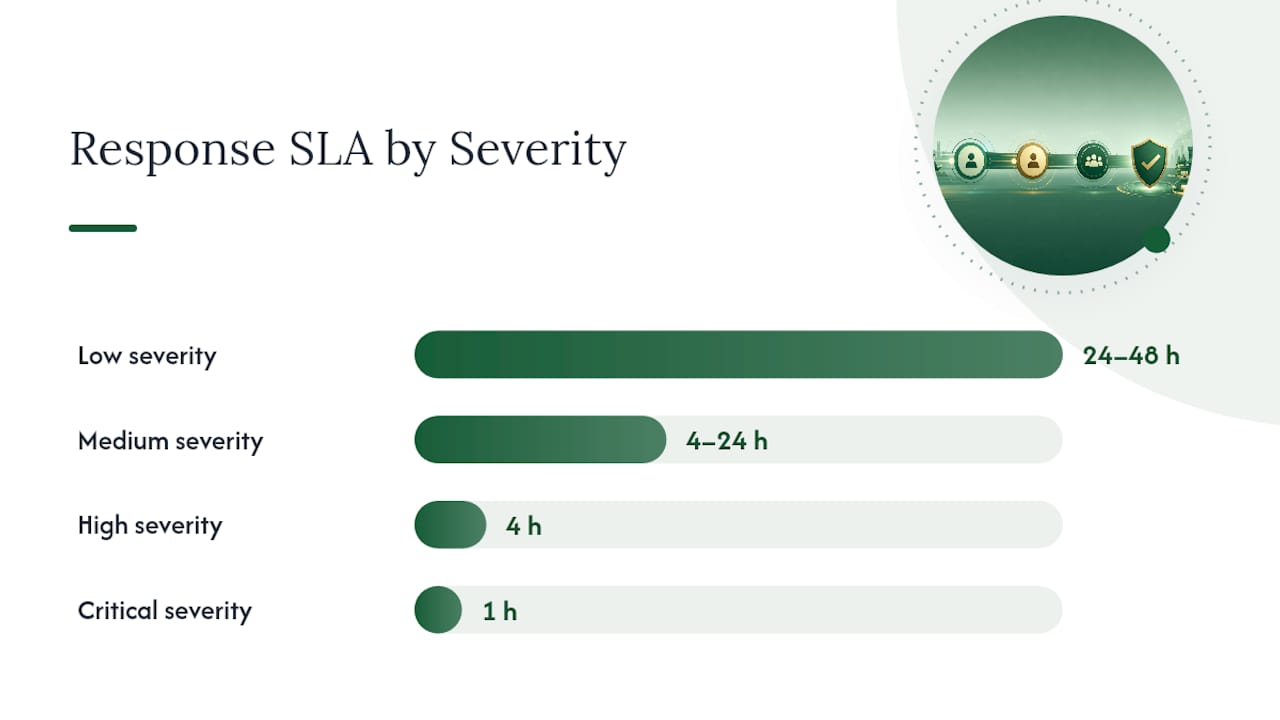
Severity flags determine where a review goes next, and each level needs its own service level agreement:
- Low severity (a minor complaint, no legal or safety language): standard queue, 24 to 48 hour SLA, front line customer service handles it.
- Medium severity (a repeated complaint theme, a billing dispute, a product defect): routes to a team lead, 4 to 24 hour SLA.
- High severity (allegations of injury, discrimination, or a named employee behaving badly): routes to a manager or HR contact, 4 hour SLA.
- Critical severity (threats of legal action, a data breach mention, a viral post): routes to legal or executive leadership, 1 hour SLA.
A review that mentions an attorney or a lawsuit is not something a front line agent should touch. That's a case for legal counsel to review before any public reply goes out, and firms advising businesses on this exposure, including Recovera Forensics' work with professional offices, consistently flag early legal involvement as the difference between a contained situation and a drawn out one. If the review references specific client or patient details, the confidentiality risk gets even sharper, which is why guidance on client confidentiality and cybersecurity controls is worth building into your escalation playbook if your business handles sensitive records.
Pro Tip: *Tag every review with its severity level the moment it's triaged, even the low ones.
The 5-Step Reply Playbook Teams Should Use for Public Responses
A good public reply follows the same five moves every time, regardless of who's writing it or what platform it's posted on.
- Acknowledge and thank. Open with the customer's first name if the review provides one, and thank them for the feedback before doing anything else. Skipping this and jumping straight to a defense or explanation is the single fastest way to make a bad situation worse.
- Empathize and apologize specifically. Name the actual problem they described rather than a generic "we're sorry you had a bad experience." Avoid language that reads as a legal admission of fault, especially anything implying negligence or liability, particularly in regulated industries or after an injury claim.
- State what you know or are investigating, in one sentence. You don't need to explain your entire internal process. One clear sentence that shows you took the complaint seriously is enough.
- Offer a next step and move the details offline. Give them a direct email, phone number, or a request to send a direct message. Never ask for order numbers, account details, or personal information in the public comment thread.
- Close the loop publicly after remediation. Once the issue is resolved, go back to the original review and post a short follow-up noting it's been addressed. Zenloop's research on responding to negative reviews at scale found that publicly closing the loop after private resolution signals accountability to every future reader of that review, not just the original reviewer.
That last step is the one most businesses skip, and it's the one with the most leverage. A resolved complaint that stays visibly unresolved in the review thread still reads as a failure to anyone scrolling through six months later.
Here's what that looks like assembled into an actual reply:
"Hi Marcus, thank you for taking the time to share this. I'm sorry the installation took three visits to get right. That's not the standard we hold ourselves to, and I'd like to make it right. Could you send us a message with your invoice number so our service manager can look into what happened? We'll follow up here once it's resolved."
Notice what's missing: no defensiveness, no compensation offer stated publicly, no admission of specific fault beyond what's already visible in the review itself. That's deliberate. The offer, if there is one, gets made in the private follow-up conversation, not in a comment thread that every future customer can screenshot.
Templates and Annotated Examples for Common Negative-Review Scenarios
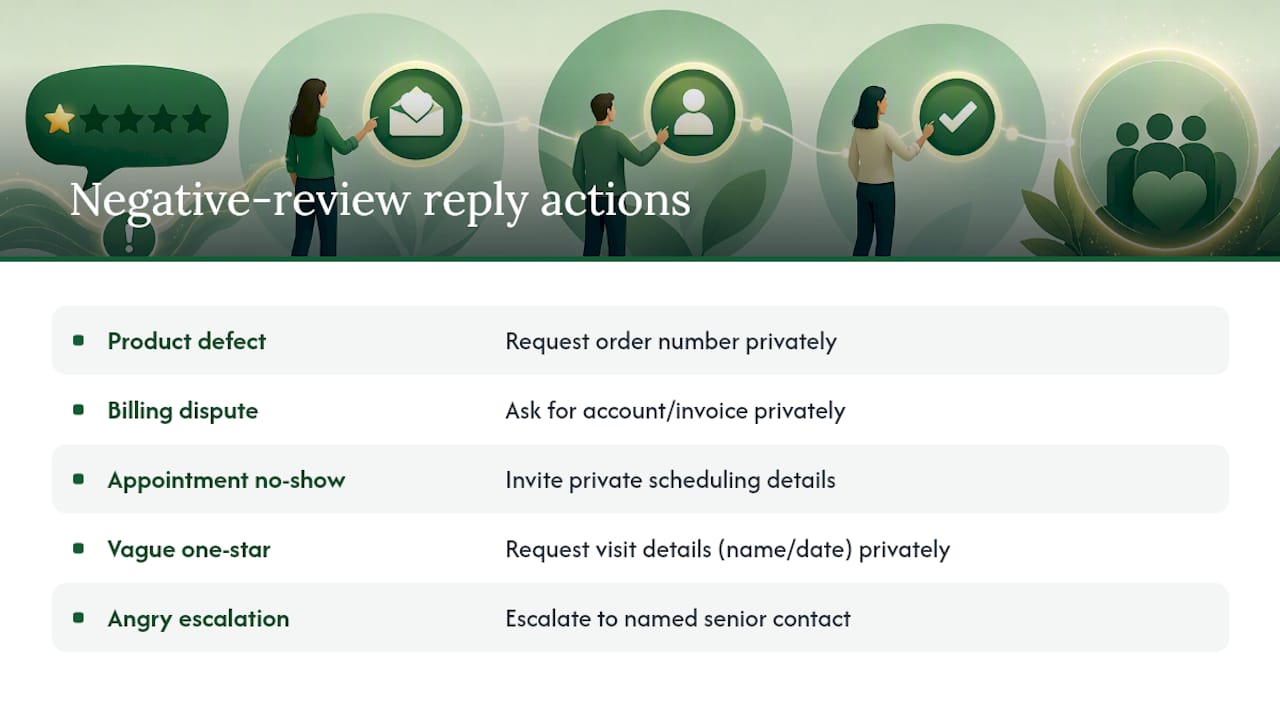
Different complaint types need different reply structures. A vague one-star rating with no explanation calls for something very different from a billing dispute with a paper trail attached. Every template below stays under 150 words, ends with a human sign-off, and avoids naming any specific compensation in public.
Specific product defect
"Hi [First Name], thanks for the detailed feedback on [product name]. That's not the quality we expect to reach you, and I want to get this fixed. Please reach out to [support email/link] with your order number so our team can look into a replacement or refund. We appreciate you flagging it. — [Sign-off name], [Team]"
Insert the exact product name if it's mentioned, since specificity here signals you actually read the review rather than pasting a template. Keep the tone matter-of-fact rather than apologetic to the point of sounding rehearsed.
Billing dispute
"Hi [First Name], I'm sorry to hear about the confusion with your bill. Billing issues are frustrating, and I'd like to walk through the charges with you directly. Could you send us a message with your account or invoice number? We'll get this sorted out. — [Sign-off name], [Team]"
Never confirm or dispute specific charge amounts in the public reply, even if you believe the review is inaccurate. That conversation belongs in a private channel where account details are actually verified.
Appointment no-show
"Hi [First Name], thank you for letting us know. We aim to communicate scheduling changes clearly, and it sounds like that didn't happen here. I'd like to understand what went wrong on our end. Please reach out to [support link] so we can look into it and make sure it doesn't happen again. — [Sign-off name], [Team]"
If the no-show was actually the customer's fault, this template still works, because it invites clarification privately instead of arguing publicly. Litigating who missed the appointment in a public comment thread never reflects well on either side.
Vague one-star, no detail
"Hi [First Name], thanks for taking the time to leave feedback. I'd love to understand more about what happened during your visit so we can make it right. Could you send us a message with a bit more detail, or your name and the date you visited? — [Sign-off name], [Team]"
This one does double duty: it shows other readers you take even unspecified complaints seriously, and it occasionally prompts the reviewer to add detail you can actually act on.
Angry escalation
"Hi [First Name], I hear you, and I'm sorry this experience fell so far short. I want to personally look into what happened. Please reach out to [direct contact] so I can address this properly and follow up with you. — [Sign-off name], [Title]"
Escalated, emotional reviews often benefit from a named, senior sign-off rather than a generic team account. It signals the complaint reached someone with actual authority to fix it.
Every template above can be adapted quickly using a library of Google review response templates organized by scenario and industry, which saves the trouble of rebuilding this same structure from scratch every time a new complaint type shows up.
Automation Guardrails and Approval Workflow for Scale
Automating review replies without guardrails is how a business ends up with an AI-generated response thanking someone for their five-star review under a one-star complaint about food poisoning. The fix isn't avoiding automation. It's scoping exactly what gets automated and what doesn't.
The rules that hold up in practice:
- Auto-post: 4 and 5 star reviews with straightforward, positive sentiment and no flagged keywords.
- Draft and hold: 3-star and mixed-sentiment reviews, where an AI-drafted reply gets generated but waits for a human to approve before it goes live.
- Stop and escalate: 1 and 2 star reviews, plus anything flagging legal action, a named employee, or a high-value account, regardless of star rating.
Futureman Labs' guidance on building AI-powered review monitoring systems recommends a conservative rollout: run AI drafts through human approval for roughly 30 days before enabling any auto-posting on negative reviews, so the system's tone and judgment get calibrated against real edge cases before it operates unsupervised.
Hard stop conditions deserve their own category entirely. ReWork's build blueprint for AI review response agents specifies that automation should hand off to a human the moment a review mentions legal action, names an employee negatively, or touches a flagged VIP account, since the reputational and legal exposure in those cases outweighs any speed benefit from posting quickly.
| Review type | Action | Required context before posting | Approval SLA |
|---|---|---|---|
| 4 to 5 star, positive | Auto-post | None beyond sentiment match | Immediate |
| 3 star, mixed | Draft and hold | CRM match | 24 hours |
| 1 to 2 star, standard | Draft and hold | CRM match, order verification | 4 hours |
| 1 to 2 star, legal/HR flag | Stop and escalate | Legal or HR sign-off | 1 hour |
Role-based approval keeps this from becoming a bottleneck. Front line staff approve routine drafts, team leads approve anything touching a refund or policy exception, and only escalated, high-risk cases need a manager or legal reviewer in the loop. A Google review approval workflow built around these tiers keeps response speed high for the easy cases while making sure the risky ones get real human judgment before they go public.
Monitoring, Routing Channels, and Operational Setup
A negative review workflow only works if reviews actually reach the right person fast, which means the monitoring layer matters as much as the reply templates sitting on top of it.
Centralizing review intake solves the most common failure mode in multi-location operations: a review posts on a location-specific Google Business Profile that nobody on the corporate team is watching, and it sits unanswered for three weeks. A central dashboard pulling in reviews across platforms and locations through APIs or webhooks eliminates that blind spot by routing every new review into one queue regardless of where it originated.
Each incoming alert should carry enough context for someone to act without digging:
- Star rating and platform (Google, Yelp, Facebook), so severity and format expectations are clear immediately.
- Review snippet, the actual text, not just a notification that something new arrived.
- Reviewer name and matched CRM account, if a match exists, so the responding team isn't starting from zero.
- Urgency flag, based on the triage severity rules covered earlier.
- Assigned owner, the specific person or team the review has been routed to.
CRM ticketing prevents the other common failure: two people responding to the same review, or a review getting marked resolved when it's still sitting unanswered. Three status tags cover most operational needs: needs human (drafted but unapproved, or too sensitive for automation), pending (approved and posted, waiting on the customer's private response), and resolved (remediation complete and the public loop closed). Keeping those tags visible across the team, especially in franchise or agency settings managing dozens of locations, is what actually prevents duplicate replies and dropped threads.
Measure What Matters: KPIs and Reporting Cadence
A workflow without measurement is just a hope. Five metrics tell you whether the process is actually working, and each one should live on a shared dashboard rather than in someone's head.
- Median response time: how long between a review posting and a public reply going live, tracked separately for critical versus standard severity.
- Response coverage: the percentage of all reviews, not just negative ones, that receive a reply within your target window.
- Resolution rate: the percentage of flagged complaints that reach a documented resolution, not just a reply.
- Percentage of reviews updated after remediation: how often a reviewer actually revises their rating or text after a resolved complaint, a strong signal of whether the loop-closing step is working.
- Top complaint themes: recurring tags (shipping delays, staffing at a specific location, a defective product batch) that point to operational fixes beyond the review itself.
Qualtrics' guidance on review management recommends tracking response time, coverage, and resolution rate as the core trio for any reputation program, since together they capture speed, completeness, and actual outcome rather than just activity.
Set alert thresholds around theme frequency, not just individual reviews. If complaints tagged "wait time" triple at one location in a month, that's an operations conversation, not a review-response conversation. A weekly report covering response time and coverage keeps the team accountable day to day, while a monthly report tracking resolution rate and theme trends is what actually drives decisions above the individual reply level.
Operational Proof: How an Approval Workflow Protects Brand Voice
The theory behind hold-for-approval rules is straightforward. The harder part is proving it holds up once a team is handling hundreds of reviews a month across multiple locations.
A workflow built around manual approval for sensitive, low-star reviews, paired with role-based permissions so the right person reviews the right cases, shortens the gap between "a draft exists" and "an approved reply is live," without removing the human judgment that keeps a brand's voice consistent. The AI handles the drafting speed. A person still decides what actually gets said publicly on anything that carries real risk.
Teams looking to reproduce this kind of governance in their own stack, regardless of what software they use, can build it around a short checklist:
- Define severity tiers before turning on any automation, not after.
- Require CRM or order verification before a draft touching a specific complaint gets approved.
- Assign named owners per location or team, not a shared inbox nobody's accountable for.
- Set approval SLAs per tier and track whether they're actually being met.
- Review a sample of auto-posted replies weekly during the first month to catch tone drift early.
A Google Business Profile review management setup built around these controls gives multi-location teams a repeatable structure instead of relying on whoever happens to be logged in when a bad review lands.
Author Perspective: Trade-Offs, Pitfalls, and Governance Advice
The biggest mistake I see teams make isn't slow response times. It's over-automating too early, because early wins with AI drafting create a false sense that the system is ready for full autonomy on the reviews that actually carry risk.
The trade-off nobody wants to say out loud is that speed and authenticity pull against each other, at least at first. A fully automated reply posts in seconds. A reply that actually sounds like your brand, that references the specific thing the customer complained about instead of a generic apology, takes a human a minute or two longer. That minute is worth spending on anything below four stars.
Centralized control versus local autonomy is the other tension worth naming honestly. Franchise operators want consistent voice across locations. Store managers want the authority to fix problems fast without waiting on corporate sign off. The workflow that actually works splits the difference: centralized templates and severity rules, local ownership of the actual remediation and customer contact.
My practical advice: train your team and your AI drafts on the same cases, side by side, for at least a month before loosening any approval rule. Spot check a sample of auto-posted replies weekly, not just when something goes wrong. And never treat "we replied" as the finish line. The follow-up reply after a problem gets fixed is the one most businesses skip, and it's the one that actually changes how the next hundred people reading that review feel about your business.
— Ryan
How Localreviewreply Fits Into This Workflow
Localreviewreply is built around exactly the guardrails covered above: AI drafts every reply in seconds, but sensitive and low-star reviews stay held for human approval before anything posts publicly. Role-based permissions let a team lead approve routine cases while escalations route to whoever actually needs to see them, and multi-location dashboards keep every review, across every location or franchise, in one queue instead of scattered across a dozen separate Google Business Profile logins.

The goal isn't replacing judgment with automation. It's giving your team a faster starting draft, in your brand's voice, while keeping a person in control of anything that could go wrong publicly. That's the balance the templates and SLA rules in this guide are built around, and it's the same balance the product is designed to support at scale.
If you're managing reviews across more than a handful of locations, check the current plans and pricing to see which tier fits your reply volume, or start with the free AI review response generator to see how a drafted reply compares to what your team is writing manually today.
Sources
- Research: What Consumers Find Persuasive in Online Reviews — Harvard Business Review (2025-02)
- Online review management — Sprout Social (2026-02-04)
- Responding to Negative Reviews: A Step-by-Step Guide — Up North Media
- How to Respond to Negative Customer Reviews at Scale — zenloop
FAQ
How Do I Respond Professionally to a Negative Review?
Acknowledge the reviewer by name, apologize for the specific issue they described without admitting legal fault, and offer a clear next step that moves the conversation to a private channel. Close the public thread with a follow-up once the issue is actually resolved, a step Zenloop's research found builds accountability with future readers.
Can You Give Examples of Negative Review Responses?
Yes. A product defect reply might read: "Hi Sarah, thanks for the detailed feedback. That's not the quality we expect, and I'd like to make it right. Please reach out to our support team with your order number." Adjust the tone and dynamic fields based on the scenario, whether it's a billing dispute, a no-show, or a vague complaint.
How Should I Respond to a Customer Who Gave Negative Feedback?
Treat it as information first and a public relations moment second. Verify the details against your CRM or order records, acknowledge what they experienced, and route it to whoever actually owns the fix, following an SLA of 24 to 48 hours for standard cases and much faster for anything involving safety or legal risk.
How Should I Respond to a 5-Star Review?
A short, specific thank-you works better than a generic one, mentioning the product or service they praised if they named it. These are the reviews safe to auto-post using a tool like Localreviewreply, since the sentiment is unambiguous and there's no remediation or legal risk to manage.
What Does Localreviewreply Cost?
Pricing runs from a Free plan through Starter, Growth, Scale, and Custom tiers, with exact figures listed on the pricing page. Costs scale with the number of locations and monthly reply volume a team needs.