
If your team can't keep up with review volume across locations, or replies read like they came from five different people, outsourcing or a hybrid model is the practical fix. The trade-off is real: you gain speed and consistency but give up some direct control over voice. Watch three signals: reviews piling up past 48 hours, tone that varies wildly between locations, and staff pulled off real work to type replies. If two of those apply, pilot a hybrid workflow before committing to a fully outsourced model.
TL;DR:
- Outsourcing or hybrid models are advisable if your review volume exceeds 30 to 50 reviews weekly across multiple locations, especially when internal staff are overwhelmed or responses differ wildly between sites.
- Clear rules and templates are essential to prevent voice drift, legal issues, and context loss when outsourcing responses, with hybrid models offering a balance of speed and control.
- For brands with sensitive or regulated industries, hybrid workflows with human approval are recommended over full outsourcing to mitigate legal and compliance risks.
- Effective monitoring includes tracking response times within 24 to 48 hours, escalation rates for low-star reviews, and the percentage of personalized replies to maintain quality and responsiveness.
- Using centralized dashboards, approval workflows, and language-specific templates helps manage multi-location, multilingual reviews efficiently while respecting brand voice and legal considerations.
Table of Contents
- What You Gain When You Outsource Review Responses
- Where Outsourcing Review Responses Can Go Wrong
- In-House, Fully Outsourced, or Hybrid: Which Model Fits
- How to Decide: A Practical Checklist
- Building the Workflow: Templates, Approval Gates, and SLAs
- How Local Review Reply Addresses These Trade-Offs
- Getting an Outsourced Team to Actually Sound Like You
- Measuring Whether the Outsourced Program Is Working
- The Tech Stack Behind Outsourced Review Management
- Managing Reviews in Multiple Languages
- Author Perspective: Recommended Next Steps
- Try Local Review Reply for Your Review Workflow
- Sources
- FAQ
What You Gain When You Outsource Review Responses
The biggest win is time. A multi-location operator fielding hundreds of reviews a month can lose real hours every week to drafting replies, and that's before anyone deals with an angry one-star review that needs careful wording. Handing that volume to a dedicated team, or pairing AI drafting with quick human sign-off, frees managers to run the business instead of typing responses at 9 p.m.
Speed matters beyond convenience. Shopify's guidance on review management points to replying within 24 to 48 hours as a baseline for businesses that want to look responsive at scale. Miss that window consistently and customers notice, especially on Google Business Profile where a stale review sits publicly for anyone researching your business.
Outsourcing also solves a consistency problem that in-house teams rarely fix on their own:
- One brand voice across every location instead of five different writing styles
- Trained responders who know how to de-escalate a bad review without making promises that create liability
- A centralized escalation path so nothing sensitive gets published without a second look
- Coverage during nights, weekends, and holidays when internal staff are off the clock
Widewail's research on outsourced review management notes that outsourced teams, when given clear rules, tend to improve response time and reduce reputational risk rather than increase it. The catch is that "clear rules" part isn't optional.
Where Outsourcing Review Responses Can Go Wrong
Handing replies to an outside team isn't risk-free, and most of the failures are predictable if you know what to look for.
- Voice drift. Generic, templated replies stand out fast to repeat customers, and once they notice, the personal touch that made your brand feel human is gone.
- Missing context. An external team without access to your booking system or service notes can't tell a one-off complaint from a pattern, so they respond blind.
- Privacy and legal slip-ups. Confirming a customer's name, order details, or account information in a public reply can violate privacy expectations or even create legal exposure. Sensitive details belong in a private follow-up, not the public thread.
- Weak escalation rules. If nobody defines when a review needs a manager's eyes before it posts, a legitimate service failure can get a canned "we're sorry to hear that" response that makes things worse.
None of these are arguments against outsourcing. They're arguments for setting the rules before you start.
In-House, Fully Outsourced, or Hybrid: Which Model Fits
Three models cover most businesses, and the right one depends on volume, risk tolerance, and how much internal bandwidth you actually have.
- Fully outsourced. A third-party service or agency handles drafting and posting for most reviews, usually with a carve-out for anything flagged as high-risk. This fits businesses with heavy volume, thin internal staff, and low tolerance for delayed replies.
- Software-assisted in-house. Your own team writes and approves every reply, but uses AI drafting tools and templates to move faster. This keeps full control and fits businesses with strong, distinctive brand voice or few locations.
- Hybrid. AI or an agency drafts replies, but internal staff approve anything sensitive, low-starred, or legally touchy before it goes live. Research on hybrid review systems finds this combination protects brand voice while still scaling response capacity, which is why it's become the default for multi-location operators.
Cost, speed, and compliance shift with each model. Fully outsourced usually costs more but demands less internal time. Hybrid splits the difference and is where most growing operations land first.
How to Decide: A Practical Checklist
Run through these before picking a model:
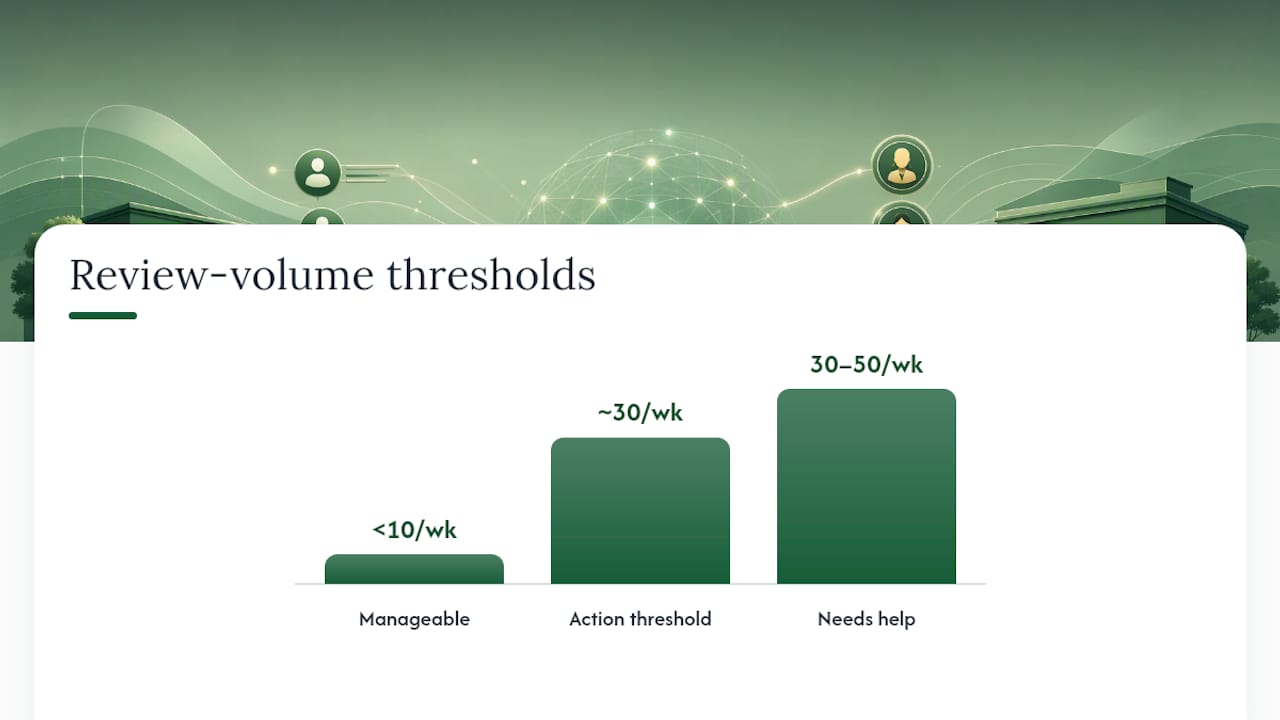
- Review volume per week. Under 10 reviews across all locations, in-house is manageable. Above 30 to 50 with multiple locations, you need outside help or automation.
- Location count. More locations mean more voices to keep consistent, which is exactly where templates and centralized workflows earn their keep.
- Brand voice sensitivity. A boutique brand with a distinctive tone needs tighter oversight than a high-volume service business where clarity matters more than personality.
- Compliance exposure. Healthcare, legal, financial, and other regulated categories should lean hybrid at minimum, with mandatory human review on anything touching liability.
- Current response times. If you're already missing the 24 to 48 hour window, that's your clearest signal to act.
- Internal staff availability. Be honest about whether someone actually has time for this, or whether it just gets squeezed in between other tasks.
A simple rule: if you're seeing more than roughly 30 reviews a week across locations and nobody owns review response as part of their actual job, outsource or move to hybrid. If legal or regulatory risk is part of the picture, hybrid beats full outsourcing almost every time, because a human needs to see anything sensitive before it posts.
Pro Tip: When vetting a vendor or agency, ask specifically how they handle approval workflows for one and two star reviews, what platforms they cover beyond Google, and whether templates can be customized per location. Vague answers to any of those three are a red flag.
Building the Workflow: Templates, Approval Gates, and SLAs
A workable rollout starts with centralized monitoring. Pull reviews from Google Business Profile, Facebook, and any industry-specific site into one dashboard rather than checking five logins separately, an approach Shopify's review management guidance treats as a baseline for scaling consistently.
Next, define approval gates. A common setup: auto-publish for four and five star reviews and low-risk neutral ones, but require internal sign-off for one and two star reviews, anything involving refunds or compensation, or mentions of safety and legal issues. Someone specific, not "the team," needs to own that escalation queue.
Templates should scaffold a reply, not replace judgment. Build a small library organized by review type (service delay, pricing complaint, staff praise, safety concern), but require personalization on every single one, referencing the specific detail the customer mentioned. Version control matters here too. Somebody should own the template library and update it when phrasing starts to feel stale.
Track these metrics weekly:
- Time to acknowledge, ideally within business hours
- Median full reply time against the 24 to 48 hour target
- Percentage of replies escalated for internal approval
- Random quality audits on a sample of published replies
Feed what you learn back to operations. If the same complaint keeps surfacing in reviews, that's a signal for a process fix, not just a better-worded reply.
How Local Review Reply Addresses These Trade-Offs
Local Review Reply drafts personalized, on-brand replies to Google Business Profile reviews using AI, then routes anything sensitive through approval controls before it publishes. That structure maps directly onto the hybrid model: AI handles the drafting speed, a person still reviews low-star or high-risk replies before they go public.
- Template libraries help standardize tone across locations without making every reply sound identical
- Multi-location support lets franchises and agencies manage several profiles from a single dashboard, similar to the workflow described in multi-location review management
- Approval workflows for low-star reviews keep a human in the loop on the replies that carry the most reputational risk
A sensible way to test this: start with one or two locations, keep approval gates active on anything below three stars, and track reply time and escalation rate for a few weeks before expanding further.
Getting an Outsourced Team to Actually Sound Like You
The fastest way to lose brand voice is skipping onboarding and handing over a login. Whether you're working with an agency or standing up an internal hybrid process, the outsourced team needs more than a style guide PDF.
Start with real examples, not abstract rules. Pull 15 to 20 of your best past replies, across different review types (a glowing five-star, a frustrated one-star, a mixed review with one specific complaint) and use them as the training set. Explain why each one works: what phrase captures your tone, where you chose warmth over formality, how you handled an awkward complaint without sounding defensive.
Give context beyond words. An outsourced team writing for a five-location restaurant group needs to know which locations have had recurring complaints, what your refund policy actually allows, and which phrases legal or ownership have flagged as off-limits. Without that operational context, even a well-trained writer will guess wrong on edge cases.
Run a short supervised period, two to four weeks, where every draft gets internal review before publishing, even routine ones. This surfaces voice mismatches early instead of after a bad reply is already live. Once accuracy is consistently strong, shift to spot-checking and full review only for flagged categories.
Revisit training quarterly. Brand voice shifts, new locations open, and staff turnover on the outsourced side means the training that worked in January might need a refresher by summer.
Measuring Whether the Outsourced Program Is Working
Response speed and reply volume tell you the program is running. They don't tell you if it's working.
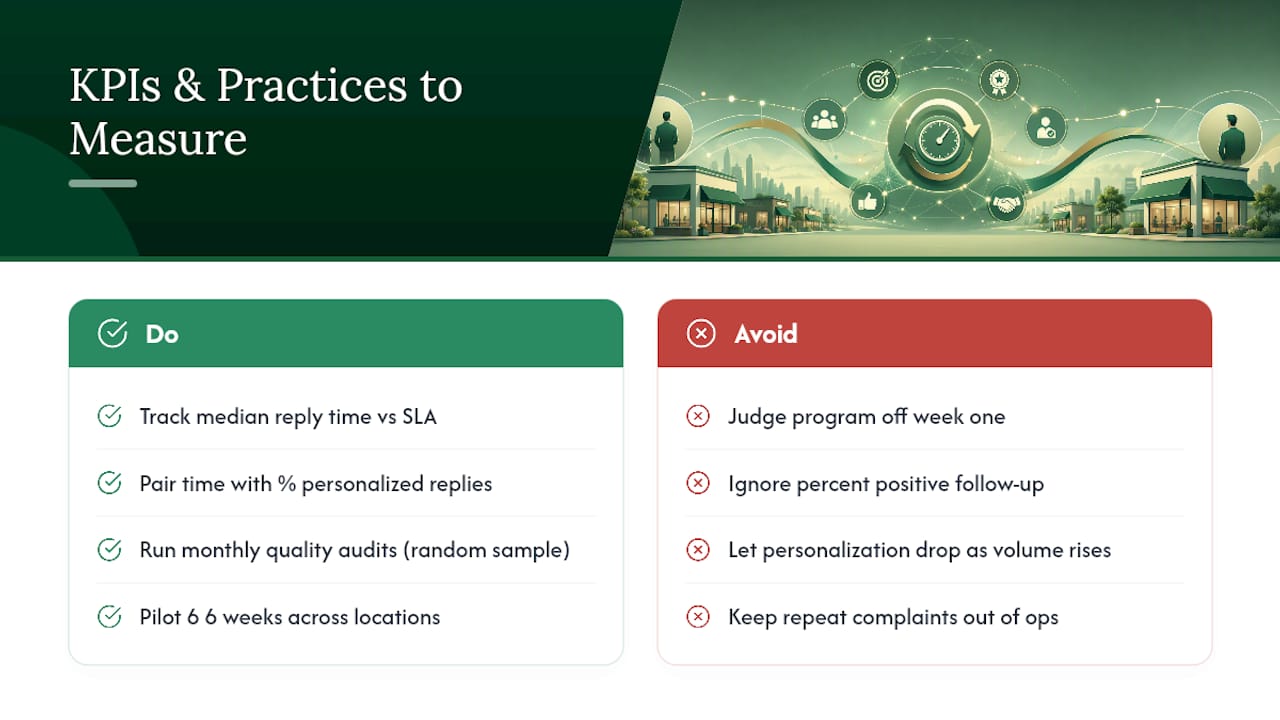
Track median reply time against your SLA target, but pair it with the percentage of replies personalized versus templated. If personalization scores drop as volume rises, quality is being sacrificed for speed. The percentage of reviews escalated for internal approval matters too. A rate that's too low might mean gates aren't strict enough; too high, and the hybrid model isn't saving anyone time.
Qualtrics's review management research points to quick acknowledgment and consistent, humanized responses as core markers of an effective program, which lines up with running periodic quality audits: pull a random sample of published replies monthly and score them against your own standards for tone, accuracy, and whether sensitive details were handled properly.
The best-run pilots track this over six to eight weeks across a representative sample of locations rather than judging the whole program off week one. Look at median reply time, percent personalized, percent escalated, and whether customers who got a public reply plus a private follow-up actually responded positively to the resolution. That last metric is often skipped, but it's the one that tells you if the reply actually fixed anything or just looked good publicly.
Report results back to operations on a set cadence, monthly at minimum. If a location keeps generating the same complaint, that belongs on someone's desk beyond the review inbox.
The Tech Stack Behind Outsourced Review Management
Most outsourced or hybrid programs run on a handful of tool categories, and picking the right combination matters more than picking a single all-in-one platform.
Centralized monitoring dashboards pull reviews from Google Business Profile, Facebook, and industry-specific sites into one feed, which Sprinklr's review management guidance frames as treating review management as an ongoing system rather than a one-off task. AI drafting tools generate a first-pass reply based on the review's content and your template library, cutting the time a human spends starting from a blank page. Approval workflow software routes flagged reviews (low-star, refund mentions, safety concerns) to the right internal person before anything publishes.
CRM integration adds context that generic tools miss. If a reviewer's complaint matches a recent service ticket or booking, a connected system like a dealer CRM platform can surface that history so the responder isn't guessing. Analytics and reporting tools round it out, tracking reply time, escalation rates, and sentiment trends across locations. For businesses managing queues or scheduling across multiple sites, multi-location queue tools can also feed operational data into the same review workflow.
None of these tools replace judgment. They reduce the manual work so the humans in the loop can spend their attention on the replies that actually need it.
Managing Reviews in Multiple Languages
International or multilingual reviews add a layer most domestic playbooks skip entirely. A franchise with locations near a border region, or a business in a diverse metro area, might see reviews in Spanish, Mandarin, or Vietnamese alongside English ones.
The core rule doesn't change: never rely solely on machine translation for a sensitive reply. Auto-translated tools can produce a reply that's technically accurate but tonally off, especially with idioms or culturally specific phrasing around apology and gratitude. For routine positive reviews, a translated template usually works fine. For anything one or two star, or involving a complaint, get a native or fluent speaker to review the reply before it posts, even if that means a slight delay.
Build your template library with language variants from the start rather than translating on the fly. A template written natively in Spanish, reviewed by someone fluent, will sound more genuine than a Google Translate pass on an English original. If you're outsourcing internationally, confirm the vendor has native speakers on staff for your key languages, not just translation software bolted onto their workflow.
Track language as a data point in your reporting. If reviews in a particular language consistently take longer to answer, that's a staffing or vendor coverage gap worth fixing before it becomes a pattern customers notice.
Author Perspective: Recommended Next Steps
I recommend hybrid over full outsourcing for most multi-location businesses, reserving full outsourcing for operators with minimal brand-voice sensitivity and very high volume. Loop in operations, whoever owns legal or compliance, and a brand lead before launch. Scope your pilot tightly: three to five locations, six weeks, tracking reply time, escalation rate, and personalization quality.
— Ryan
Try Local Review Reply for Your Review Workflow
Local Review Reply is built around exactly the hybrid workflow this article describes: AI drafts personalized, on-brand replies to Google Business Profile reviews, sensitive and low-star reviews route through approval controls before anything publishes, and multi-location teams can manage everything from one dashboard instead of juggling logins per site.

A practical way to start is small. Pick a handful of locations, turn on approval gates for anything below three stars, and see how reply time and consistency shift over a few weeks. You can review plan details, including the Free, Starter, Growth, Scale, and Custom tiers, on the Local Review Reply pricing page, or get a fuller look at drafting, approval workflows, and template features on the features page. If you just want to see what an AI-drafted reply looks like first, the free review response generator is a no-commitment way to try it.
Sources
FAQ
What Are Some Good Responses to a Negative Review?
Acknowledge the specific issue, apologize without over-explaining, and invite the customer to continue the conversation privately rather than airing details publicly, an approach The UPS Store recommends for de-escalating while still showing competence to other readers.
What Do Good Review Responses Generally Include?
A strong reply names the specific point the reviewer raised, thanks them by name when appropriate, and stays consistent with your brand's tone rather than reading like a form letter.
What Are Examples of Good Responses to Positive Feedback?
Thank the reviewer specifically for what they mentioned (a staff member's name, a particular service) rather than a generic "thanks for the kind words," since personalization is what separates a real response from a templated one.
What Do Strong Five-Star Review Responses Look Like?
The best ones reference a detail unique to that review, add a small personal touch, and invite the customer back, rather than repeating the same closing line across every reply.
Can Local Review Reply Handle Multi-Location Review Responses?
Yes. Local Review Reply supports multi-location and franchise management with team roles and permissions, letting operators manage review replies across several Google Business Profiles from one dashboard.
How Much Does Local Review Reply Cost?
Plans include Free, Starter, Growth, Scale, and Custom tiers, with pricing details available on the pricing page.